Is this the only way to make a website backup?

Hello guys,
I'm an LTD user and I'm converting all my websites in brizy cloud.
I was checking how can I protect myself in case of down of your services, everything may happen, consider for example that on March 10 2021, OVHcloud’s in Strasbourg, France catch fire and the whole data center have been destroyed and took over 3.6 million websites offline with a permanent data loss for some customers who did not have off-site backups.
So I have read a lot of forum post in this community, and seems having our own backup it is a very long requested feature.
So as far I understand there are 3 ways to have a functionable backup considering a user that linked the main domain direct to brizy cloud.
- periodically download the website as a HTML, from what I have read, for a website of 5 pages can take up to 30 minutes to create a zip file and for a website over 10 pages can take hours, but at the end a user can have a set of html files that can upload to another host and redirect the domain to the new IP and have a backup running.
- downloads each page layout and upload to a wordpress installation with brizy as plugin editor and try to recreate the website in wordpress, but I'm not sure if this will include any graphics elements or imported fonts.
- use server sync on another hosting, this should sync the website content and create a backup ready to be used in case brizy server are down for some reasons , just redirect the domain ip address in the dns like the html backup.
Am I correct? can brizy staff provide us a detailed pro and cons and feasibility of each solution? are there other workaroung am I missing?
thanks
-

Hi Valerio,
Thank you for contacting us.
For your case, the most reliable backup option would be exporting your layouts and importing them into a WordPress installation using the Brizy plugin. This allows you to reuse and continue editing the layouts with Brizy, giving you long-term flexibility and control.
Exporting as HTML creates a static version of the site (not editable with Brizy), while Server Sync works similarly to HTML export but lets you build in Brizy Cloud and sync the output to your remote host. Both are good for deployment backups, but not for full editor-based recovery.
If editability is your priority, exporting layouts to WordPress would be the safest approach.
If you choose to export the layouts and import them into WordPress, you can also use Local by Flywheel to create and manage backups of your websites safely on your computer.
This would allow you to rebuild and edit your pages locally in WordPress using the Brizy plugin, giving you full control and an additional layer of protection outside of Brizy Cloud.
This setup offers more flexibility and long-term security compared to static HTML exports.
Best regards,
Ariel H.0 -
Thank you for your reply Ariel
both export layout and html would contain all images and embed code or those need to be exported separately?
Regarding wordpressç I need to purchase a paid license in order to be able to import the layout with all the pro feature exported from the cloud?
Thanks0 -
Hi Valerio,
Thank you for the update.
Both layout export and HTML export will include the images and embed code used on the pages. However, any scripts added in Project Settings → Code tab will need to be backed up separately.
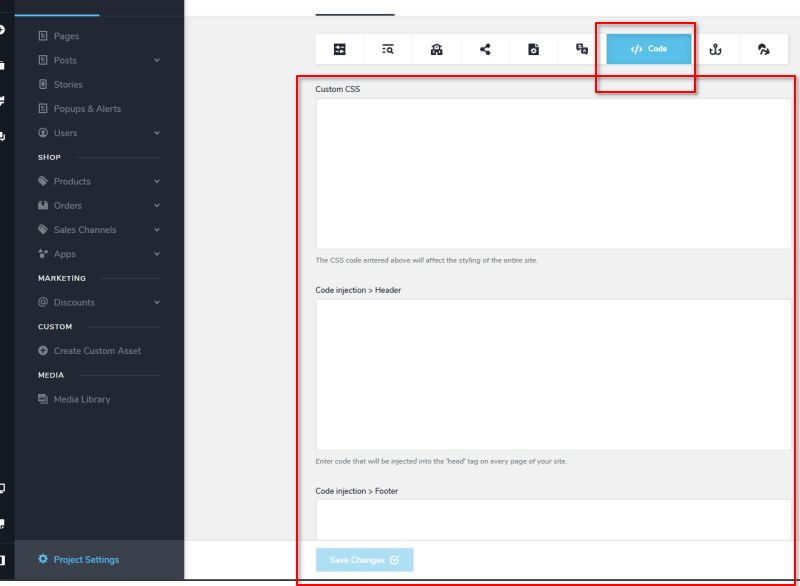
Regarding WordPress, yes, to import layouts that use Pro features from Brizy Cloud, you would need at least one active Brizy Pro license. You can use a single license and take turns activating it locally to reproduce your websites one by one until you’ve created copies of all your sites.
You can also sync layouts and blocks across Brizy projects - https://youtu.be/iid5ZagYpuE?si=1NywJeGunZilmzICI hope this helps clarify things.
Best regards,
Ariel H.0
Please sign in to leave a comment.
Comments
3 comments