datenschutz seite

i want to create a privacy polici page for my website (in german) is there a possibility to get the necessary text in brizy?
thanks for your help
-

Hello Helena,
Kindly use a service like https://policygenerator.usercentrics.eu/ to generate Privacy Policy text for your website in German. You can then copy paste the text into your Brizy page.
0 -
hello, i was looking for a template or some AI generated option, because i have not been able to copy paste any text so far. i have built my website and typed in all sorts of texts that i had already written bevor, because copy paste was only possible with texts within the website, not with texts that i wanted to copy from any other source, like a word document or anything else... this has been very annoying and I have for instance typed in all the legal texts for my who is...
i also have another problem: in the preview of my page the headlines, buttons an texts are all over the place. if i adjust them accordingly in my draft, it is going to be very messy. is there a way you can fix this problem? the menu also seems to work only partly, i am not sure what i might have done wrong...
0 -
Hello Helena,
Text can be pasted into the Brizy Text element from a word processing program like Google Docs, Microsoft Word or from a Privacy Policy website. Kindly watch my demo at https://jmp.sh/IHAGX99W
Could you elaborate on the issues you are facing when trying to paste content from a website, Google Docs, or Microsoft Word?
Please also share with us the URL of the website where you are facing problems with previews.
0 -
thank you for the video, this was acutally helpful, i wish i had asked earlier ;) i guess the only difference was that i used the shortcut command and v to paste, instead of choosing paste from the right click bar...
0 -
my website is not online yet, how can i share the URL of my project?
0 -
Hello Helena,
To share the URL of an unpublished website, open the project in the Brizy editor and copy the URL from the browser address bar and share it with us. It will look like https://admin.brizy.io/projects/20472406/editor/page/4986473.
0 -
okay thank you
https://admin.brizy.io/projects/23447757/editor/page/8793706
0 -
i also wonder about the tablet and mobile versions... i have been adjusting them, because also here things where in differetn places... but i cant preview them, so i don´t know what the result will actually be.
0 -
Hello Helena,
I have looked at your website, but could not understand what you mean when you say "In the preview of my page the headlines, buttons an texts are all over the place". Can you elaborate on this statement? The preview appears just as you have designed it in the editor. Can you highligh the differences you see between the editor and the frontend view?
I have observed a deviation from web design best practices in your project. As a best practice, page elements are set to "Absolute" position very rarely. Two to three out of every 100 elements on a page may have absolute position, whereas the remaining elements are designed using normal position. Nearly every element in your homepage is assigned "Absolute" position. Your design can appear differently on different screen sizes if you use "pixel" values rather than "percentage" values for element positioning.
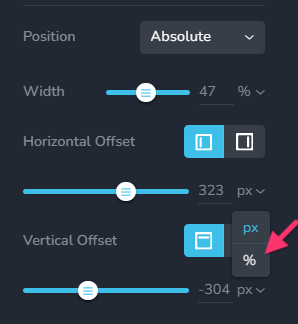
Responsive design can become quite cumbersome when using "Absolute" position for all elements. You will need to individually set a horizontal offset and a vertical offset for each and every element for the desktop, tablet and mobile devices. This can increase your workload significantly. In light of these factors, we recommend that you use "Absolute" position sparingly and to use normal position for the bulk of the elements on a page.0 -
hej thank you for your help...
i was guessing that it might have to do with the absolut position. i was using it a lot, because i had a hard time positioning elements and texts where i wanted them and also because i wanted to use the same formation and color so i often duplicated texts or buttons and then needed to move the copy freely....
is there anything i can do to fix the issue without needing to start from scrap?
thank you!
0 -
Hello Helena,
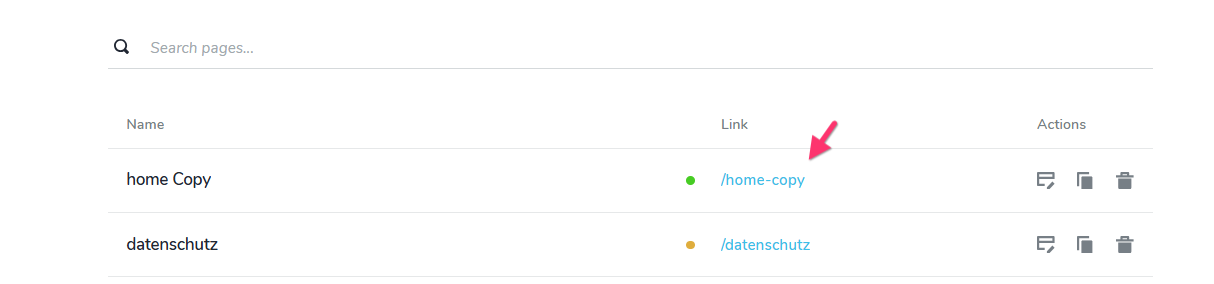
You may need to recreate your homepage using elements with normal positions for majority elements. I have made a copy of your homepage and have attempted to convert your design using elements with normal position. Have a look at the page "home Copy". I have recreated only the first two blocks
 0
0 -
Hej,
thanks a lot for your effort. Unfortunately my computer broke down and I need to fix it before I can continue to work on my website and also look at the page you created. I will get back to you as soon as I can take up the work again. Thanks a lot
Helena0 -
Hello, I am still sick and I also have some trouble with my computer right now, but I just managed to take a quick look at what you have done and unfortunately I found that in my first block there are elements missing. I had created three buttons, and now they are gone. I definately wanted to work with these buttons.
I actually wish that you had not just messed with my page - the page that you created is useless to me (it looks almost as messy as the preview version), though not the things you explained. I am grateful for those explanations and I understand that I will need to rebuilt my page, but I still want to be able to use the elements I have created earlier and it is very frusttrating that those three main buttons have just dissapeared. Can you reverse what you have done? I am too sick to work at the computer right now and I also need to fix it still.
I hope you can reverse what syou have done, because otherwise I will need to create new buttons.
I actually don´t want anybody making changes in my project!
I hope you udnerstand that
Helena
thank you
0 -
hej again, i created new buttons, so no need for you to do anything about it now...
0 -
... i am not so happy with the results i could get, i would prefer to have the original buttons back, you copied them into the new page you made, but now they are missing in the original one....
i don´t like the idea of someone working in my project although i appreciate your effort... i really am a bit at a loss. could you tell me how you managed to position the buttons in different places? thanks you
0 -
Hello Helena,
We apologize for any inconvenience that was caused. Let me explain what had happend.
I worked exclusively on the copy of your homepage. The three-button block was set as a global block. Any modifications made to a global block affects all pages that contain the global block. Your homepage was affected even though I was making changes to the homepage copy. The existing design in other blocks down the page were getting impacted as I was attempting to bring back the three buttons on your homepage. Hence I reversed all my changes and did not save my work on your homepage.
I can try again to restore the three buttons to your homepage if you log out of your Brizy Cloud dashboard. After you sign out, kindly confirm here.
0 -
hej again, i am sorry, for many messages ;) i just panicked a bit. I started rebuilding my page according to your advice and it seems to work okay, so thank you for that. I am sorry if I sounded ungratefu... I did create new buttons and am learning to position things with the help of using columns and rows...
There is one issue, that I don´t understand: for the most time it was not possible to have a preview of my homepage, only for the other pages. Then, all of a sudden, I could see the preview (and found out, that the page wasn´t working as it should...).
Now I can not see a preview for the homepage again. Do you have any idea why that is and what I can do about it?
Thanks for your help.
Helena
0 -
you don´t need to undo any changes, no worries, I figured out how you positioned the buttons and created new ones.
0 -
Hello Helena,
Preview of all pages in Draft Mode will be available to logged in users if you just publish the home page. Kindly consider publishing just the homepage.
0
Please sign in to leave a comment.
Comments
19 comments