Lazy load messes with gallery of photos layout

Hi, I’m having an issue with my gallery layout.
My photos are correctly set inside a gallery with the proper layout, but when the page loads, the gallery initially displays all the images in a straight horizontal line (wrong layout). It only switches back to the correct layout if I resize the browser window (for example switching to tablet/mobile view), or if I zoom in/out (example: changing browser zoom to 110%). After doing that, the layout fixes itself and I can even return to 100% zoom and it stays correct.
However, as soon as I refresh the page or leave the page and come back to the portfolio, the issue happens again.
It doesn’t always break the same way: sometimes only the images at the top are wrong, and other times the ones in the middle fix themselves while the top stays broken. It seems to depend on where I am on the page when I refresh.
I noticed that if I disable lazy loading, the gallery loads correctly every time. But the problem is that my website then takes around 7 seconds to load, which is very slow.
To improve performance, I already converted my images to WebP at around 80% quality/resolution, and the files are now much lighter than before (around 10x smaller). Even after doing this, the website still takes the same amount of time to load.
So I’m not sure if the slow loading is really caused by the images, or if there is another performance issue happening in the background. Because after the website loads once, navigating between pages becomes much faster.
Could you please check why the gallery layout is not applying correctly on initial load and whether lazy loading is causing this issue?
I just need to figure out why it takes so long to load the first time, if that is fixed i do not need a solution for lazy load since the files are so small now
-

Hello Afonso,
I could not reproduce the issue you have reported. Please see my test at https://jmp.sh/RoZDEc5P What are the steps we must follow to see the problem you are seeing? Maybe you can demonstrate the issue for us in a screen recoding?
0 -
I disabled on each and every photo the lazy load to fix this issue but now the website takes around 7 to 10 seconds to load completely and I think that is why. My main goal is to make the website load faster and I think lazy load would make it possible
0 -
Hello Afonso,
For testing, I have enabled "lazy loading" for all image in your "Landscapes" portfolio towards the bottom of the page. The gallery loaded fine at my end. Please check at your end.
 0
0 -
I will share a link with the issue, it happened to me now
https://photos.app.goo.gl/xjuigQNVKiCNEB1EA
Also did you enable on the main page? You can click on each photo there and it loads a gallery as well, there if it is enabled also happens
0 -
Hello Afonso,
Unfortunately, the video did not open at my end and hence I could not see the problem. Can you use a service like https://www.loom.com/ to make a screen recoding and share the link with us?
0 -
As you can see at https://jmp.sh/2dHJrVJY, the "Landscapes" gallery loads fine on Google Chrome. Please test the same page using multiple browsers and let us know on which browsers do you see the above problem.
0 -
It's not only the landscapes it depends on where I am when I reload the page, I have cleared my cache and used different devices it is even doing this on mobile, it it happens here I do not know what can be done to fix it, but again, my problem is not that it is the website first loading that takes a lot of time I can have lazy load disabled just to make sure it does not mess up with the gallery layout, but everyone coming in still needs to have a 7 to 10 second wait for the website to load fully.
0 -
We would like to reproduce the problem you are seeting at your end. Can you please let us know which browser you were using while visitng the portfolio page?
- Safari
- Chrome
- Firefox
- Opera
If you were testing on a mobile, did you see the above issue on an Andoid phone or an iPhone? Give us more details so that we can attempt to see the problem you are seeing at our end.
0 -
It was on both chrome and Firefox on Android and windows
0 -
About the lazy load it's the same issue I showed on video but for mobiles l, no matter the device I even tested on other new androids that never opened the website before and it did the gallery problem, but that is completely fixed if I disable lazy load on everything, the bigger problem I have os the loading times, not on the devices that it already has opened, somethimes it takes up to 10 seconds to load but others it's quick I assume because the browser stored the data, but on new devices and if I clear the cache it takes up to 10 seconds to load everything all over again
0 -
I tested using Firefox browser for Android and the page loaded instantaneously for me. Please see my test at https://jmp.sh/NtmVu0kY
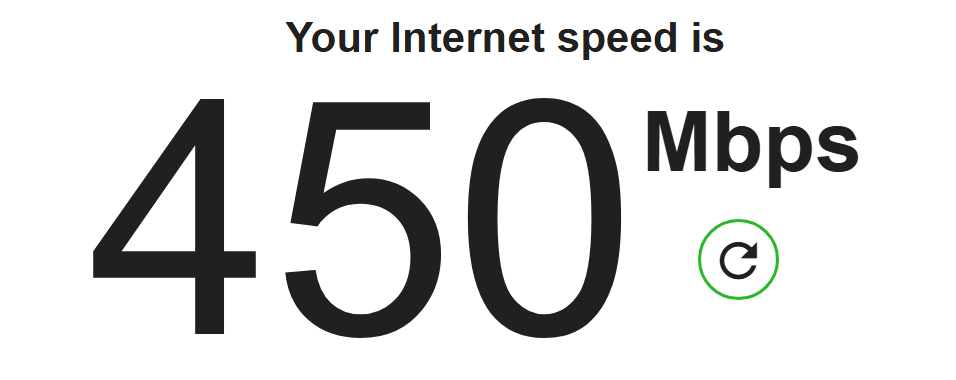
Please visit https://fast.com/ and check your internet speed. Probably I am testing on a relatively a faster connection. Could that be a factor?
 0
0 -
Please check if you can open this link since I could not seem to upload this to loom
0 -
Hello Afonso,
I could download the video and watch it.
Your Portfolio page has around 140 photos. A page with so many photos is likely to load slower compared to a regular page with just a few images. The page loaded instantaneously even for the first time using the Firefox browser at my end on my mobile.
0 -
Okay, thank you, I tried to fix this by doing .webp files and with 80% quality but I hunderstand it is a lot
0 -
Please revert the lazy load to all of the images please
0 -
Hello Afonso,
I have disabled lazy loading for all images under the "Landscapes" section of your portfolio page.
0
Please sign in to leave a comment.
Comments
17 comments