HTML code errors

Brizy is producing the following code:
<img src="vertical-colour-dark.svg" alt="{{brizy_dc_image_alt imageSrc="/>
<img src="North_Mackay_Seventh-Day_Adventist_Church-11784-4274.jpg" alt="{{brizy_dc_image_alt imageSrc="/>
How can I fix this?
The website url is https://mackayadventist.church
-

Hi Benjamin,
Thank you for contacting us.
Could you please add the alt tags to the images, as shown in the screenshot?
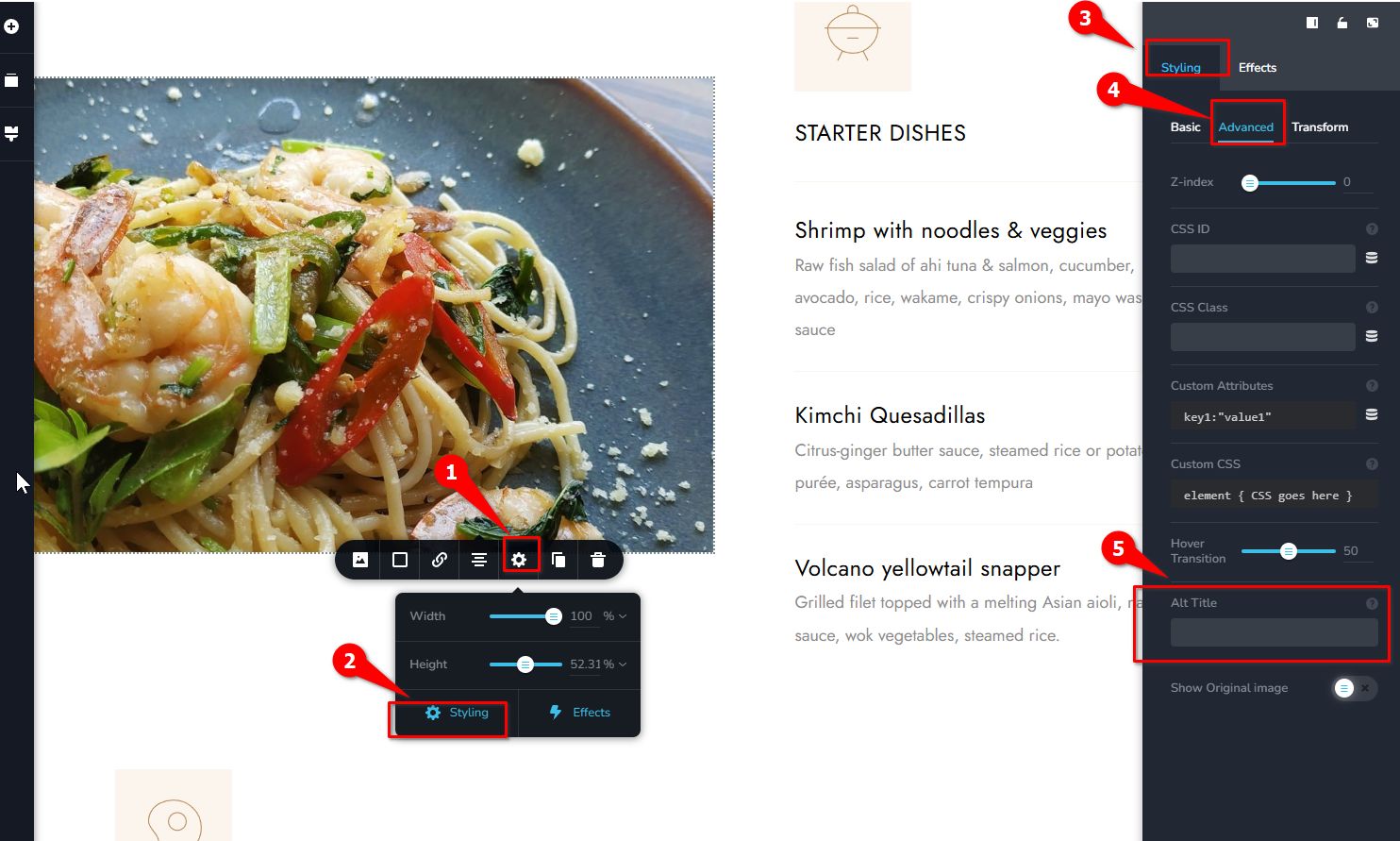
Best regards,
Ariel H.0 -
Hi Ariel,
I followed your instructions and it fixed the problem. Thank you.
I still would like to know why these specific images had this issue. Do I have to remember to follow this process for every image on the site?
0 -
Hi Benjamin,
This is a known glitch but should be fixed in the next update.
However, we do recommend adding an alt tag when uploading images. Alt text is important not only for accessibility but also for SEO, so it’s a good practice to include it consistently.
Best regards,
Ariel H.0 -
Ok, thank you.
All the images have ALT info in the image gallery. Wouldn't it make sense for this info to match the Brizy ALT option?
0 -
Hi Benjamin,
The ALT text set inside the builder will override the original ALT text from the Media Library.
For consistency and SEO purposes, it’s generally a good idea to make sure the ALT text in Brizy matches the one in the Media Library for now until we fix this issue on our end.
Best regards,
Ariel H.0 -

Hi Ariel,
I am experiencing the same issue where the raw code
{{brizy_dc_image_alt imageSrc=...}}is appearing as the ALT text on the frontend.This is already affecting my SEO and showing up in Google search results.
Since you mentioned this is an issue on your end, would rolling back to a previous version of Brizy Pro temporarily fix this?
If so, could you please let me know which version is stable and does not have this bug? Manually overriding the ALT text for every single image across multiple sites is not a feasible solution for me at this moment.
Best regards,
0 -
Hi Kasumi,
Thank you for reaching out.
Rolling back most likely won’t resolve the issue, as the alt tag value is already stored in the database and rendered by the Image element on the frontend.
At the moment, the only workaround is to manually enter the alt text directly within each Image element in the Brizy Editor.
That said, a fix is currently in the beta testing phase and will be rolled out soon. We appreciate your understanding and will keep you posted once it has been released.
Kind regards,
Ariel H.0 -

Hi Ariel,
Thanks for the advice so far.
But now we have another mayor release (8.2.0), but still no fix for this problem!
And there's another bug related to this. The title attribute is filled with the value of the alt value from the media library instead of the title value. So even if the alt-attribute would work, we'd get
alt="alttext" title="alttext"
Please fix this.
Kind regards
Karl0 -
Hi Karl,
Thank you for the follow-up.
At the moment, the issue is still unresolved in the recent update. Our developers are aware of it, and a fix is planned for one of the upcoming updates. In the meantime, please refer to our previous reply in this thread on how to manually add the ALT tag.
We apologize for the inconvenience this has caused and appreciate your patience while we work on resolving the issue.
Best regards,
Ariel H.0 -

Hi Ariel,
I can't assign the ALT tag for background images in Brizy. For SEO, it's a disaster that this doesn't work. Those are the basics.Kind regards
Reto0 -
Hi Reto,
Thank you for reaching out.
Background images do not require ALT tags because they are added with CSS. ALT attributes are only used for images that are part of the page content and need to be interpreted by screen readers or search engines.
Background images are considered decorative design elements: https://stackoverflow.com/questions/4359920/is-it-necessary-to-include-alt-in-images
Best regards,
Ariel H.0 -
Hello Ariel,
Many thanks to the team for solving both problems (alt="alttext" and title="titletext"), even though this fix didn't make it into the changelog. 😉
Best regards, Karl
0
Please sign in to leave a comment.
Comments
12 comments