Scattered Menu On Page Load

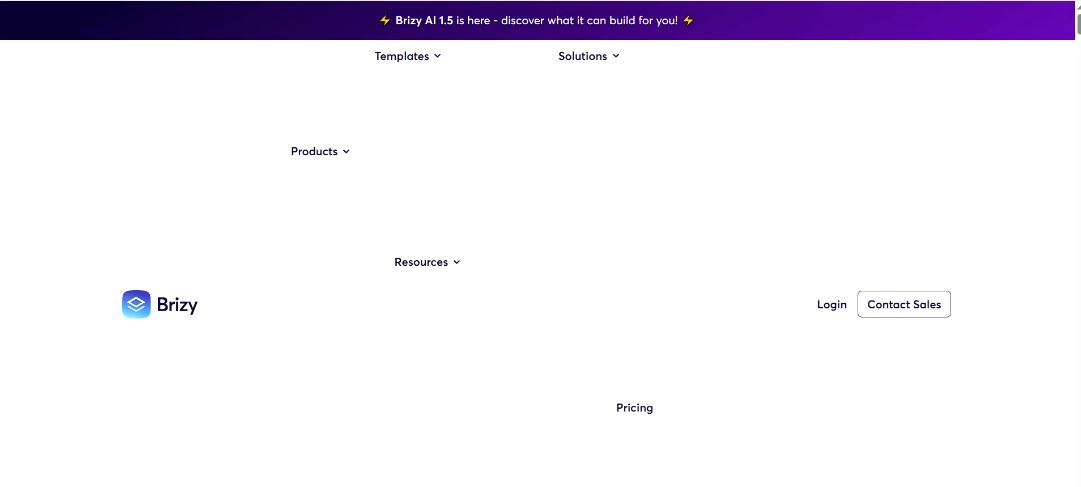
We noticed today that several of our Brizy clients' sites show a scattered menu for a brief second during page load. Not all Brizy designed sites are doing it, but some do it worse than others. This is actually happening on Brizy's main website as well.
We've tested this across multiple browsers and desktops in different locations. This only happens on desktop view. Mobile view is working fine.
Do you know of this issue, and do you have a fix for it? Attached is a screenshot of clients site and Brizy's main site. I have videos showing this in action if you would like to see them also.
-
We created a workaround.
Workaround that fixes UX:
-
Add a class to
<html>after DOMContentLoaded and hide Brizy menu until ready:-
JS:
document.documentElement.classList.add("brz-menu-ready"); - <script>
document.addEventListener("DOMContentLoaded", function () {
requestAnimationFrame(function () {
document.documentElement.classList.add("brz-menu-ready");
});
});
</script> -
CSS:
html:not(.brz-menu-ready) nav.brz-mm-menu { visibility:hidden; }(desktop breakpoint only) - @media (min-width: 992px) {
html:not(.brz-menu-ready) .brz-menu {
visibility: hidden !important;
}
}
-
Request:
-
Please fix the initial paint so off-canvas/mmenu is hidden on desktop before first render (no flash), and/or ensure header/menu CSS required for desktop is render-blocking or applied before paint.
0 -
-

Hi Chad,
Thank you for contacting us and for sharing your solution.
This is a known issue and has already been reported to our developers, so it can be addressed in an upcoming update.
We apologize for the inconvenience.
Best regards,
Ariel H.0
Please sign in to leave a comment.
Comments
2 comments