Alignment issue stock value / add to cart button

Hello Brizy support team,
We’re finetuning our webshop and have a little alignment issue with our stock value and add to cart button:
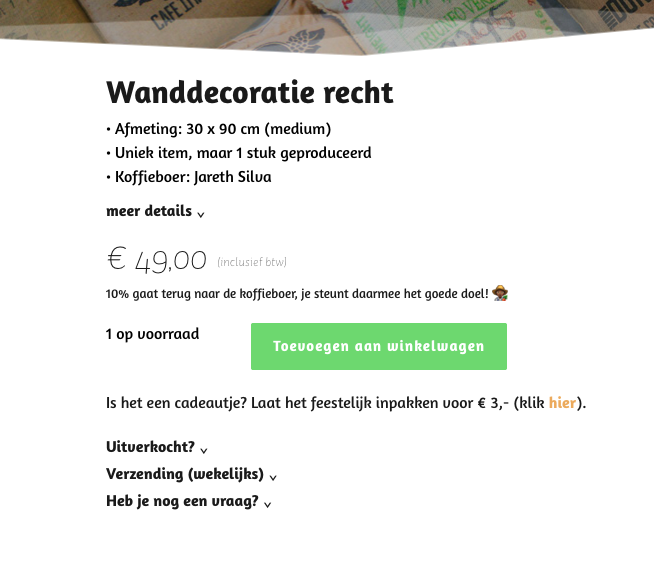

URL
https://jutekoffiezakken.nl/product/wanddecoratie-recht-medium-beneficiosantarosa/
We prefer a more aligned design (I made a Photoshop edit):
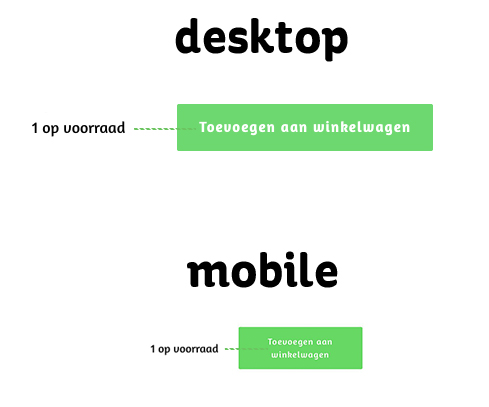
Could you provide a CSS code to fix this issue both desktop and mobile?
Thank you, as always: great Brizy support
🙏🏼
Best regards, Xander
-

Hi Xander,
Could you please try applying the CSS below and check if it resolves the issue on your end?
.brz-woo-add-to-cart p {
    display: flex;
    flex-direction: column;
    justify-content: center; /* vertical alignment */
    white-space: nowrap !important;
}

@media (max-width: 767px) {
    button.single_add_to_cart_button.button.alt {
        scale: 90%;
    }
}
We tested this using an online CSS editor, and it worked as expected. You can see the test here for reference: https://streamable.com/w2yohx
Let us know how it goes.
Kind regards,
Ariel H.0 -
Hello Ariel, my friend. Thanks again: you’ve fixed it! 👏🏻
A small last request: I would like to replace the default quantity input (number field with arrows / manual typing) with a dropdown select, both on desktop and mobile. This is mainly for usability on mobile, where typing the quantity is not very user-friendly…
Important requirements:
• The dropdown values should dynamically respect the actual product stock (min / max quantity)
• The solution should be native to the Brizy Woo Add to Cart component, not a CSS-only workaround. Maybe we could combine the CSS with a PHP Snippet?At the moment I can only solve layout issues via .brz-woo-add-to-cart, but replacing the quantity field itself seems to require a Brizy-side solution. Is this something you can support? 👍🏻
Thanks in advance! Xander
0 -
Hi Xander,
Thank you for the update.
At the moment, this functionality is handled by WooCommerce itself, and Brizy’s Woo Add to Cart component simply renders the output provided by WooCommerce.
If this is something you’d like to see supported in the future, we kindly encourage you to submit it on our Ideas & Roadmap page at https://www.brizy.io/ideas-and-roadmap. This helps increase visibility and gather community support, which can improve the chances of it being considered for future development.
Best regards,
Ariel H.0 -
Hello Ariel,
Thank you, I've tried to add this idea to the Brizy Road map, but after clicking the "Create post" button nothing happens... Help?
Thank you, Xander
0 -
Hi Xander,
Thank you for the update.
We’re using Canny to collect and manage feature feedback. After clicking Create post, a small sign-in popup should appear so you can log in to the platform.
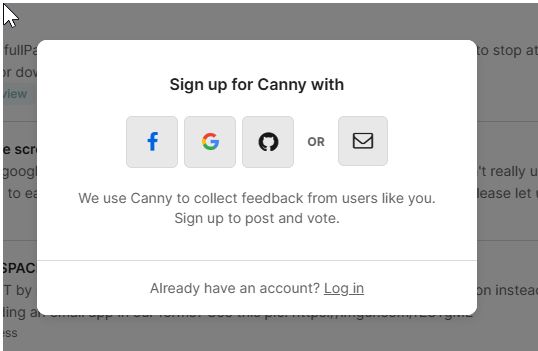
If nothing happens, it’s likely that the popup is being blocked by your browser.
Could you please try disabling your popup blocker or using a different browser to see if that helps?
Kind regards,
Ariel H.0
Please sign in to leave a comment.
Comments
5 comments