Global Menu (Header) appears expanded during page load

Hello,
In the last few days, the global menu has been expanding while the website pages are loading (it stays expanded for 0.1–2 seconds, depending on the computer used) — see the screen below. Then it returns to normal.
Do you know how to fix this issue?

-

Hi Francesco,
Thank you for contacting us.
The menu expansion issue is a known bug and has already been escalated to our developers. They’re actively working on it, and it will be addressed in an upcoming update. We apologize for the inconvenience and appreciate your patience while this is being resolved.
Best regards,
Ariel H.0 -

Hi Ariel
Do you have a timeframe for the ‘upcoming update’ you mentioned, please? I’m currently holding off on showing a client their new site, which I had promised them this week. I am having the same menu lagging issue described above. If you have an indication of how long this is likely to take, that would be very helpful.
https://www.loom.com/share/0d600ec3b0bf4f61b38010f1acd94d5b
Thanks
Eva0 -
Hi Eva,
Thank you for reaching out.
At the moment, we don’t have an ETA to share. As soon as we have any updates, we’ll reach out and let you know.
In the meantime, we can apply a temporary fix while the issue is being worked on. You can send your site credentials to communitysupport@brizy.io and include the ticket reference #33036315160978 in the subject line so we can easily locate your request.
Kind regards,
Ariel H.0 -

For me it doesn't stay expanded, for me it slows page load to 3-4 seconds more. (from 1.3 seconds to over 5 seconds).
Thank you!
Also, Query Monitor says:
Slow queries:
SELECT post_id, meta_key, meta_value
FROM wp_postmeta
WHERE post_id IN (22532,32283,115191,115304,115352,21510,115382,26081,28096,102773,32177,125940,21487,80429,94840,89559,21794,32308,126953,31646,84608,17251,17254,25859,18514,25104,25223,51114,25362,25414,25479,25533,25582,25637,25693,25769,161676,27305,27307,27310,51965,167445,178219,179531,96783,51984,51962,170242,22142,52034,52037,172695,32394,112978,53200)
ORDER BY meta_id ASC
update_meta_cache()
Plugin: brizy-pro 766 0.1229 0 -
Hi Eva,
Thank you for your cooperation.
We’ve added the scripts and labeled them properly.
This is demonstrated on this screencast: https://streamable.com/lg79acPlease keep them in place for now, and remove them once we confirm that the issue has been fixed.
We’ll reach out to you as soon as we have an update.
Thank you for your patience.
Best regards,
Ariel H.0 -
Hi Stefan,
Thank you for reaching out.
Could you please share your website URL so we can inspect it?
Looking forward to your reply.
Best regards,
Ariel H.0 -
htt*s://i*****.ro/
It's the same with the menu, stays big a little, and the page load increases from 1.5 seconds to 4-5 seconds. when i deactivate brizy pro or i delete the menu, all is ok.
Thank you.
0 -
Hi Stefan,
Thank you for the update.
To temporarily fix the issue for WordPress websites, you’ll need to add both a CSS snippet and a JavaScript snippet using the WPCode plugin.
The JavaScript should be added as a snippet in the footer, and the CSS should be added as Custom CSS. I’ve created a short video that walks through the exact steps on how to add these scripts here:
https://youtu.be/hzqoKcC7i-wCustom CSS:
/* Hide the menu on desktop until it's fully initialized */
@media (min-width: 992px) {
  html:not(.brz-menu-ready) .brz-menu {
    visibility: hidden !important;
  }
}
JS Snippet:<script>
// Add a class after page load to reveal the menu
document.addEventListener("DOMContentLoaded", function () {
requestAnimationFrame(function () {
document.documentElement.classList.add("brz-menu-ready");
});
});
</script>
Please carefully follow the steps shown in the above screencast to insert the CSS and the JS snippets and let us know if you have any questions along the way.
Once the issue is fully fixed on our end, you can safely uninstall the WPCode plugin.Kind regards,
Ariel H.-1 -
Hi Ariel
Thanks for adding the code snippets. It's an improvement with the navigation menu expanding issue - but the whole website header still jumps down then up at each page load - your video even shows this.
Also I now noticed that my online form isn't displaying reliably. This form is embedded from GHL. On my phone I can't get it to appear at all even after refreshing. In the editor it won't let me select the embed widget even though the form itself is displayed in the editor.
Is there something we can do about these two problems?
Regards
Eva
0 -
Hi Eva,
Thank you for the update.
This is a temporary solution to help reduce the navigation expansion issue. Once the page is cached, the movement becomes much less noticeable. Our developers are actively working on a proper fix, and it will be rolled out soon. We apologize for the delay.
About the embedded GHL form, it wasn’t displaying because the iframe was set to height: 100% while its container didn’t have a fixed height.
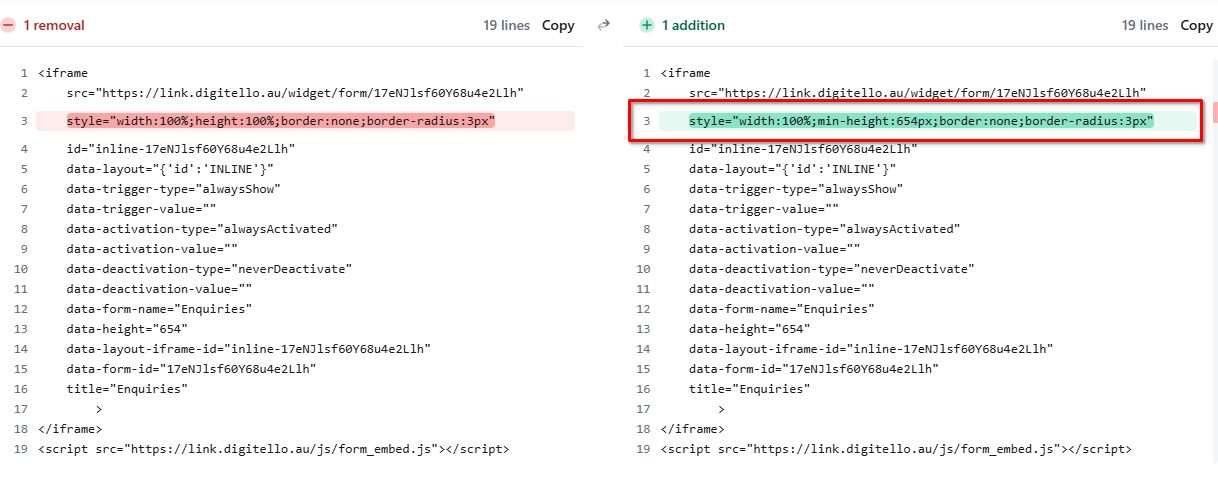
We adjusted this by setting a fixed/minimum height, which resolves the issue.Best regards,
Ariel H.0 -
Thank you, I look forward to the update.
Regards
Eva
0 -
Hi, Ariel
Just a follow up on this as I haven't heard back as mentioned above...? Has this fix been rolled out yet?
Thanks,
Eva0 -

Hello Eva,
The problem where the menu briefly expands across the screen while the page loads has been resolved.
0 -
Oh that's good.
So do I need to remove all those code snippets that you added?
0 -
Hi Eva,
I've removed the code snippets for you.
Best regards,
Ariel H.0 -
Thank you.
0
Please sign in to leave a comment.
Comments
16 comments