Menu disappears when Brizy plugin falls out of date (Pro feature dependency)

Hi Brizy Support Team,
We’re experiencing a recurring issue where the site’s main menu disappears whenever the Brizy plugin falls out of date.
Important context:
-
The menu in use is a Brizy Pro feature.
-
When the Brizy plugin is not on the latest version, the menu disappears both in the builder and on the front end.
-
Manually updating the plugin immediately restores the menu.
-
The issue reoccurs when the plugin fails to auto-update.
-
Cache has been checked and cleared at the hosting level (SiteGround), and cache usage shows 0 MB before and after updates.
At this point, the issue appears to be related to version mismatches between Brizy Free and Brizy Pro features, triggered when the plugin does not stay current — rather than a caching issue.
Could you please advise:
-
Whether Pro features (specifically menus) are expected to break or disappear when the free plugin version lags
-
If there are known issues with menus disappearing due to version sync problems
-
Whether there is a recommended way to prevent Pro-dependent elements from breaking when auto-updates fail
Happy to provide site access, plugin versions, or logs if needed.
Thank you,
Charmaine Martinez
Do Good Communications LLC
-

Hello Charmaine,
Every Brizy version has a corresponding Brizy Pro version. Some website features may stop working if you are using incompatible versions of Brizy and Brizy Pro. Your website frontend can break if Brizy automatically updates and Brizy Pro does not.
Auto updating Brizy and Brizy Pro is not a recommended practice. Kindly disable auto updates for both Brizy plugins. If you do not visit your website often, kinldy update Brizy and Brizy Pro plugins manually once or twice a year. After updating, please ensure all website content works as expected.
0 -
Hi KC,
Thank you for letting us know that auto updating is not a recommended practice. However, it is our desire that the plugin WILL auto-update regardless of your recommendation.
This is because only the site that is NOT auto-updating is having this issue. Our other builds auto-update and our customers never have issue. Can you please assist us in ensuring the plugin WILL auto-update and investigate why it is not doing so even when we Enable Auto Updates in the Plugins area of the WordPress Dashboard?
I had our hosting provider SiteGround look into it as well and they said there is no issue on their end. Today, the plugin failed to auto update and we received yet another email from our customer who was very upset about it. We need this resolved ASAP as it keeps happening month over month only for her site.
Please help.
Thank you.0 -
Hello Charmaine,
Brizy plugin is part of the official WordPress plugin repository whereas Brizy Pro is not. WordPress checks for updates every 12 hours using the built-in WP-Cron system, for plugins hosted on the official WordPress.org repository (for example: Brizy Page Builder). Premium plugins that are not hosted with the WordPress plugins repository (for example, Brizy Pro) use their own specialized auto-update mechanisms and API endpoints to check for updates. Even though Brizy and Brizy Pro updates are released at the same time, the variation in the update procedure used by the two plugins can result in a time difference in auto-updating the plugins. Let's say if Brizy plugin gets auto updated at 10:00 AM on a given day, Brizy Pro may get auto updated by 12:00 noon. During the two hours when the Brizy and Brizy Pro plugins are incompatible with each other, the website will malfunction.
SiteGround maintains an internal mirror plugin repositoy (which mirrors the WordPress.org plugin repository). Therefore, for websites hosted with SiteGround, the time difference in auto-updating the plugins may be slightly different. The issue is not that the Brizy Pro plugin fails to update, but rather the time discrepancy between auto-updating plugins. We may be unable to resolve this issue because we do not have complete control over the time difference in auto-updating the two Brizy plugins.
This is one of the reasons why we recommend updating the plugins manually (once or twice a year). Let's say Brizy plugin shows an update notification at 10:00 AM on a given day and Brizy Pro plugin shows the update notification at 12 noon on the same day. If you are checking the plugins section of your WordPress project anytime after 12 noon, you will find an update notification for both the plugins and the update process will be smooth and the website will not malfunction.
0 -
Hi KC,
Thank you for explaining the timing difference between how Brizy (WordPress repo) and Brizy Pro (premium) handle updates. I understand what you’re saying about the potential time gap between the two plugins auto-updating.
However, I need to reiterate that this is not a once-or-twice-a-year edge case for us. This issue is happening month over month on this specific site, and it is creating repeated front-end breakage and very frustrated client emails.
We also manage multiple other Brizy builds that have auto-updates enabled and do not experience this recurring issue. This appears to be isolated to this one website.
To restate the problem clearly:
-
The Brizy (free) plugin auto-updates.
-
Brizy Pro does not update at the same time.
-
The menu (a Pro feature) disappears on the front end.
-
We receive client complaints.
-
Manually updating resolves it immediately.
-
The cycle repeats the next release.
This is not sustainable for a client site that relies on the navigation to function properly. While we understand your recommendation to disable auto-updates, that approach does not align with our maintenance standards, and again — our other Brizy sites do not behave this way.
Given that this is happening consistently on only one site, could your team please:
-
Review the site directly if we provide access
-
Confirm whether there is anything in the Brizy Pro licensing, API connection, or update mechanism that may be causing delayed update checks
-
Advise whether there is any configuration on your end that can help ensure Brizy Pro checks for updates at the same interval as the free plugin
We are not asking for control over WordPress core timing — we are asking whether there is anything that can be done on your end to prevent this recurring version mismatch from breaking Pro-dependent elements every month.
We are happy to provide admin access, plugin versions, logs, or anything else needed for troubleshooting.
This has now happened multiple times, and we need a durable solution.
Thank you,
Charmaine Martinez
Do Good Communications LLC0 -
-
Hello Charmaine,
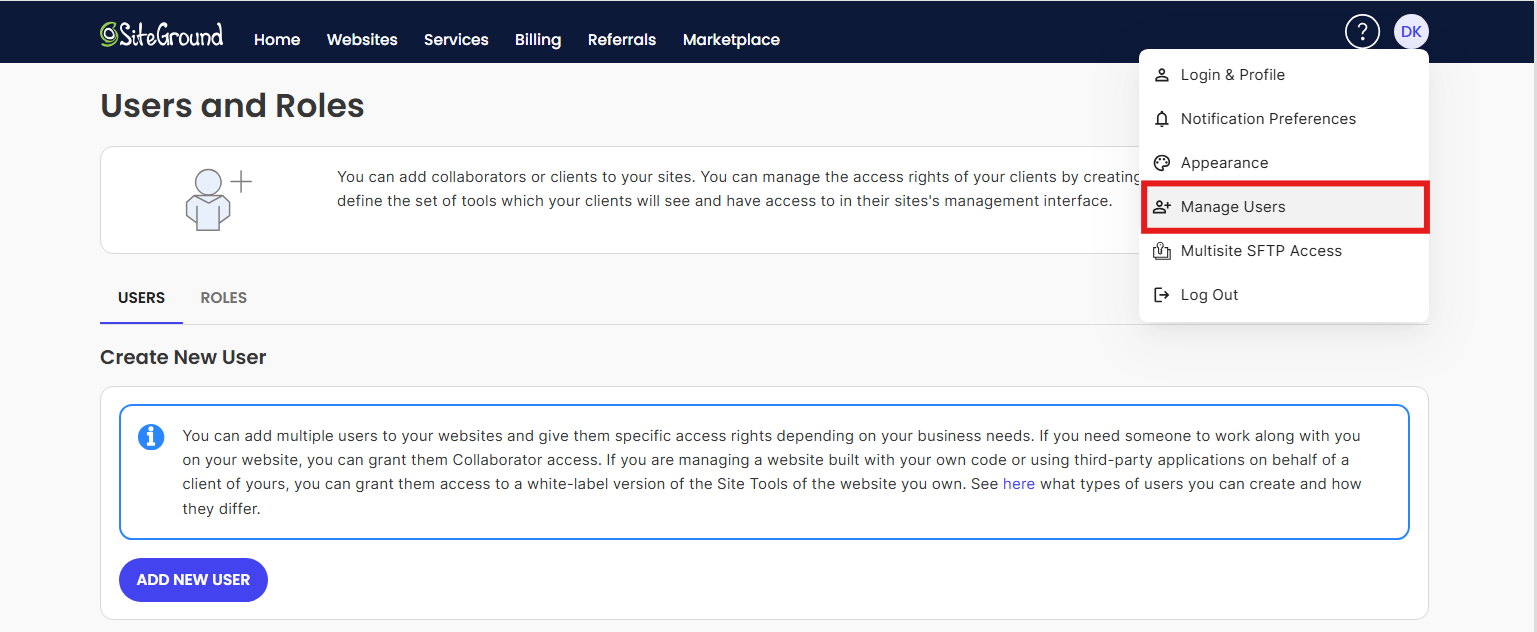
We are happy to review the website if you give us access. If you can give us access to the SiteGround hosting control panel as a collaborator, we are also willing to interact with SiteGround support on your behalf and work towards a solution. Have a look at https://world.siteground.com/kb/can-add-collaborator-website/ for the procedure. Our email address: communitysupport@brizy.io. By keeping track of the support ticket, you will have an update on the issue.
 0
0 -
Hi there, Thank you so much. I have added you on as a collaborator to investigate. I have also received the following info from SiteGround and requested they remove the bit of code referenced in the message below as it may be what is causing the issue. See message from SiteGround for your info & thanks for your help:
Feb 12, 2026 05:56 PM
Thank you for your patience, Charmaine.
I have reviewed your previous case, and it appears that the issue arises when the Brizy Pro plugin is updated, but the free Brizy plugin is not updated simultaneously. This discrepancy in versions, especially since there are Pro-dependent elements in the newer versions, seems to be causing disruptions in the site's menu section.
To protect your live site from any potential issues during our investigation, I conducted the analysis on your staging site, staging6.jaxccr.org, specifically labeled "Brizy troubleshoot."
Additionally, I ensured a complete backup was created via Site Tools ->; Security -> Backups.
02/12/2026 09:43 PM - BackupTID5016254
Upon further investigation, I noticed that when the free version of the Brizy plugin is downgraded, no new updates are indicated in the WordPress admin dashboard or when checking the plugin using wp-cli. This is due to the following code:
add_filter('site_transient_update_plugins', function($value) {
    if (isset($value) && isset($value->response)) {
        unset($value->response['brizy/brizy.php']); // Path to main plugin file
    }
    return $value;
});
This code is located in the wp-content/themes/astra-child/functions.php file of the site's child theme, "Astra Child." Essentially, this code conceals update notifications for the Brizy plugin, which interferes with the automatic update functionality of the native WordPress auto-update plugin.
To enable updates for the free plugin through the WordPress core auto-update feature, this code can be removed. Once removed, the WordPress site will recognize the newer versions available in the WordPress.org repository, and the auto-update functionality of WordPress will manage the updates effectively.
I am unsure if this code was recommended by the plugin developers or if it was initially added by your website developer.
To resolve the issue, we can remove this code, which will allow the plugin to be automatically updated by the WordPress core.
Please let us know if you would like us to proceed with removing the code from the child theme's functions.php file on the live site.
Best Regards,
Tsvetan Mitev
Technical Support Supervisor0 -
Hello Charmaine,
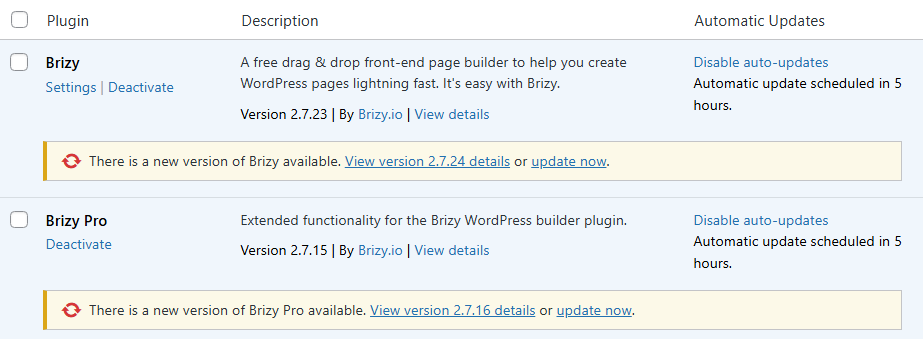
I have rolled back to previous versions of Brizy and Brizy Pro and now your WordPress Dashboard shows update notifications for both the plugins. It also says automatic updates are scheduled in 5 hours. Let's wait for five hours to see if the plugins will be automatically updated and whether the website frontend will be impacted.
 0
0 -
Hello Charmaine,
The frontend of the website remained unaffected after the Brizy plugins were automatically updated. Looks like the plugin auto-update process went through without a hitch.
Let's wait for the upcoming Brizy update to see if the auto updates would work smoothly.
0
Please sign in to leave a comment.
Comments
8 comments