Popup mobile "bottom load"

I'm creating a series of popups triggered from site clicks. On mobile, the content of the popups (two-columns) goes beyond the viewport so it needs to scroll. This is fine.
My issue is that the popup loads as if scrolled to the bottom of the content, so the viewer needs to scroll UP to see the rest.
I want the popup to load at the TOP of the content. How do I make this happen?
-

Hello Benjy,
I checked one of your projects: https://www.getbaxtr.com. Popups appear on top of the content from which they were triggered. In which project are you experiencing this problem?
0 -
Hi...thanks for looking. I should have given more detail – I'll try again. For the "BtB" project (https://swallow80ee2c79.brizy.site/), scroll down to the Meet The Band section, and click on any of the people except for the first one (Christy – I messed around with that popup a bit, trying to make this work). On mobile, the popup shows photos, which are at the bottom of the popup...you need to scroll UP to see the text. I want it to load with the top part of the popup content showing, not the bottom part of the content.
I hope that makes more sense.
0 -

Hi Benjy,
Thank you for the update.
To address this, you may want to consider moving the image column to the right on desktop and tablet views. Then, in mobile view, you can use the column swap option, so the text column appears first and stays at the top when the popup opens.
This is demonstrated on this screencast - https://streamable.com/4zhgbo
This setup should ensure the popup loads with the text visible first on mobile.
Best regards,
Ariel H.0 -
Thank you Ariel. While this does seem to look like it works when editing (as you showed in your screencast), it does not work when actually viewed on my phone: https://jmp.sh/obrk0JVs
The columns are swapped, but the popup still loads with the content scrolled to the bottom.
0 -
Hello Benjy,
Looks like we have a bug with Brizy popup when adding scrolling content. However, you can temporarily fix the issue by implementing these two changes
- Set the popups as non-global
- Align the photos on the left and profiles on the right on desktops and tablets and on mobile, flip the columns to show the photos first and the profle second.
I have implemented this change for you. Please check.
0 -
Thank you. Looks like it's working. I made some additional adjustments with hiding and showing things to get it to where I like it. Strange bug you've got there :-)
On a similar note, there seem to be a bunch of different places where popups can live:
1. Saved Popups
2. Global Popups
3. Created on the fly (not saved or global)
4. In the Admin panel under Popups and AlertsThis causes some confusion (for me), especially since I don't see an obvious way of knowing where a particular popup has come from. I know one is Global once I open it and can see the icon in the main popup settings, but not until then.
FEATURE REQUEST: put the name of the popup and its status (saved/global) in the Link menu when adding popups (here: https://jmp.sh/3NxigmnG)
Which brings me to #4. I originally tried to create the popups there, and then access them from the site. Doesn't seem like I can do that. When I use the link icon, the window allows me to make my own, start from a template, use a Saved popup, or use a Global popup. But the ones I created in the Admin panel don't show up anywhere. Are those for a different use case?
Thanks for addressing the original issue.
0 -
Hello Benjy,
There are two types of popups one can create in Brizy
-
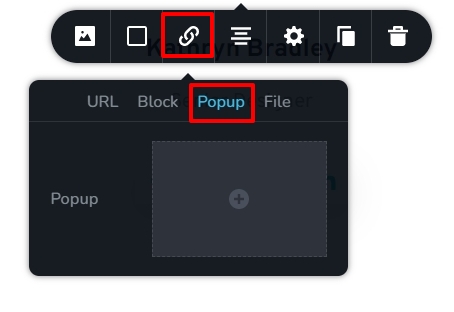
On-click popups. These popups are triggered on the click of a button, icon, text or an image. On-click popup are designed by selecting the popup tab under the link toolbar. On-click popups do not have Triggers and Conditions tab.
-
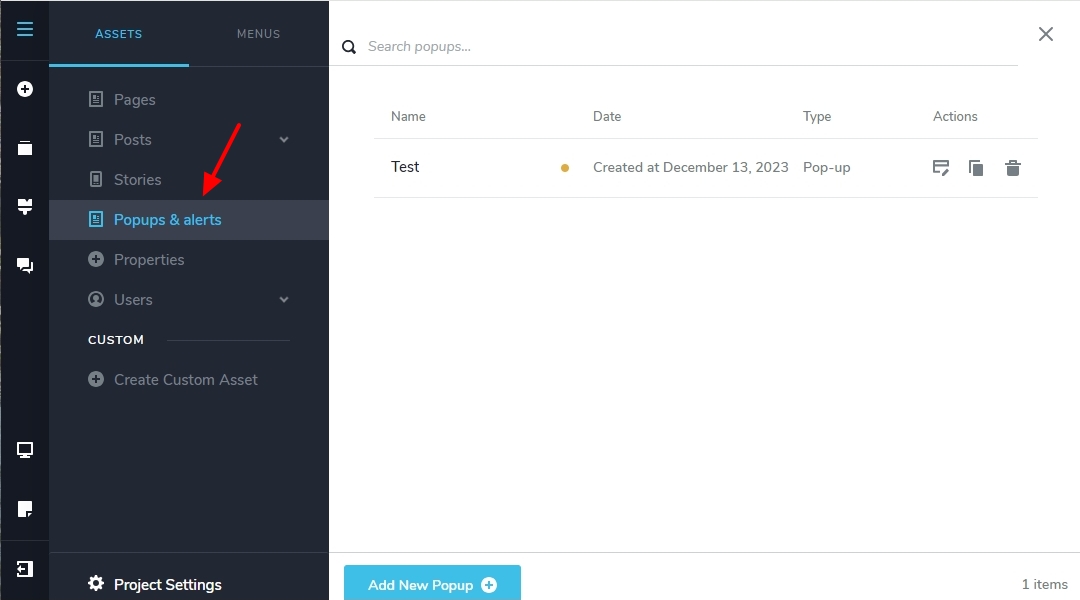
Conditional Popups. These popups are triggered automatically when a condition is fulfilled. You design conditional popups under CMS - Popups & Alerts. These popups have Triggers and Conditions tab. Examples of a conditional popups: A popup which gets triggered when the user scrolls 75% of a page, A popup which gets triggered when the user want to exit the page
Let's also look at what these are
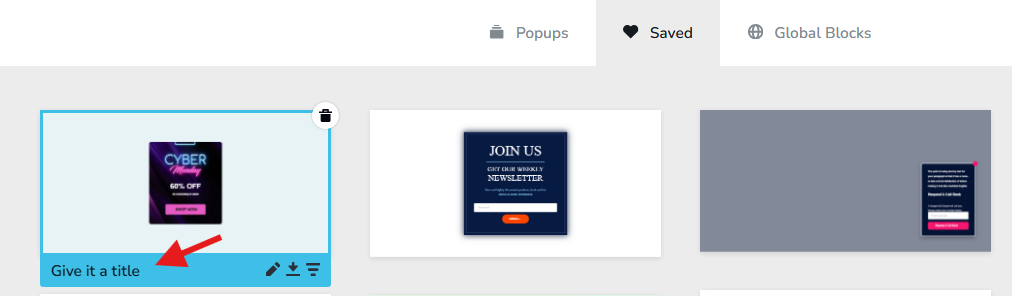
- Saved popups: The popup design gets saved in the popups library when the heart icon is clicked. This enables to reuse the popup design in a future project or on another page in the same project.
- Global popups: Let's say 10 buttons on a website link to a Black Friday offer popup. When you make an edit to one of the 10 Black Friday popups, if you want the change to reflect in all the other 9 instances of the popup, you must make it a global popup. If you have the same popup that gets triggered from multiple buttons/images/ texts, making it global popups help centralize the design changes.
You can name popups in the saved popups library and global popup library; but not in the screen where you add the popup.
 0
0 -
On-click popups. These popups are triggered on the click of a button, icon, text or an image. On-click popup are designed by selecting the popup tab under the link toolbar. On-click popups do not have Triggers and Conditions tab.
Please sign in to leave a comment.
Comments
7 comments