problems with adding elements

strange thing just happened! I had some changes on an existing site, namely a change in the e-mail address. clickon the column I was told a problem has arisen and I just eliminate the column. so I did and wanted to build it up again. created a new block and went to the folder „elements“ to add a column and a text element. went to „elements“ and moved to columns at which point the whole page turned white. I reloaded the page and tried again - same result. I deleted brizy and deleted brizy pro produced a new licence, to no avail. I restarted the mac book air and safari, no change. I a running the newest version ov wordpress 6.9. anybody have an idea what’s happening and how I can resolve the issue?
-

Hello Tomas,
Please try these to fix this issue.
- Kindly check if you have these Brizy and Brizy Pro versions. If you do not, please update to these versions and check if the issue resolves.
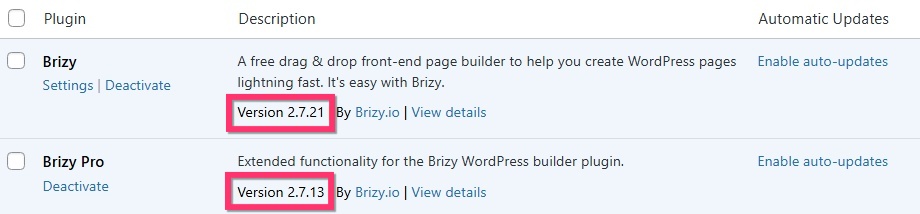
- Check if you have enabled the "Jetpack Boost" plugin. Deactivate the plugin and check if it resolves the issue
- If you are hosting with WordPress.com, check if you have activated the "Page Optimize" plugin. Deactivate it and check if the issue resolves.
If none of the above helps, we would like to take a look at your WordPress Dashboard to fix this issue. Please add a new user to your WordPress Dashboard and send the following details to our email: communitysupport@brizy.io
- Support Forum link: https://support.brizy.io/hc/en-us/community/posts/32581913363858
- WordPress Admin URL:
- Username
- Password
Your email should include a link to this thread's URL, otherwise we will be unable to reference your support request. Please notify us in this thread when you send us the email.
0 - Kindly check if you have these Brizy and Brizy Pro versions. If you do not, please update to these versions and check if the issue resolves.
-
thanks much for your invaluable help- here ar the specific details:
support forum link: https://support.brizy.io/hc/en-us/community/posts/32581913363858
0 -

Hi Tomas,
Thank you for the update.
Upon checking, it appears to be a conflict with the Jetpack Boost plugin. When it is disabled, the Brizy Editor works as expected.
This is demonstrated on this screencast: https://youtu.be/vzAOMwixI9o
For now, we recommend disabling Jetpack Boost while editing your pages with Brizy, then re-enabling it once your changes are published. This should allow you to continue working without interruptions.
We also recommend reporting this behavior to the Jetpack Boost plugin developers so they’re aware of the issue and possibly offer a solution.
If you have any further questions, please let us know.
Kind regards,
Ariel H.0
Please sign in to leave a comment.
Comments
3 comments