Navigation menu routing issue – assistance required

I need support to directly assist with fixing my navigation menu routing.
I have already created separate pages for About, Services, Reviews, and Contact, each with its own unique slug, and I have attempted to link the navigation menu items to these pages. However, all navigation menu items continue to route to the same page in Preview mode.
At this point, I am requesting that support review the project and assist with properly connecting the navigation menu items to their respective pages. I am not looking for step-by-step instructions, as I have already been working through this issue for an extended period of time.
Please let me know how to grant access or what information you need in order to resolve this on your end.
-

Hello Vernesha,
Please share with us the frontend URL of your project (brizy.site) and we will fix the probelm with the navigational menu for you.
0 -
Hello,
Is this what you need? https://crocodile693846cb.brizy.site/
0 -
Hello Vernesha,
I have fixed the issues with hyperlinks to various pages. Please check.
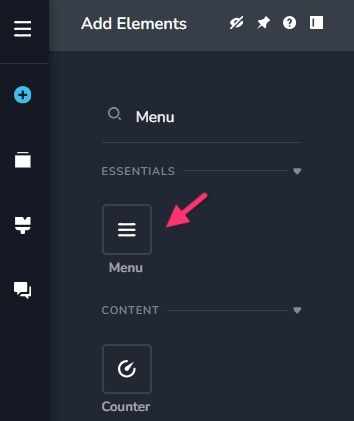
You have designed your header navigation without using the Brizy "Menu" element. Ideally you should add your pages to a menu and use the Menu element to implement the site navigation.
 0
0 -
Hello,
My apologies. I provided the incorrect url. Here is the correct url.
https://crocodile693846cb.
brizy.site/ The navigation items About, Services, Reviews, and Contact should each route to their respective pages. Currently, all menu items are resolving to the same page. Also, can you assist with the drop down menu or point me in the instruction direction? Thanks in advance!!
0 -
Hello Vernesha,
The reason why menu navigation does not work is because you have not published About, Services, Reviews and Contact pages. Kindly follow the procedure at https://jmp.sh/B5o3BdkI to publish those pages and check if the navigation works well.
0 -
Hello,
I’ve followed the instructions and published the About, Services, Reviews, and Contact pages as outlined.
However, the issue persists. All navigation menu items are still routing to the same copyright/footer page instead of their respective pages. This is happening consistently across preview and live views.
At this point, the pages are published, and the menu items are correctly labeled, but the routing itself appears to be misconfigured or overridden on the backend.
Could you please review the project on your side and correct the navigation routing? It seems like something is forcing all menu links to resolve to the same page.
Please let me know if you need anything further from me.
Thank you,
0 -
Hello Vernesha,
The website's navigation appears working fine. Have a look at my test at https://jmp.sh/ld2xzt3u What do you expect to happen when a user clicks on the About, Services, Contact, or Reviews links? Are you expecting them to be redirected to the appropriate pages?
0 -
Hello Kc,
Thanks for checking and for the test link.
To clarify from my side, when I click the navigation items, I’m not being taken to the actual pages I created. For example:
-
Clicking About should take me to the About page
-
Clicking Services should take me to the Services page
-
Clicking Reviews should take me to the Reviews page
-
Clicking Contact should take me to the Contact page
Instead, all of the navigation links are taking me to the same area at the bottom of the site, not to the individual pages themselves.
I may have set something up incorrectly, so I’d appreciate your help reviewing the navigation and updating it so each menu item routes to its correct page.
Please let me know if you need anything further from me.
Thank you
0 -
-
Hello Vernesha,
You said when you click on the navigation items, you are not being taken to the actual pages you created. Can you carry out these tests?
- Click on the "About" menu in the header and check the URL in the browser address bar. Do you see https://crocodile693846cb.brizy.site/about? If not, what do you see in the browser address bar?
- Click on the "Services" menu in the header and check the URL in the browser address bar. Do you see https://crocodile693846cb.brizy.site/services?
- Click on the "Contact" menu in the header and check the URL in the browser address bar. Do you see https://crocodile693846cb.brizy.site/contact?
- Click on the "Review" menu in the header and check the URL in the browser address bar. Do you see https://crocodile693846cb.brizy.site/reviews?
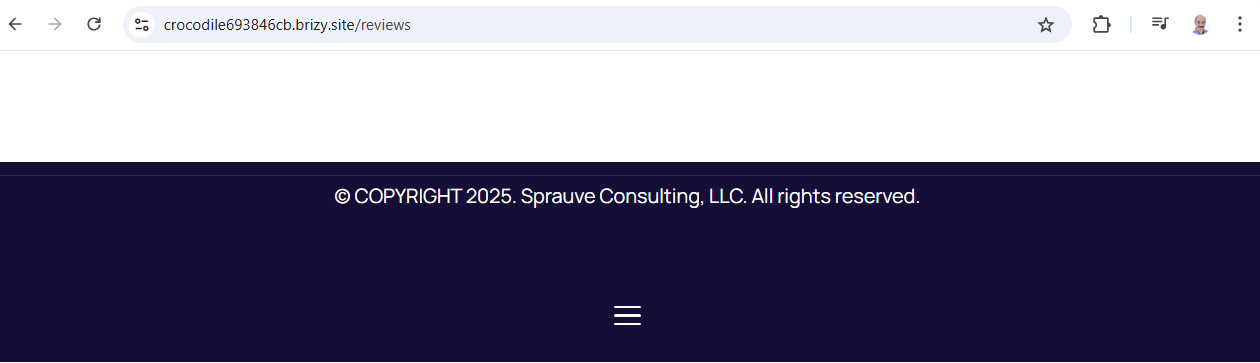
You have currently designed all the four pages, About, Services, Contact and Reviews like the screenshot below. Each page has a blank header and a footer. Did you expect a different design in these four pages?
 0
0 -
Hello Kc,
Thank you for laying this out. I think we’re talking past each other a bit, so let me restate what I’m trying to achieve in simple terms.
Yes, it looks like I currently have the navigation pointing to blank headers or sections, and that was not my intention. If that setup is what’s causing this behavior, then it is a mistake on my end.
What I want is very straightforward:
-
When a user clicks About, they should be taken to the About page with the About content
-
When a user clicks Services, they should be taken to the Services page with the Services content
-
When a user clicks Reviews, they should be taken to the Reviews page
-
When a user clicks Contact, they should be taken to the Contact page
Right now, even though the URL changes (for example /about, /services, etc.), the page content is not changing and appears to be showing the same header/footer layout. That is not the expected result.
If this is happening because the menu items are linked to sections instead of full pages, I do not know how to correct that properly in Brizy. I did not intend to use section anchors at all. I want full page navigation.
Can you please either:
-
Adjust the navigation so each menu item links to the correct page, or
-
Show me exactly where I need to change this so the menu points to the actual pages instead of headers/sections
I’m not trying to redesign these pages. I just want the menu to route users to the correct page content.
Thank you for your help.
Best,
0 -
-

Hi Vernesha,
Thank you for the update.
We’ve adjusted the navigation links so each menu item now points to the content as requested.
Please let us know if this matches what you were aiming for. If so, we’ll be happy to walk you through the exact steps we took to set up the links.
Looking forward to your confirmation.
Best regards,
Ariel H.0 -
Hi Ariel,
Thank you very much — the main navigation is now working as expected. I appreciate you getting that resolved.
I did notice two additional issues that I didn’t catch earlier and could use your help with:
-
Contact form – “Send Message” button
When I click Send Message on the Contact page, it redirects me back to a blank page instead of submitting the form and sending the message to my email. The intended behavior is for the form to send the message to my email. I’ve attached a screenshot for reference.
-
Footer menu under the copyright
At the bottom of the site, under the copyright section, there is a menu that appears to be routing to another menu or page that I wasn’t expecting. I originally had this tied to terms and conditions, but it looks like it’s behaving differently now.
If possible, please feel free to update these directly on your end.
Thanks again for your help.
Best regards,
0 -
-
Hi Vernesha,
Thank you for the update.
For the contact form, the entire block was linked to an empty page, which caused the redirect when clicking Send Message. We’ve removed that link, and the form should now submit correctly.
This is demonstrated on this screencast - https://youtu.be/xHdrN6VlKhEAbout the footer, we fixed the navigation by adding Terms and Conditions directly to the footer menu. This is a common setup and makes it easier for users to access important links without scrolling back up.
Please have another look and let us know if everything behaves as expected now.
Best regards,
Ariel H.0 -
Hi Ariel,
Thanks again for all the help so far — the recent updates definitely got things much closer, and I appreciate you taking the time to walk through this.
I did one more pass end-to-end and noticed a couple of remaining items:
-
Contact form delivery
I tested the contact form but did not receive the email. It would help to confirm which email address the form is currently configured to deliver submissions to.
If possible, please update it to deliver to:
and verify that submissions are sending successfully.
-
Phantom / blank navigation behavior
There still appears to be a “ghost” or blank navigation behavior when moving between pages, including:
-
Clicking certain areas near the top of pages
-
Clicking the copyright text in the footer (“© 2025 Sprauve Consulting, LLC”), which routes to a blank page
If there are any leftover links, empty pages, or unintended navigation elements still attached from earlier setup, I’d appreciate it if you could remove or clean those up so navigation only routes between the intended pages.
If it’s easier on your end, please feel free to update or correct these directly rather than walking me through the steps. I’m happy to re-test once everything is aligned.
Thanks again for the support — we’re very close now.
Best regards,
0 -
-
Hi Vernesha,
Please try it again.
I can’t confirm whether the email was sent successfully since we don’t have access to the email account, but I did send a test email from my end. You may also try submitting a message using the contact form and check if it’s received.Best regards,
Ariel H.0 -
Hi Ariel,
Thank you again for the follow-up. The email actually did come through this morning, so that part looks good now. I appreciate you checking on it.
I did notice one small change on the site that I wanted to clarify. It looks like the navigation/header is now locked at the top on every page. My preference would be for the header not to be fixed across all pages. Ideally, I only want the navigation to behave that way on the first page and the last page.
My earlier request was really just to make sure there weren’t any hidden or phantom navigation links on the other pages. Previously, if I clicked near the header area, it would jump to other pages unexpectedly. I wasn’t trying to change the overall header behavior across the site.
If you could unlock the fixed header on the other pages while keeping the navigation clean and stable, that would be perfect.
Thanks again for all your help. I really appreciate it.
Best regard
0 -
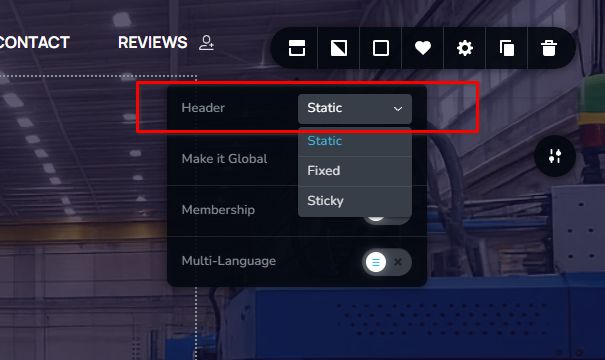
Hi Vernesha, the header has now been changed from sticky to static.
 0
0 -
Hi Ariel,
Thank you again for updating the header — I can confirm it’s now changed from sticky to static, and that resolves the issue on my end. I appreciate the help with that.
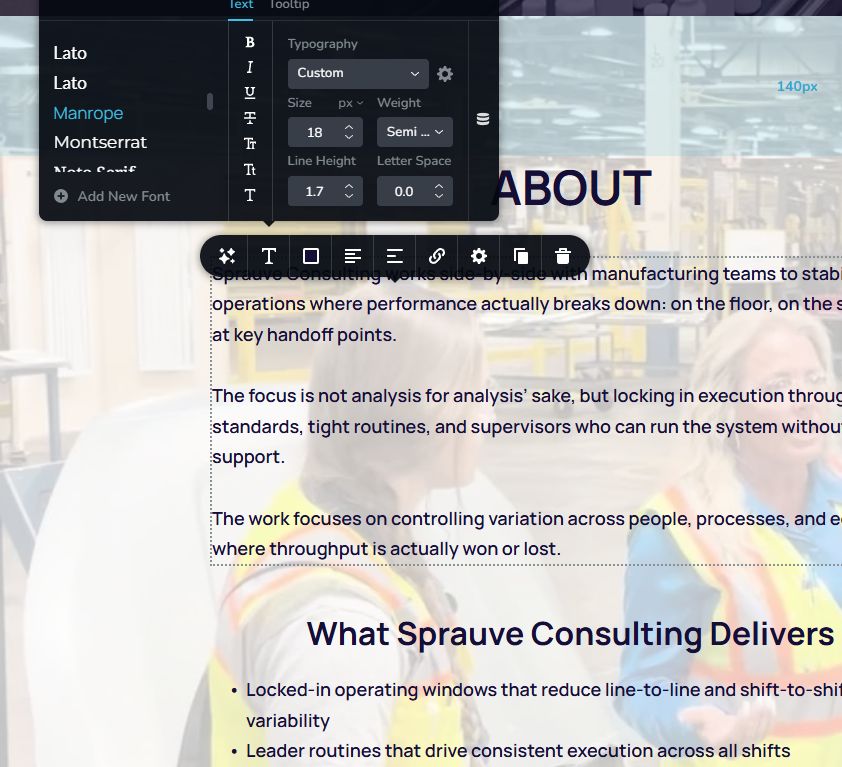
One additional request: on the About section, I’ve been unable to update the body text font size. I’d like that text set to 18px. If you’re able to adjust that directly on your side, I’d appreciate it.
Thanks again for your support and for unlocking the header behavior earlier.
Best regards,
0 -
Hi Vernesha, the font size is now 18px as requested.
 0
0 -
Sprauve Consulting — Website Update Request
3 Changes Needed on sprauveconsulting.com (Brizy Cloud)
Hi — I need three changes made to my homepage in Brizy. I’ve included the exact text and placement for each one below. The site is built in Brizy Cloud (project ID 23272519, page: Home).
I’ve already made some other text edits myself, so please don’t change anything else on the page — just add these three items.
Change 1: Add a CTA Button in the Hero Section
Where: Hero section (the very top of the page), directly below the white subheadline text that starts with “Hands-on implementation that stabilizes…”
What to add: A button element with the following settings:
- Button text: Book a 15-Minute Call
- Link action: Scroll to the existing Contact section on the same page (anchor link to the “GET IN TOUCH” section)
- Alignment: Centered
- Style: Solid fill button that stands out against the dark hero background (white or a contrasting color). Match the overall site style.
Change 2: Add a “Who This Is For” Section
Where: Add as a new section between the existing ABOUT section and the SERVICES (“What Sprauve Consulting Delivers”) section.
What to add: A new content block with a heading and body text, plus a bulleted list. Use the same dark background and white text styling as the About section.
Section Heading:
Who This Is For
Body Text (paragraph):
Sprauve Consulting partners with mid-size manufacturing operations (200–5,000 employees) in beverage, food, packaging, and high-speed production environments. The work happens on the plant floor — embedded with your plant leadership, production supervisors, and frontline teams where execution actually breaks down.
Intro line before bullet list:
If your plant deals with any of the following, this work was built for you:
Bullet Points:
- Shift-to-shift variability that makes performance unpredictable
- Changeover and startup routines that depend on who’s running the line
- Supervisors managing by feel instead of a repeatable system
- Chronic downtime that keeps coming back despite repeated fixes
- A gap between your best shift and your worst shift that you can’t close
Change 3: Add a “How We Work” Section
Where: Add as a new section between the SERVICES (“What Sprauve Consulting Delivers”) section and the REVIEWS section.
What to add: A new content block with a heading and three sub-phases. Use the same styling as the rest of the site. Each phase should have a bold sub-heading and a description paragraph.
Section Heading:
How We Work
Intro line:
Every engagement follows a structured, floor-first approach designed to deliver measurable results — not a binder full of recommendations.
Week Zero — Assessment & Value Stream Map
We walk your lines, observe your shifts, and map where throughput is actually being lost. You get a clear picture of what’s broken and what to fix first.
Weeks 1–8 — On-Floor Execution Sprint
We embed with your production supervisors and operators to lock in standards, build leader routines, and attack the specific losses identified in the assessment. This is hands-on implementation alongside your plant team — not classroom training.
Ongoing — Sustainment & Advisory
After the sprint, we provide light-touch support to make sure the systems hold. The goal is a plant that runs the standard without needing us in the building.
Important Notes
- Don’t touch any existing text. I’ve already updated the About section, copyright year, Contact CTA, and LinkedIn link myself.
- Match the site’s existing style. Dark backgrounds with white/light text for the new sections, same fonts and spacing as the rest of the page.
- The hero button should scroll to the Contact section (anchor link), not open a new page or external URL.
- Please publish/update the page when done so the changes go live.
Thanks — let me know if you have any questions.
0 -
Hi Vernesha,
Thank you for reaching out.
At the moment, Brizy support focuses on builder-related issues, as well as account and billing concerns. While we’ve previously assisted with updates as a one-time courtesy, we’re no longer able to take on larger website modification requests. We can still help with small changes, but the updates you’ve outlined would require more time and are outside our current scope.
For this request, you may want to work with a designer who can implement the changes for you.
You can reach out to our Brizy expert here: https://dev.addvices.work/AvedicGabrielIf you have any further questions, please let us know.
Thanks for your understanding.
Best regards,
Ariel H.0
Please sign in to leave a comment.
Comments
21 comments