Posts Template

Hello, I have a question. Since I am redesigning a website and they have some info from the past such as posts, now I want to make them look nice with the new template, but I dont seem to see this option anywhere, so they keep showing with the old template, but if I use the bulk edit option and set the template to brizy nothing shows or If I edit one page all of them uses the same info and shows the same
-

Hi Nikita,Thank you for contacting us.
It’s possible that some of your blog posts were already edited with Brizy. If that’s the case, applying a template afterward may not work as expected, especially if the content was already created or overridden within the editor.
To better understand the issue and confirm this, could you please share your site credentials? Kindly add us as an Admin user in your WordPress Dashboard and send the details to communitysupport@brizy.io:
- Community Post link: https://support.brizy.io/hc/en-us/community/posts/32514073349650
- WordPress Admin URL:
- Username:
- Password:
Best regards,
Ariel H.0 -
Hi Nikita,
Thank you for your cooperation.
The Post Content element only appears when you create a dynamic template for posts and set its Display Condition to Single Post. This is demonstrated on this screencast - https://youtu.be/q-vBJgqf0r8
When you use a dynamic template, you don’t need to edit each post with Brizy anymore, the template will automatically show the correct content for every post.
We’ve created a simple post template for you as an example, with the display condition already set. Please try opening posts that were not edited with Brizy and check if they now display correctly.
Please try this and let me know how it goes.
Best regards,
Ariel H.0 -
Thanks for the help. Just one more thing, How I am supposed to fix the posts that I tried to edit and now they are kind of broken. You can see the broken posts by going to: POSTS, Filter - Международни изпълнители, Then filter them by a-z and the first page of artists are still with the old template.
0 -
Hi Nikita,
You can try opening one of the affected posts and clicking Back to WordPress Editor.
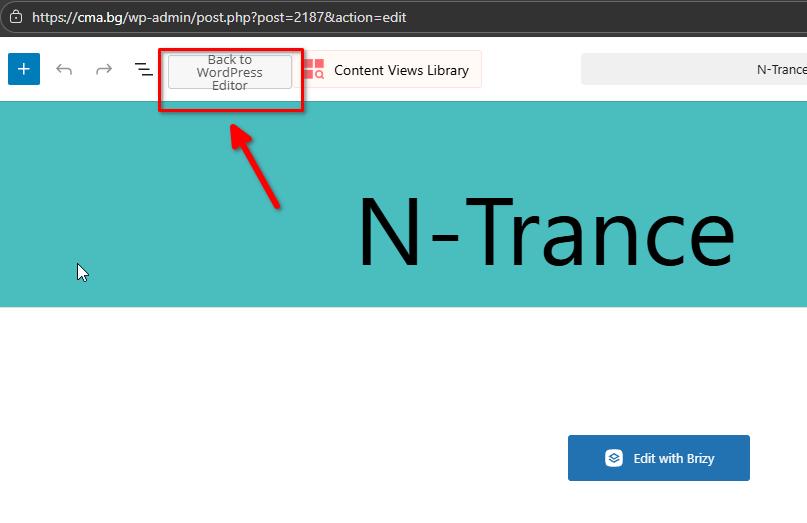
This will remove the Brizy content from that post and allow the dynamic template to display correctly.Best regards,
Ariel H.0
Please sign in to leave a comment.
Comments
4 comments