How to change the contents of a menu

Hello and best wishes.
I'm sorry to ask such a simple question, but I don't use Brizy enough. I can't seem to change the content of the only menu on my website https://www.bois-chauffage-bearn.com/.
I can't find where I can choose the items that appear in the menu.
In the “Appearance” menu, I don't have “Menu” as an option. So I went to “Editor” then “Navigation,” where I found the ‘main’ menu, which is the name of the menu used on the site. I deleted “Home,” which I didn't want to see in the menu, but even after saving, the menu remains unchanged on the
Regards,
Laurent
-

Hello Laurent,
You will find the "Menus" option under "Appearance" menu, if you are using a "classic" theme. If you are using a "block" theme, you will not find this option.
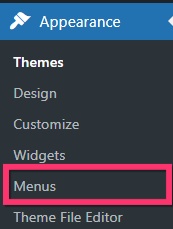
To access the "Menus" option under Appearance menu, kindly install a "classic" theme and activate it. For example,
- Astra
- Blocksy
- Twenty Twenty One
You can read more about this at https://www.wpbeginner.com/beginners-guide/how-to-fix-missing-appearance-menu-in-wordpress-admin/
0 -
Hello,
Thank you for your help! Everything is fine!Regards,
Laurent
0
Please sign in to leave a comment.
Comments
2 comments