Product badge

Hello, I have an online shop on wordpress with woocommerce and I created all the layouts with Brizy. I have a product out of stock and I'd like to still keep it in the shop, just with a badge that says "sold out". I tried to use various plugins but nothing seems to work... Does Brizy support any such plugins or is there another way to fix it? I also tried to create a custom CSS to dim the picture of the out-of-stock item, hide the price and write "SOLD OUT" instead but I don't know where I could use such CSS?
-

Hello Hanna,
Are you wanting to replace the "Out of stock" notification in the Product Details page to "Sold Out"? I tested the "Sold Out Badge for WooCommerce" plugin. This seems to work fine with Brizy. Have a look at my product page at https://brizy.support/product/abstract-table/
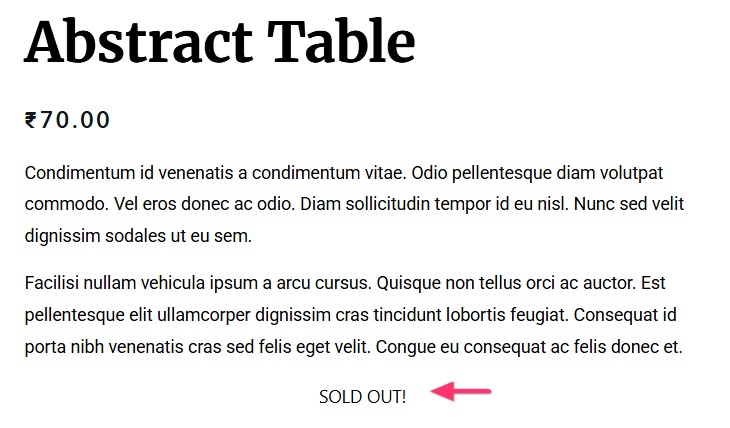
Please checkout the above plugin. The formatting options in the plugin does not seem to take effect with Brizy. However the SOLD OUT text itself works fine.
0 -
Thank you for your reply, although that's not what I wanted to achieve. I wanted to create a badge that would display on the product thumbnail in the product gallery... Is there a way to do it without a plugin? Or if not a badge then perhaps to have the picture slightly "grayed out" with the text "SOLD OUT" on top of it...
0 -

Hi Hanna,
Thank you for the update.
We do have a workaround using Advanced Custom Fields (ACF) together with a bit of custom CSS that can display a “SOLD OUT” badge.
Please note that this workaround does not connect directly to WooCommerce’s built-in stock status. Products would need to be marked as “sold out” manually via a custom ACF field for the badge to appear.
If this approach works for you, let us know and we’ll be glad to prepare the CSS and a short screencast showing how to set it up.
Kind regards,
Ariel H.0
Please sign in to leave a comment.
Comments
3 comments