Can I anchor a button up to an element rather than a whole block/section?

Hi, is it possible (at least on mobile) to page anchor up to an element instead of a block/section?
Please see 1 min. video here for context:
https://www.berrycast.com/conversations/4a471c8d-ec83-58b6-8c65-a7e07d1f33b7
Thank you,
Justin
-

Hello Justin,
It is possible to target an element in a Brizy page using anchor links. For example, https://jaguar5a15f44b.brizy.site/#results should take you to "We Get Results" heading of the "About Us" section.

Add a CSS ID to the element in the "Styling" tab of the side panel that opens.

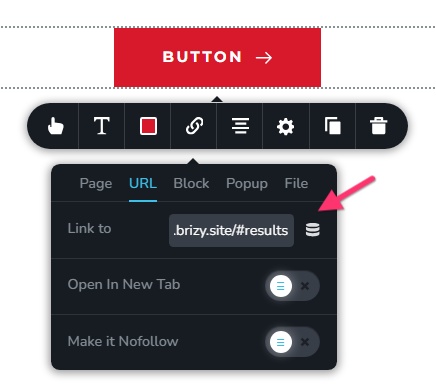
You can then hyperlink to the element by adding the anchor link #element CSS ID to the URL of the page. In my example, it would be https://jaguar5a15f44b.brizy.site/#results
To link to the element, type the URL with the anchor link in the URL field of the link tool
 0
0 -
Hi George, thanks for the reply.
I'm following your instructions but for some reason the link is just returning me back to my top-level homepage instead of to the element I've defined on my subpage.
Please see this 2 min. video here: https://www.berrycast.com/conversations/59d602f8-091f-51fe-a516-1cfbf630f84f
The page in which I'm trying to set up the page anchor is: www.privateteacherblueprint.com/start
And I called the element: checkout
So the full URL would be: https://www.privateteacherblueprint.com/start/#checkout
Let me know if I've got that wrong. When following that link, either by clicking on it normally or by attaching it to a button, it takes me to just https://www.privateteacherblueprint.com (the top level homepage).
Do you know what I'm doing wrong?
0 -
Hello Justin,
You have correctly added the CSS ID. However the format of your anchor link has a minor error.
- Correct anchor link: https://www.privateteacherblueprint.com/start#checkout
- Your anchor link: https://www.privateteacherblueprint.com/start/#checkout
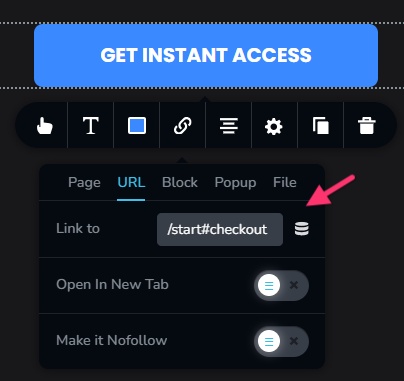
A forward slash ( / ) is not required just before the anchor name. /start#checkout is correct while /start/#checkout is not. Please check if you see the expected result, when using the correct anchor link. I have also added the correct URL to the "Get Instant Access" button.
Instead of using the full URL https://www.privateteacherblueprint.com/start#checkout you can also use just /start#checkout in the URL field of the Link tool.
 0
0 -
Hi George, thanks.
I ended up getting it to work. I realized that you don't actually need to insert the full URL, only the element ID, so i just put in #checkout on it's own and that worked.0
Please sign in to leave a comment.
Comments
4 comments