Aweber and Form Side by Side

Hello, I was wondering how to Integrate with Aweber Email Service because I don't see it on the integration with my form.
Also, how do I make the forms side by side instead of stacked on top of each other?
Example:
[First Name] [Email]
[Subscribe]
Thank you,
Ed
-

Hi Edwin,
Thank you for reaching out.
At the moment, Brizy doesn’t have a direct integration with Aweber. However, it is still possible to connect the two by using a Webhook, which is available as an option when you open Brizy’s Integrations box.
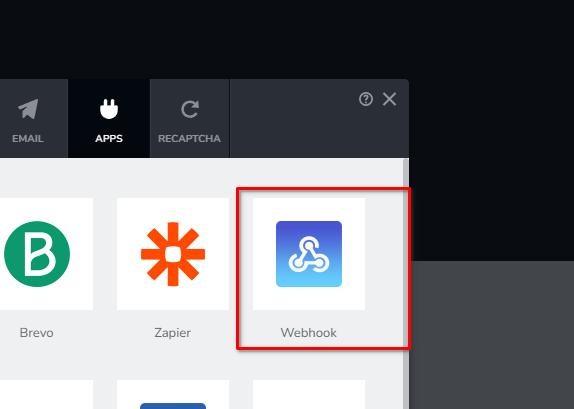
For more details on how Aweber handles webhooks, please refer to this documentation: https://docs.aweber.com/api/api/does-aweber-have-webhook
If you have any further questions, please let us know.
Kind regards,
Ariel H.0 -
Hi Ariel,
The URL link you provided doesn't work. Please check.
Also, how do I make the form element side by side instead of stacked on top of each other?
Example:
[First Name] [Email]
[Subscribe]
0 -
Hi Edwin, sorry about that, here is the correct link: https://docs.aweber.com/api/api/does-aweber-have-webhooks
Regarding the form elements placed side by side, you can adjust the text field width to 50%, as demonstrated in the example below.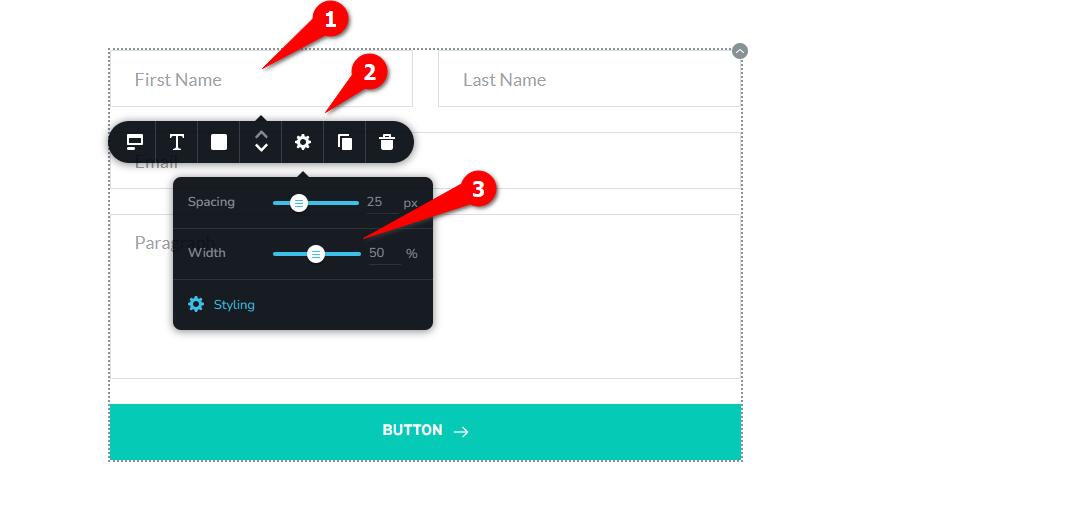 0
0 -
Thank you for the form information. I was able to get the results I wanted.
I still don’t understand how to integrate Aweber with Brizy. Any tutorial videos on this? Perhaps you can give me more details on how to integrate it?
0 -

Hello Edwin,
Webhooks are configured as a part of the apps one can create in AWeber’s Developer Portal. You will need to sign up with the "Developer Portal" at https://labs.aweber.com/ and add an app first and then configure webhooks following the procedure at https://api.aweber.com/. This could be a bit long process for you.
Instead kindly design your sign up form in AWeber and embed the AWeber form to your Brizy page following the procedure at https://jmp.sh/NB6mWSxl
0
Please sign in to leave a comment.
Comments
5 comments