Major issue with Brizy - entire site broken when Brizy is activated

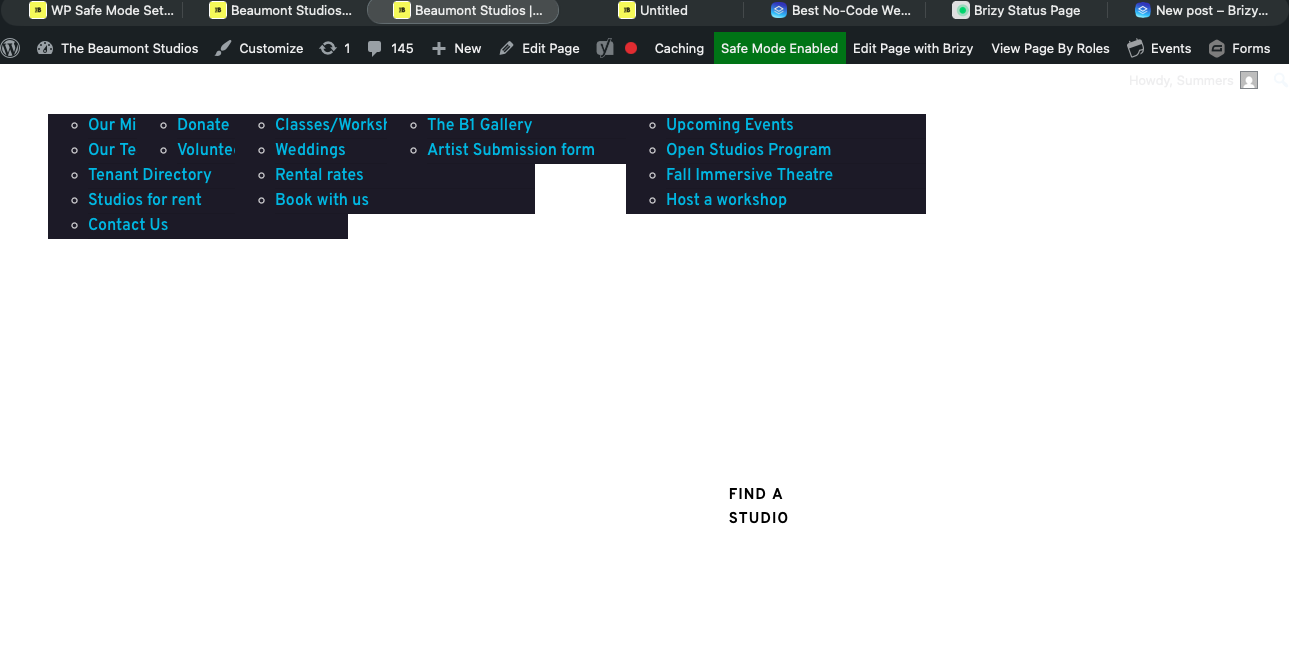
My site will not load when Brizy is active. I have enabled safe mode so only Brizy, Brizy Pro, and Blocky are running. All other plugins are disabled. When I try and load any page, either the page doesn't load at all, or I get a completely broken mess. What are the steps I can take to troubleshoot this?
-

Hi Luke,
Thank you for contacting us.
Please try making a small change to the affected blocks (the block that contains the navigation menu). For example, reduce the block width to 90%, then click Update to save the changes. After that, preview the front end and check if this fixes the issue. If it does, go back to the editor, revert the block width to 100%, and click Update again. This process forces the block to recompile, which can often resolve such issues.
If this didn't help, please provide temporary access to your WP Admin so we can take a closer look at your site? Kindly add us as an Admin user in your WordPress Dashboard and send the details to communitysupport@brizy.io:
Community Post link: https://support.brizy.io/hc/en-us/community/posts/31959364682130
WordPress Admin URL:
Username:
Password:Please also provide access to your cPanel or FTP.
cPanel/FTP host address:
Username:
Password:Best regards,
Ariel H.0 -
I have tried that without success. I have emailed you ftp access and wp admin access as requested
0 -
Hi Luke,
Thank you for sharing the access details. We were able to log in successfully using the WordPress Admin credentials; however, the FTP access doesn’t seem to be working on our end.
Could you please review the FTP credentials and send the updated details again when convenient?
Looking forward to your update.
Best regards,
Ariel H.0 -
I have just emailed you ftp details, as well as direct cPanel access as the bluehost ftp server is sometimes difficult to authenticate
0 -
Thought I'd add some additional context. When Brizy is disabled, the site loads instantly, which suggests the issue is specific to frontend Brizy rendering rather than WordPress or the theme itself.
Pages always look correct inside the Brizy editor, and previewing a page while logged in usually works (sometimes after a long delay). When logged out, pages often take 1–2 minutes to load and may appear partially styled or broken, although some eventually load correctly after an extreme amount of time. Adding ?nocache=1 sometimes helps, and making a small edit and re-saving a page does make a difference (for instance, https://thebeaumontstudios.com/tours/ will load correctly after I made a slight change in the editor, but only after several minutes)
All assets (CSS, JS, images, fonts) appear to load correctly in the browser network tab, even Gravity Forms embedded via Brizy code elements render normally. No frontend PHP errors are visible.
The site is running on PHP 8.1.33 on a LiteSpeed server (Bluehost). WP Rocket is enabled. MU plugins were disabled during testing. Server security rules that were blocking /wp-cron.php and /wp-admin/admin-ajax.php were identified and whitelisted, but the issue persists. WordPress Site Health reports loopback request failures (HTTP 409), and pages consistently load faster and more reliably when logged in.
The issue appears to be isolated to frontend Brizy rendering under real-world (logged-out) conditions rather than content, theme, or asset loading.
0 -

Having the same problem after updating the Brizy plugin....broke the whole website. Now I have to rollback the update to restore the website.
Brizy...you guys need to do better.
0 -
Hi Luke,
Thank you for the detailed feedback. It looks like you’re already running the latest version, and the site is loading properly during our checks.
That said, we’re still actively investigating this behavior, particularly around frontend rendering. We’ll be sure to keep you informed as soon as we have any updates.
We apologize for the inconvenience.
Best regards,
Ariel H.0 -
Hi Minn,
Thank you for reaching out.
Could you please provide temporary access to your site while keeping its current state unchanged?
Please send the site credentials to communitysupport@brizy.io and include 31959364682130 in the subject line so we can quickly locate your request.
Thank you for your cooperation.
Best regards,
Ariel H.0 -
Hi Brizy Team,
I have been waiting for a response from you for days, so for you to tell me that my website is loading fine when it is taking 30-60 seconds for each page to load when the brizy plugin is activated is beyond disappointing. I have been a. brizy customer for at least 5 years, so I was hoping for a bit more than 'It's loading" fine - when it is clearly not - as an update.
Please provide details as to what exactly you are working on. Currently my site is practically unusable.
0 -
Hi Luke,
I understand how frustrating this situation is, especially when the site becomes difficult to use. Based on our checks, your website is intermittently returning a 503 Service Unavailable error, which is why pages can take 30–60 seconds to load.
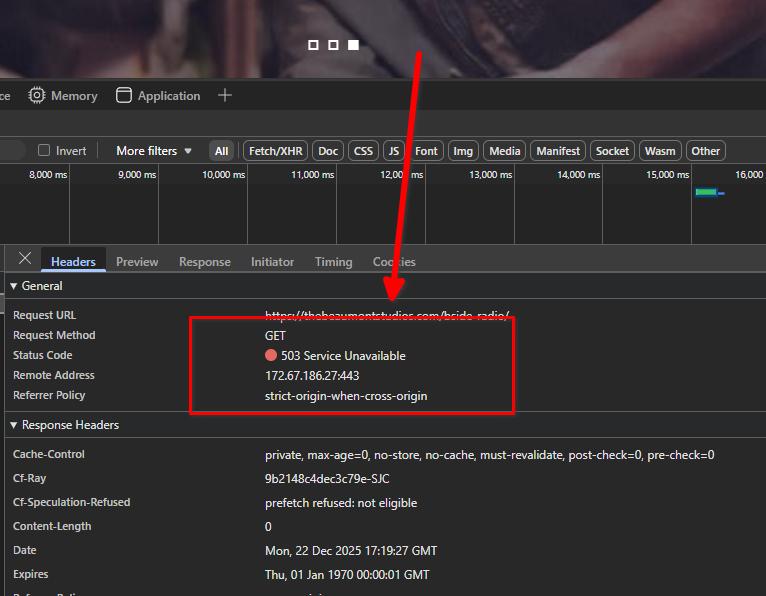
A 503 error indicates that the server is temporarily unable to handle requests. In your case, this is likely not caused by Brizy alone. The site currently has over 30 active plugins, and together they place a significant load on the server. This often points to a conflict or heavy resource usage from one or more plugins.
To help narrow this down, we kindly ask that you temporarily enable only the essential plugins and check if performance improves with Brizy active. Unfortunately, since this is a live site, we’re unable to disable plugins on our end. If the issue improves with fewer plugins enabled, it will help identify whether a specific plugin (or combination of plugins) is contributing to the problem.
Please let us know the results, and we’ll be glad to continue assisting from there.
Best regards,
Ariel H.0 -
Hi Ariel,
As stated in previous replies, I have disabled every plugin other than brizy, brizy pro and the companion plugin for the theme I am using. The delay is still the same. The second I deactivate brizy, the site loads instantly.
0 -
I forgot to add, I'm testing with the WP Safe mode plugin. Currently only 2 plugins, brizy and brizy pro are activated
0 -
Here are some additional errors that came up with brizy when talking to my hosting provider and accessing the logs:
[~/public_html/beaumont]# tail -f error_log [18-Dec-2025 23:16:53 UTC] PHP Fatal error: Exception thrown without a stack frame in Unknown on line 0 [18-Dec-2025 23:16:53 UTC] PHP Parse error: syntax error, unexpected '|', expecting variable (T_VARIABLE) in /home3/labeaut7/public_html/beaumont/wp-content/plugins/brizy/vendor/psr/log/src/LoggerTrait.php on line 18 [18-Dec-2025 23:16:53 UTC] PHP Fatal error: Exception thrown without a stack frame in Unknown on line 0 [18-Dec-2025 23:16:53 UTC] PHP Parse error: syntax error, unexpected '|', expecting variable (T_VARIABLE) in /home3/labeaut7/public_html/beaumont/wp-content/plugins/brizy/vendor/psr/log/src/LoggerTrait.php on line 18 [18-Dec-2025 23:16:53 UTC] PHP Fatal error: Exception thrown without a stack frame in Unknown on line 0 [18-Dec-2025 23:16:54 UTC] PHP Parse error: syntax error, unexpected '|', expecting variable (T_VARIABLE) in /home3/labeaut7/public_html/beaumont/wp-content/plugins/brizy/vendor/psr/log/src/LoggerTrait.php on line 18 [18-Dec-2025 23:16:54 UTC] PHP Fatal error: Exception thrown without a stack frame in Unknown on line 0 [18-Dec-2025 23:16:54 UTC] PHP Parse error: syntax error, unexpected '|', expecting variable (T_VARIABLE) in /home3/labeaut7/public_html/beaumont/wp-content/plugins/brizy/vendor/psr/log/src/LoggerTrait.php on line 18 [18-Dec-2025 23:16:54 UTC] PHP Fatal error: Exception thrown without a stack frame in Unknown on line 00 -
Update: In attempting to rule out any other problems, I resolved severe database autoload bloat (reduced autoload size from ~1.6MB to ~280KB)
All plugins apart from Brizy and Brizy Pro, a redirection plugn (CRITICAL, do not disable), Imagify and an activity logger. No difference whatsoever. The front end rendering from Brizy is destroying the entire site. It takes around 30 seconds to 3 minutes to load a page with barely any content.
As soon as I disable brizy, the site loads instantly.
Please let me know if you are acting on the site. I did notice severl logins using the admin password I provided you, and someone activated and disabled brizy, that wasn't me.
I will not touch he site any further until I hear back from you.0 -
At this point I need to be very clear that I believe I have isolated this issue and it needs a concrete next step from your side.
I’ve confirmed via Chrome DevTools that this is a pure server-side TTFB delay. On a completely blank Brizy page at /brizy-test1234/, the initial request takes roughly 36 seconds to return a 301, followed by another ~49 seconds before the final 200 document response. Once the HTML is finally delivered, all CSS, JS, fonts, and images load instantly in milliseconds. Non-Brizy pages load instantly. This means the delay is happening before any HTML output and inside Brizy’s server-side execution, not in assets, caching, or theme rendering.
I should point out that the brizy page I tested /brizy-test1234 is literally just a brizy text block
Separately, server logs are showing repeated PHP parse errors coming from Brizy vendor code, specifically LoggerTrait.php inside the vendor/psr/log directory, with syntax errors involving the pipe character. That points very strongly to a corrupted Brizy vendor or autoload state, or an opcode cache issue, causing Brizy to stall during initialization or frontend rendering rather than fail cleanly.
For context, this is not a constrained environment. The site is running PHP 8.2.29 with a 2048M memory limit, max execution time of 300 seconds, and max_input_vars set to 10,000. I’ve tested in Safe Mode and the only active plugins right now are Brizy, Brizy Pro, Redirection, and WP Activity Log. A completely blank Brizy page with no template, header, or footer still stalls. The filesystem is writable and the uploads/brizy directory is regenerating assets correctly. The second Brizy is deactivated, or if I load a non brizy page, the site loads instantly.. For everything else we are talking 1-4 minutes
Given all of that, this isn’t a general server load issue, a theme issue, or a third-party plugin conflict. Everything points to Brizy core initialization or vendor code blocking frontend rendering. I need clear guidance on what the next corrective step is here — whether that’s a clean Brizy vendor reset/reinstall, opcache or vendor cache invalidation, or something else you want me to do on my side to move this forward.
Right now the site is effectively unusable with Brizy enabled, and I’ve exhausted the normal troubleshooting paths. Please let me know what specific action you want taken next, or what your team is actively investigating.
0 -
Hi Luke,
Thank you for your continued patience and for the thorough troubleshooting you’ve done.
Based on everything we’ve reviewed, we can confirm that your site performs normally when Brizy and Brizy Pro are disabled, which indicates conflict between Brizy and the current hosting environment.
To confirm this, we've duplicated your site at https://thebeaumontstudios.brizywp.online/, which is running PHP 8.4.11 with only 512 MB RAM, significantly lower specs than your server—yet Brizy pages load instantly. You’re welcome to log in to that test site using your own credentials to inspect the setup directly.
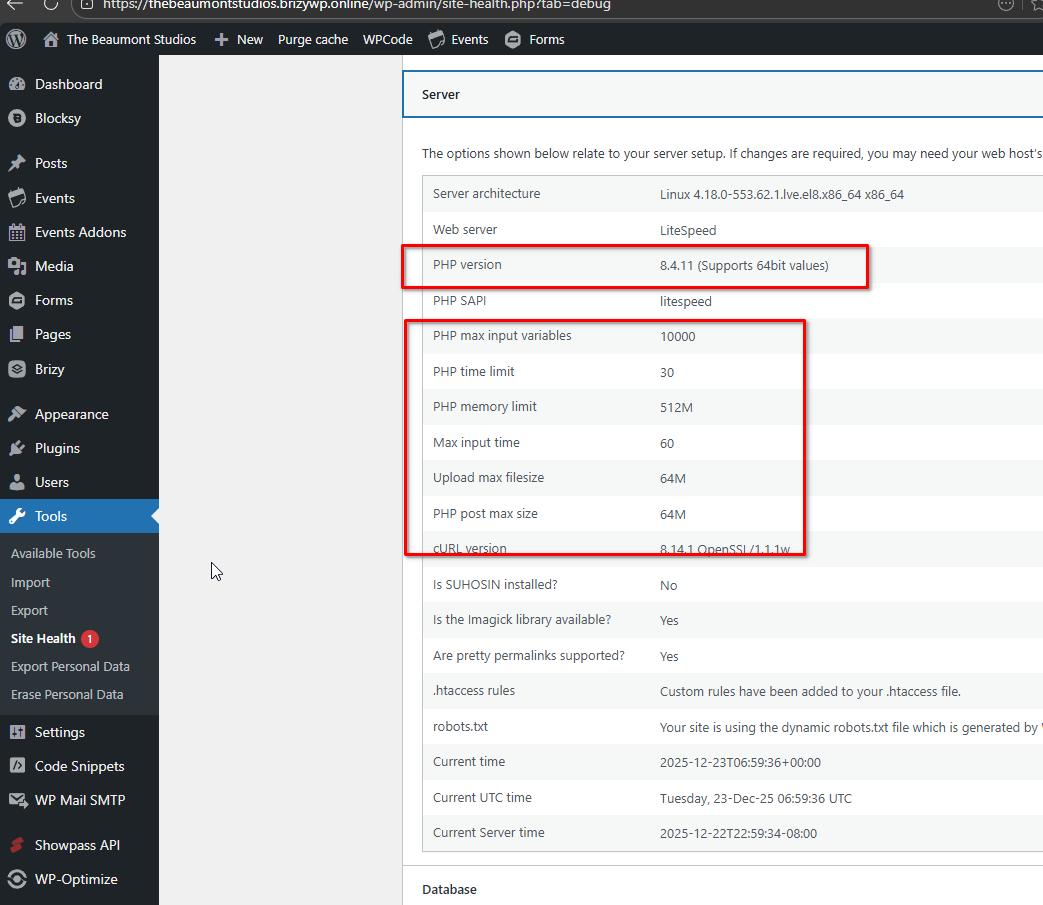
Given that Brizy has likely been used on your server for a long time, it’s possible that environment-level state (such as PHP opcache, server caching, or security/WAF rules) has accumulated and is now causing Brizy’s server-side initialization to stall. This explains why reinstalling Brizy and switching PHP versions did not change the behavior.
As a next step, we kindly ask that you enable Cloudflare Development Mode temporarily, as this disables edge caching and helps rule out Cloudflare’s involvement while testing. In parallel, reviewing server-level components (PHP-FPM/opcache reset, cache layers, and security modules) with your hosting provider so they can further investigate the issue.
Please try this and let me know how it goes.
Best regards,
Ariel H.0 -
Hi Ariel,
Thanks for the update, and creating the clone site. I have placed cloudflare in development mode, and I'm asking Bluehost to restart php-fpm, clear the opcache, and check for any security rules that I missed.Hopefully this has some effect, but I have gone through most of these steps with bluehost already. In the event that these changes don't improve the site, what are the next steps you can take?
Thanks
Luke0 -
Hi Ariel, one further update. Bluehost has confirmed PHP/opcache and server-side caches have been cleared as far as shared hosting allows, and there are no server-level firewall or security rules involved. Cloudflare’s also been ruled out as it is still on dev mode
With only Brizy and Brizy Pro active and the issue still happening, I think I’ve exhausted what I can reasonably test on the hosting side.
What would you suggest as the next step on your end? It does seem that brizy is doing something for 30-60 seconds to cause the delay on the live site. Is there any logging/debug mode, or component we can disable to see what’s stalling during frontend rendering?
Thanks
LukeThanks,
Luke
0 -
Hi Ariel,
I think I may have found something. When I open Global Blocks in the editor, the previews never finish loading and just sit there spinning. I’m also seeing repeated console errors like:
“Unhandled Promise Rejection: preloadImage(…brizy_block_screenshot…) onerror”
It looks like Brizy is trying to load or generate preview screenshots and those requests are failing or timing out. That feels related to the broader issue I’m seeing, where Brizy pages stall for a long time before finally rendering. Can you see what’s happening on those brizy_block_screenshot requests, and whether there’s a way to regenerate, disable, or debug that preview process?
Thanks,
Luke
0 -
Hi Luke,
Thank you for sharing the details.
The “Unhandled Promise Rejection: preloadImage(…brizy_block_screenshot…) onerror” error message is related to Brizy attempting to generate preview screenshots for Global Blocks, specifically for the Reorder Blocks functionality. This process runs only in the backend/editor and is not used on the front end.
You may want to consider a different approach. I recommend making a full backup of your website (files and database) and then asking your hosting provider to create a fresh environment from scratch. Once that’s done, the backup can be restored into the new environment.
Best regards,
Ariel H.0 -
Hi Ariel,
After talking with Bluehost, we are migrating to a VPS, however they suggested the following:
Since Brizy created a staging site, can you see if they can give you access to the server, and we will just move that site over to the new VPS, since we know it works?
This would certainly rule out any other weird config errors present in my install. Would this be something you could help with, either by providing access or sharing the process?
ThanksLuke
0 -
Hi Luke,
I can provide you with full access to the staging site. However, please note that this staging site was created specifically for testing Brizy on a different server and is not intended to be a production-ready backup. Because it was duplicated quickly for testing purposes, I removed some plugins, and a few media files may not have been fully migrated.
Since you already have access to the WordPress admin area, I kindly ask that you review the staging site first—please check that all pages load correctly and that all images and media files are displaying as expected.
If needed, I can also send you the Direct Admin Panel credentials via our community support email so you can review the server-side setup. Additionally, if you’ve chosen a managed VPS plan with Bluehost, they typically offer free site migration. In that case, providing them with Direct Admin Panel access would allow their team to fully access the site and migrate it directly to the new VPS.
Best regards,
Ariel H.0
Please sign in to leave a comment.
Comments
22 comments