Urgent Help Needed – Website Not Working

Subject: Urgent Help Needed – Website Not Working
Hello,
My website www.fahrwerk-holzkirchen.de has not been working for several days. None of the links are functioning anymore, and popups are no longer being displayed.
I am currently running WordPress version 6.9 with Brizy Pro 2.7.13 installed.
Could you please provide urgent assistance to resolve this issue?
Thank you in advance for your quick support.
Best regards,
-

Hi Uli,
Thank you for contacting us.
Could you please provide temporary access to your WP Admin so we can take a closer look at your site? Kindly add us as an Admin user in your WordPress Dashboard and send the details to communitysupport@brizy.io:
Community Post link: https://support.brizy.io/hc/en-us/community/posts/31955878606226
WordPress Admin URL:
Username:
Password:Best regards,
Ariel H.0 -
I already sent you the login details a while ago. Please provide the solution — it’s really important.
0 -
Hi Uli, could you also please provide FTP/cPanel access for this website?
0 -
I sent you the FTP login details by email today, but unfortunately the issue still hasn’t been resolved. How are things looking on your end? The end customer is starting to get impatient.
0 -
Hi Uli,
Unfortunately, we haven’t received your FTP/cPanel details yet. When you have a moment, please share them directly in the current support thread.
In the meantime, could you please ask your hosting provider to temporarily disable any server-side caching and ModSecurity? These can sometimes interfere with editing or saving changes and may help us narrow down the cause of the issue.
Best regards,
Ariel H.0 -
Hi Uli,
Thank you for your patience. We’re still actively looking into the issue on our end.
In the meantime, could you please check with your hosting provider? We’re intermittently encountering Service Unavailable responses when accessing your site, and it’s also loading quite slowly at times.
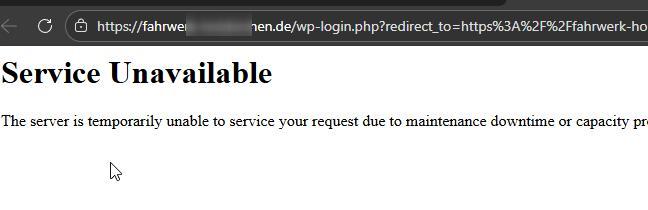
This makes troubleshooting more complex, so it would be helpful to confirm if there are any server-side issues or resource limitations.
Thank you for your understanding, and we’ll keep you posted on any updates.
Best regards,
Ariel H.0 -
Hi Uli,
Thank you for your patience.
Could you please check the site again and let us know if everything is working properly now? We rebuilt the gallery on our end, as the images were not displaying on the front end.
We also noticed that the image optimization service from Optimole may have contributed to the issue. Since WP-Optimize already handles image compression, we recommend not using Optimole at the same time to avoid conflicts.
If you notice anything else or have questions, please let us know.
Best regards,
Ariel H.0
Please sign in to leave a comment.
Comments
7 comments