Update Brizy Pro 2.7.12 went wrong "The destination folder already exists."

Hello Brizy Help,
we have tried to update this clients website, but it did not work due to this message:
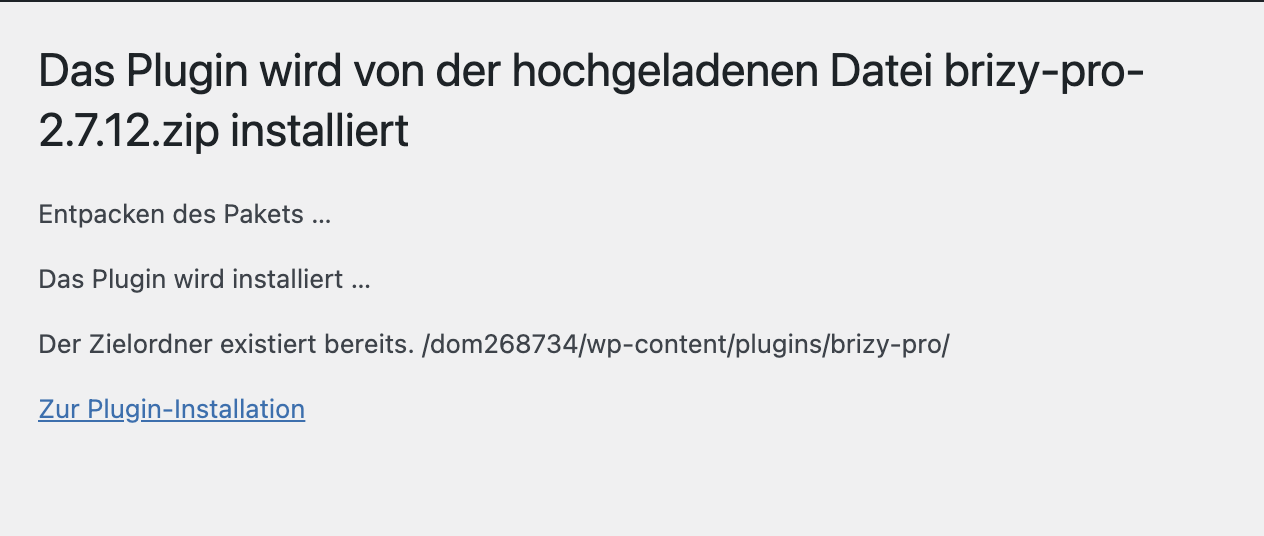
... and now the website is only running with Brizy and looking aweful. Unfortunately we did not make an extra back up to roll back and I also don't know which Plugin Pro Version we had before. What can we do to install the new plugin?
Greetings, Leslie
-

Hi Leslie,
Thank you for contacting us.
This error usually means that a previous or incomplete Brizy Pro installation is still present on the server. To fix this, please delete the brizy-pro folder from /wp-content/plugins/ via FTP or File Manager, then go back to your WordPress dashboard and install Brizy Pro again.
If you need further assistance, you may temporarily provide access to your WP Admin dashboard and cPanel/FTP. This will allow us to check the website files directly and help resolve the issue.
Kindly send the following details to communitysupport@brizy.io.Community Post link: https://support.brizy.io/hc/en-us/community/posts/31869987000850
WP Admin login URL:
Username:
Password:cPanel/FTP host address
Username:
Password:Looking forward to your reply.
Best regards,
Ariel H.0 -
Hi Ariel, thank you. I will send access via email for further assistance. All the best, Leslie
0 -
Hi Leslie,
We’ve fixed the issue. Could you please double-check that all pages on your site are working as expected? If you notice anything unusual or continue to experience any issues, feel free to let us know and we’ll be glad to help.
Best regards,
Ariel H.0 -
Awwww, I am very thankful for your support! So quick. Everything looks fine. Best christmas gift ever! Your Support ist awesome. Thank you thank you! Leslie
0
Please sign in to leave a comment.
Comments
4 comments