how to set up as brizy cloud pro options?

I recently bought personal cloud plan as 19$.
But at the dashboard, it hasn't been changed to PRO, so I couldn't connect to personal domain.
Please help me solve this problem. URGENT
-

Hello 희선,
To activate Pro license in a project, please select the "Activate Pro" option in your project thumbnail.
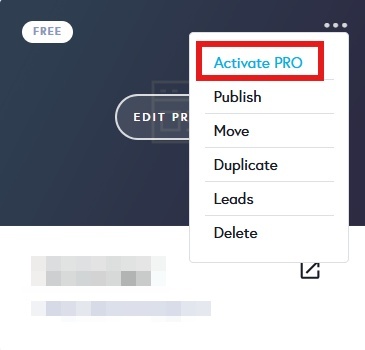 0
0 -
I bought personal cloud option but it shows that I don't have pro license. SO I couldn't activate PRO now.
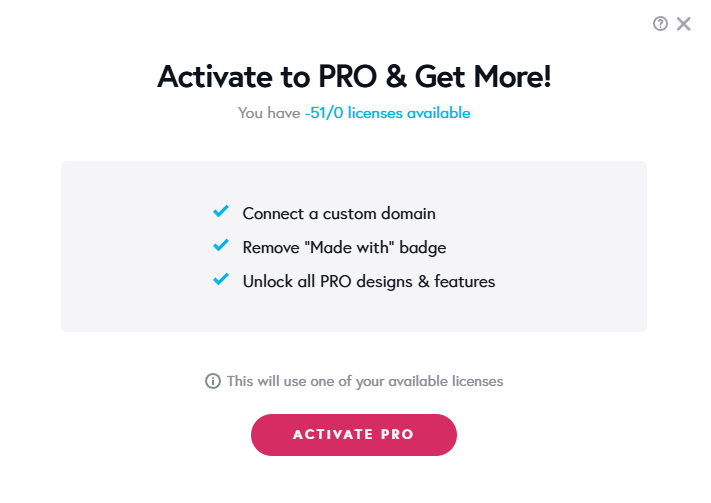 0
0 -
 0
0 -
Hello 희선,
You cannot activate your Pro license in a project within a workspace where you are just a Team Member. Kindly activate the Pro license you have purchased in a project within a workspace in which you are the "Admin" or owner. For instance, you can activate the Pro license in a project in the "My Personal Projects" workspace or any other workspace you create under your account. Then you will see that you have 1/1 licenses available to be activated.
 0
0 -
Then Can I move this project to my personal workspace? Do I need to ask to admin to do that?
0 -

Hi 희선,
Thank you for the update.
You can clone the project and move it to your preferred workspace, however, you'll need Admin credentials to login to the account where you will be moving the project to. To clone an existing project, please refer to this link: https://www.brizy.io/cloning-functionality-in-brizy-cloud
After successfully cloning the project, you can delete it from the previous workspace.
Best regards,
Ariel H.0 -
Hi, Ariel.
I found the clone function and tried, but it cloned to team spaces as a copy of it. So I still couldn't activate pro as my own personal cloud pro option.
Can you give me any guide for creating my own workspace and clone team space's project to my personal cloud?(If it's possible)0 -
Hi 희선,
Thank you for the update.
To proceed, you’ll first need to log in to your team’s project workspace to make sure cloning is enabled there. After that, please log in to your own account console and create your personal workspace, as shown in this example: https://youtu.be/ECWb2Ayhr7g.
Once your personal workspace is set up, you should be able to clone the project into it.
If you have any further questions, please let us know.
Best regards,
Ariel H.0
Please sign in to leave a comment.
Comments
8 comments