Brizy Cloud Preview Adding Editable Fields

Hi guys, we're experiencing a really strange issue. Building off of a Brizy template in Brizy Cloud and when we preview the front end of the web page, there are editable text fields being added that don't exist in the editing environment.
Can someone look at these and advise? Here's a temporary domain to the page experiencing the issue.
https://mindfulnessspace.scsitebuilder.site/
You can find the issue in between the text fields in the 4th block as well as the footer. Screenshots attached here of the editing environment showing no issues and then front end showing the added spaces and fields.
Thanks


-

Hello Sportsman Creative,
This is due to a bug with Brizy. When pasting formatted text, this bug gets triggered. We will work on fixing this bug. The immediate solution is to follow the two steps below for each affected element. I have made this change on your homepage in the "Areas We Support" block. Please check if the issue is resolved.
- Right click the element and select the option "Clear Formatting". This will clear the currently applied typography and color
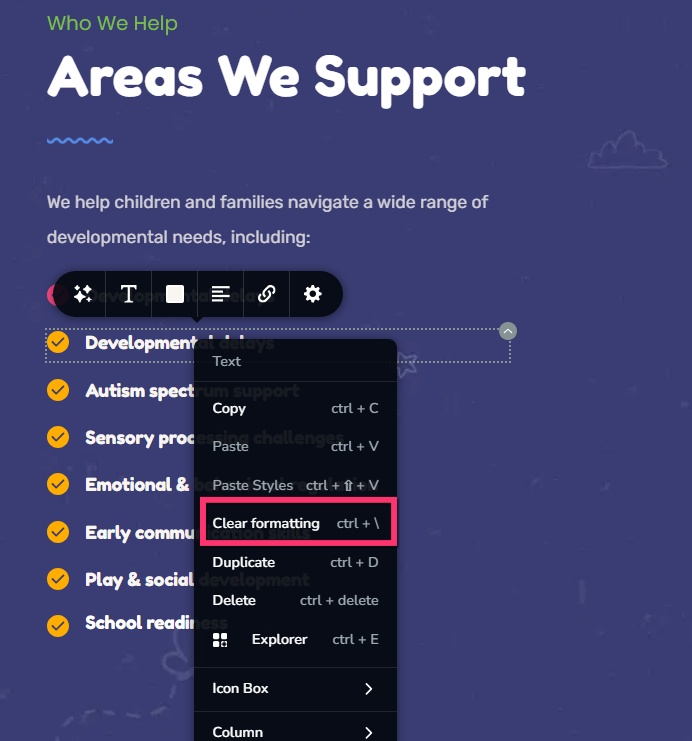
- Assign the appropriate typography and color once again and update the project.
0 - Right click the element and select the option "Clear Formatting". This will clear the currently applied typography and color
-
Hi K C,
Thank you so much! That worked great, appreciate it!
Jordan
0
Please sign in to leave a comment.
Comments
2 comments