Page takes forever to load

I tried to edit a page at Brizy WP and it is loading forever.
Can you please help me out?
Thank you!
-

Hi Stuart,
Thank you for contacting us.
Could you please confirm if you can replicate the issue with all other plugins besides Brizy and Brizy Pro disabled? Also, try using another theme and see if this makes any difference?
If the issue continues, this is something we need to inspect from your WP Admin page. Please add us as an Admin user to your WordPress Dashboard and send the following details to: communitysupport@brizy.io
Community Post link: https://support.brizy.io/hc/en-us/community/posts/31718910562834
WordPress Admin URL:
Username:
Password:Please make a full backup of your site as a precaution.
Best regards,
Ariel H.0 -
Hi Anna-Maria,
Thank you for your cooperation.
The issue you’re seeing occurs because your site is graphics-intensive, with some images reaching up to 6MB each.
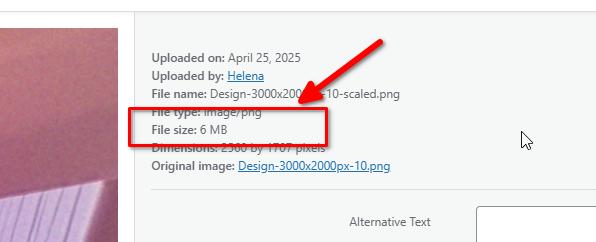
Even though you have WP Optimize installed, large images combined with 37 active plugins can still significantly slow down page loading and editing in Brizy. Each plugin consumes memory and processing power, and large unoptimized images take longer to render, which affects your editing experience.
To address the issue, please try the following:
1. Further Optimize Images:
- Resize images to appropriate dimensions before uploading. For sliding hero images, aim for 1920×800px at 200–400KB.
- For other images, keep them below 150–300KB while maintaining quality.
- Consider using WebP format for faster loading.
2. Review and Streamline Plugins:
- Deactivate or remove any unnecessary plugins to reduce server load.
- Only keep essential plugins for your site’s functionality.
3. Enable Additional Caching:
- Use your server’s caching features or a caching plugin to further improve load times.
4. Use a Content Delivery Network (CDN):
- A CDN can serve images and other assets faster to visitors worldwide.
5. Minify and Combine CSS/JS Files
- Reducing the number and size of files your site loads will improve performance.
Additional resources:
- https://shortpixel.com/blog/properly-size-images-for-websites
- https://www.mizanthemes.com/blogs/wordpress/speed-up-wordpress-performance
- https://jetpack.com/resources/how-to-speed-up-wordpress
Best regards,
Ariel H.0
Please sign in to leave a comment.
Comments
2 comments