Custom CSS (Class and ID) not working.

Hi, I am having a problem with custom CSS. After I add the ID name or class name and define a style for this class, it has no impact on the element on the page.
This is how I do it:
-
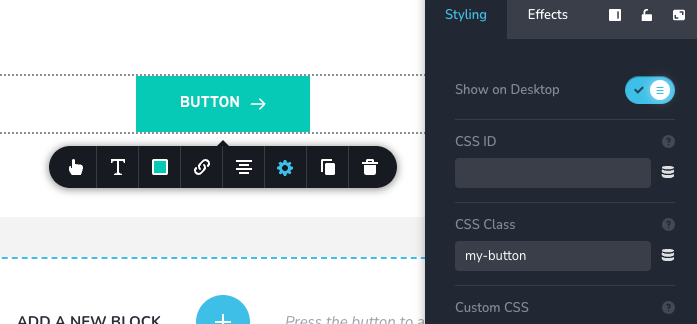
I select the element, i.e. button, then I navigate to Styling > Advanced > CSS Class and type in class name, i.e. my-button
-
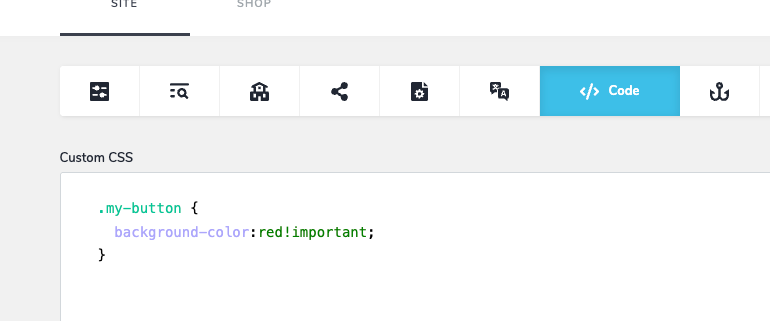
Top left CMS button > Project Settings > Code tab > And here I define the style, i.e.
.my-button {
background-color:red!important;
}
Click the Save Changes button at the bottom, and even clicking Publish has no effect on the element. I tried this on several different elements, where it worked by defining it as element {}.
Could you please help?
Thanks
Jan
-

Hi Jan,
Thanks for contacting us.
Is there a particular reason you’re trying to manually style the buttons with CSS instead of using Brizy’s built-in color settings? The editor normally lets you control button colors directly.
If you prefer to continue with custom CSS, you can use the snippet below:
.brz-btn.my-button {
  background-color: red !important;
}
Best regards,
Ariel H.0
Please sign in to leave a comment.
Comments
1 comment