brizy_media causing extreme high loads on CPU

Hello,
Our hosting has blocked our website because of brizy_media causing extreme high load on their server.
What can we do to solve this issue?
We have latest version of Brizy and Brizy Pro. Also using LiteSpeed plugin for caching. We have one of the highest hosting subscriptions.
Please support us as we have tried eveything in our hands already.
-

Hi,
Thank you for contacting us.
Could you please try temporarily disabling any non-essential plugins, or alternatively deactivate all plugins except Brizy and Brizy Pro? This is an important troubleshooting step because it helps us identify whether a plugin conflict may be contributing to the issue.
In the meantime, please contact your hosting provider and request the server error logs for the period when the problem occurred. Once you have the log file, you can attach it in ZIP format and send it to communitysupport@brizy.io. Kindly include the reference number 31500522674706 in the subject line so we can easily track your case.
If your site is hosted on cPanel, you may also provide your WP Admin credentials along with your cPanel login details, and we can directly inspect the issue from our end.
Best regards,
Ariel H.0 -
Hi Akın,
Thank you for the update.
It seems you’ve shared the access log instead of the error log. Just to clarify, the access log shows all requests to your site, while the error log records server-side issues, which is what we need to troubleshoot the problem. Could you please provide the error log file instead?
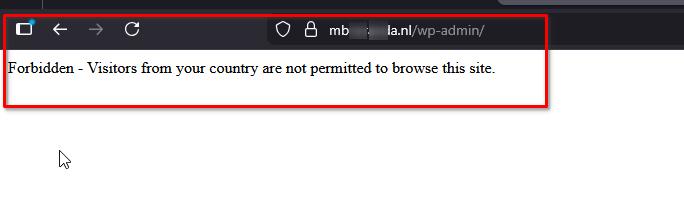
Additionally, we are currently unable to access your WordPress login page. Could you please provide access to your cPanel so we can continue working on this?
Thank you for your cooperation.
Best regards,
Ariel H.0 -
Hi Akın,
Thank you for your cooperation.
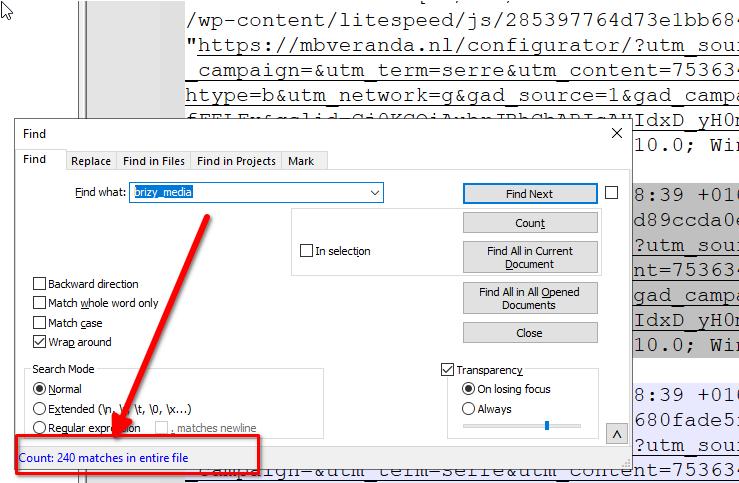
Based on the information so far, this appears to be more of a server-related issue rather than something caused specifically by Brizy. The access log shows only 240 lines referencing brizy_media out of over 41,000, which is not enough to indicate extreme CPU usage from Brizy alone.
Your site also has 50 active plugins and a 16.32 GB uploads folder, both of which can heavily impact server performance and contribute to high CPU load.
At this point, it would be best to check with your hosting provider and ask them to review:
1. Overall server resource usage (CPU, RAM, I/O)
2. Any heavy or long-running PHP processes
3. Cron jobs or background tasksWe also noticed this error in your WP Admin Dashboard:
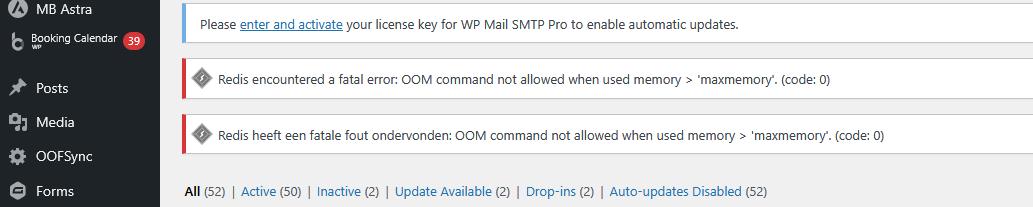
When Redis runs out of memory, it can no longer cache data properly. Requests that would normally be served quickly start hitting PHP/MySQL instead, which increases CPU usage. This can make WordPress slower and heavier, especially with many active plugins, and can cause pages to take longer to load and use more resources overall.
If you have any further questions, please let us know.
Best regards,
Ariel H.0
Please sign in to leave a comment.
Comments
3 comments