Updating Brizy Wordpress Plug-in giving errors.

If I deactive and delete both it and Pro, will the pages already built using Brizy not work anymore? How do I get the update to work?
-

Hello Rob,
The most common cause of errors following an update is not updating both the Brizy and Brizy Pro plugins. Each Brizy plugin has a matching Brizy Pro plugin. Consider the following scenario: we released an update for both Brizy and Brizy Pro, and the user received an update notification for Brizy at 10:00 AM but not for Brizy Pro until 11:00 AM. If the user updated at 10:30 A.M., he can only update Brizy, not Brizy Pro. Updating the Free plugin without updating the Pro results in errors.
If you receive an update notification for the Brizy plugin, do not update immediately. Wait a few hours and see if you receive an update notification for Brizy Pro. When you receive update notifications for both, update the plugins. In some circumstances, we release updates only for Brizy. After a few hours, if you do not get an update notification for Brizy Pro, you can update Brizy.
If you are facing issues after update, kindly update to these versions to fix the errors.
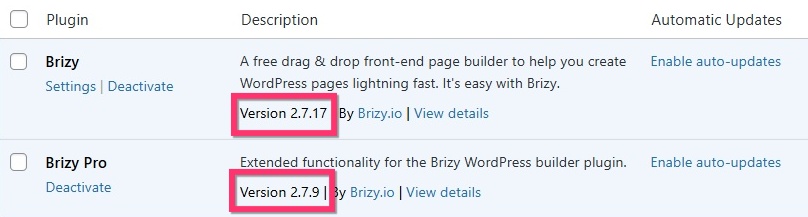
Kindly follow these steps.
- Dectivate and delete Brizy and Brizy Pro plugins
- Install Brizy 2.7.17 following the procedure at How to Install Brizy Free in WordPress
- Install Brizy Pro 2.7.9 following the procedure at How to Install Brizy PRO in WordPress
0
Please sign in to leave a comment.
Comments
1 comment