Recurring issue

This is an issue i have had with a couple of websites that i have created with Brizy.
I always enable autoupdate for plugins once the site is done. But after a few update cycles we encounter a site breaking issue where either the pages are white or the header or footer is missing.
Is this a known bug? It breaks my credibility to clients when a completed working site breaks spontaneously and they have to call to ask what is going on.
-

Hello Baru,
Enabling automatic updates for the Brizy and Brizy Pro plugins is not recommended. Please update Brizy plugins manually when you have time to ensure that everything functions properly following the update. If you do not have an annual maintenance contract with your client, you should consider signing one and checking for updates every six months, updating the plugins manually.
0 -
Another question.
Once a websute is completed and Auto update is disabled (which was how i used to do it) shoukd it exist in a static state at that point if all remains constant. Why does it break after some time. I have only encountered this with Brizy.
Thanks
0 -
Hello Baru,
If Brizy plugins are not automatically updated and your website content has not been updated in a few months, the site should not break after a short while. If this happens at your end, it is usual. Kindly give us more details.
- What is the typical time frame in which something breaks on a website after a project is completed? Ex: One week, a few weeks, a few months?
- Give us example of what type of issues appear when it breaks? Ex: Form not receiving notifications, design of the webite gets messed up, website displays an error etc.
- Do you have a screenshot of the issue that surfaces without a trigger?
- What access have you given to the client? Ex: Editor, Author, Administrator. Do you know if the client is likely to attempt to edit the website aftert the site goes live?
0 -
The clients don't have access to the back end.
Typically the issue has arisen when a new version of Brizy and Pro are available but have not been effected yet.
The most common issue is the header and footer not showing up until the update is made
0 -
Hello Baru,
You said "Typically the issue has arisen when a new version of Brizy and Pro are available but have not been effected yet". We have released a new version of Brizy and Brizy Pro. Can you please check if your website shows any error?
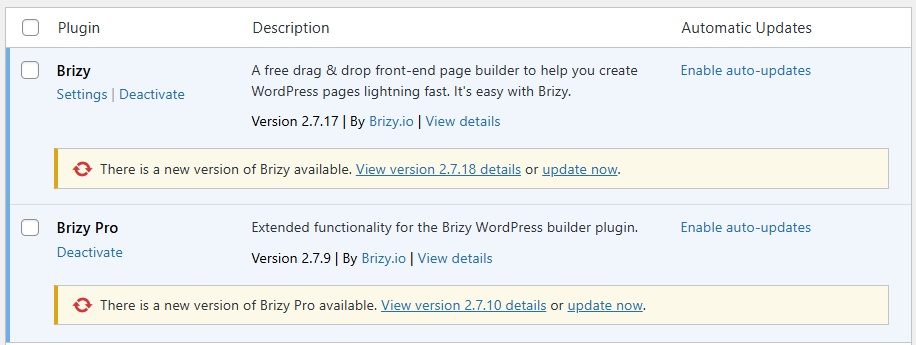 0
0 -
HI, Happy new year
Sorry it took so long to respond to this.
As I had described before, it seems as if whenever there is a new update available, and it has not been done, i.e., in plugins, it shows update now, like in the above screenshot, the website seems to break until a few things are done
- The update is installed.
- I open the affected page(s) in edit mode, make a tiny change, revert, and then save.
- Refresh the page.
If the website should be in a static state after completion, i.e., no further changes are made, content or layout-wise, why would it break when an update is available? This has primarily been affecting the header and footers, but occasionally happens to other parts of the website, and it does not bode well for business since clients are beginning to question the state of technologies used in website development.
0 -

Hi Baru,
Happy new year!! Thank you for keeping in touch.
Could you please provide temporary access to your WP Admin so we can take a closer look at your site? Kindly add us as an Admin user in your WordPress Dashboard and send the details to communitysupport@brizy.io:
- Community Post link: https://support.brizy.io/hc/en-us/community/posts/31365990467602
- WordPress Admin URL:
- Username:
- Password:
Best regards,
Ariel H.0 -
Hi Baru,
We’ve updated both Brizy and Brizy Pro on your website, and everything completed successfully without any issues - https://streamable.com/6arm30
We’re aware of the behavior you mentioned, which can affect some websites. While it’s a complex issue, our developers are aware of it and are actively working on improvements.
We understand your concerns from a business perspective and appreciate you sharing this feedback with us.
Best regards,
Ariel H.0
Please sign in to leave a comment.
Comments
8 comments