Mega menu inaccessible with keyboard navigation

Hi,
Keyboard navigation is a very important requirement for ADA compliance in the USA. We use the <tab> key to navigate through the links. As you can see in the video, we can access the submenus for Board Agenda and Lithium Valley, but not the Departments. When hovering with the mouse it works but not with the keyboard. The Departments submenu uses a megamenu element.
https://jmp.sh/T68rZ6p
How can we solve this?
-

Hi Leonel,
Thank you for contacting us.
I checked the site on my end, and something seems off, the dropdown menu isn’t appearing in the right place when I test it.
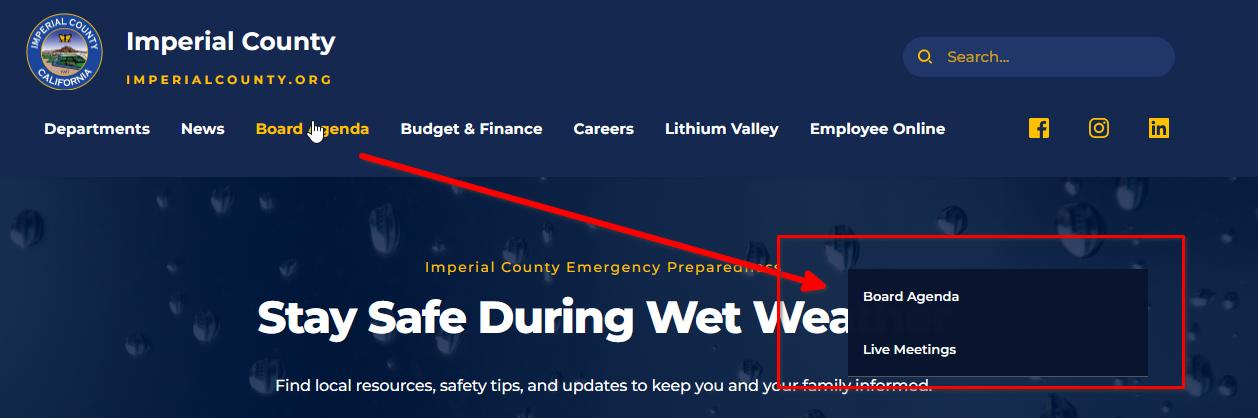
To help narrow this down, could you temporarily disable all other plugins except Brizy and Brizy Pro and see if the issue still occurs?
Let me know what you find, and we’ll continue from there.
Best regards,
Ariel H.0 -
Thank you for your prompt response. I disabled the plugins. I still can't access submenus with keyboard navigation, not only the megamenu one (Departments) but the Boar Agenda or Lithium Valley.
We would like to achieve menu keyboard navigation like the one in this site
proper keyboard navigation video
Is it possible?
Thank you for your support.
Leonel
0 -
Hi Leonel,
Please provide us with temporary access to your WP Admin page so we can take a look. Kindly add us as an Admin user to your WordPress Dashboard and send the following details to communitysupport@brizy.io.
Community Post link: https://support.brizy.io/hc/en-us/community/posts/31256966260754
WordPress Admin URL:
Admin Username:
Password:Looking forward to your reply.
Best regards,
Ariel H.0 -
I sent the information to the email account
0 -
Hi Leonel,
Thank you for your cooperation.
Upon checking, this is currently a limitation of the Brizy menu element, as it doesn’t yet support opening submenus/mega-menus through keyboard navigation. I’ve submitted this to our team as a feature request so it can be considered for a future update.
In the meantime, you can try using your theme’s menu, as some themes already allow keyboard-triggered submenus.
We apologize for the inconvenience.
Best regards,
Ariel H.0 -
Thank you for your support.
Keyboard navigation is essential for us, and we kindly request that it be added to the Brizy menu. Beginning in April 2026, all government websites in the United States must fully comply with ADA requirements. Without proper accessibility features—such as keyboard navigation—we are at risk of non-compliance and potential legal issues.
We are very happy with Brizy and want to continue using it, but ADA compliance is not optional for us.
Here is a link to the ADA compliance requirements:
https://www.ada.gov/resources/web-guidance/
We would truly appreciate it if this feature could be prioritized in an upcoming Brizy release. I’m confident we are not the only government agency relying on Brizy who will need this.
Thank you again for your assistance
0 -

Hello Leonel,
We have been working on making Brizy compliant to Web Content Accessibility Guidelines 2.1. You can see what we have done so far at https://support.brizy.io/hc/en-us/articles/29937628214034 We appreciate you bringing to our notice the non compliance of mega menu with the accessibility guidelines. We have escalated the matter and will work on making Brizy fully compliant. Hopfully our next update should carry this fix.
0 -
Hi,
I reviewed the article outlining Brizy’s ADA compliance features, which states that Brizy-generated websites are fully navigable using a keyboard. Unfortunately, this does not appear to be accurate.
On our website (https://imperialcounty.org/), any menu item that contains a submenu cannot be accessed using keyboard navigation alone. This issue occurs even without a mega menu. For example, the “Departments” submenu is not reachable via keyboard, which represents a significant accessibility barrier and places the site out of ADA compliance.
It is imperative that this issue be addressed. If it cannot be resolved, we will have no choice but to evaluate alternative solutions to Brizy.
Given our ADA compliance deadline of April 2026, can you confirm whether this issue can be fixed prior to that date, and if so, provide an estimated timeline?
Thank you for your attention to this matter.
Best regards,
Leonel0 -
Hi Leonel,
Thank you for the update.
We understand the importance of keyboard navigation for ADA compliance, particularly with your April 2026 deadline. We can confirm that our team has developed an update to address keyboard navigation issues affecting submenu items and mega menu items. This fix is currently in beta testing and is expected to be released within the next 2–3 weeks.
Thank you for your understanding.
Kind regards,
Ariel H.0 -
That is great news. Thank you very much for your support and understanding.
0 -
Hi Leonel,
We have released new versions of Brizy and Brizy Pro. Kindly update to these versions, which include a fix for the keyboard navigation.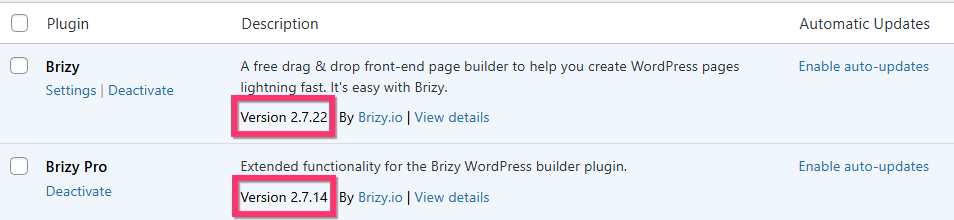
After updating to the above versions, kindly make a minor change to the menu element, such as increasing the padding by 1 pixel, save your work by clicking the "Update" button at the bottom right corner and check if sub menus are accessible through keyboard navigation.
0 -
Thank you very much for fixing this issue. Both the mega menu and sub menu items are now accessible with keyboard navigation.
0
Please sign in to leave a comment.
Comments
12 comments