Images Not Loading on Different Browsers and Devices

Hi to all,
I created a project with pictures to show a client, but some of the images are not loading on Chrome (default), Safari, Firefox, or iPhone. What can I do to fix this? The customer can’t see them, and I’d really appreciate any help.
Here’s the link: https://phillipsedison.brizy.site/
Thank you,
Robson Desa
Charlotte, NC – USA
-

Hello Robson,
We apologize for the inconvenience. Kindly remove the images and add it again following this approach. When you're done re-adding images within a block, click the "Update" button at the bottom right corner to save your work Since you have seven blocks on your page, you must save your work seven times (once after adding images to each block).
I have duplicated your homepage and tried adding a few images to the carousel and it shows in the frontend. https://phillipsedison.brizy.site/home-copy
0 -
Thank you, K. C. George. I did what you guided me to do, and it worked. The only thing I’m still struggling with is how to change the color of the arrows. Thanks again.
0 -
Hello Robson,
To change the color of the arrows, click at the top right corner of the carousel element, select the "Color" icon and set the color under the "Arrows" tab.
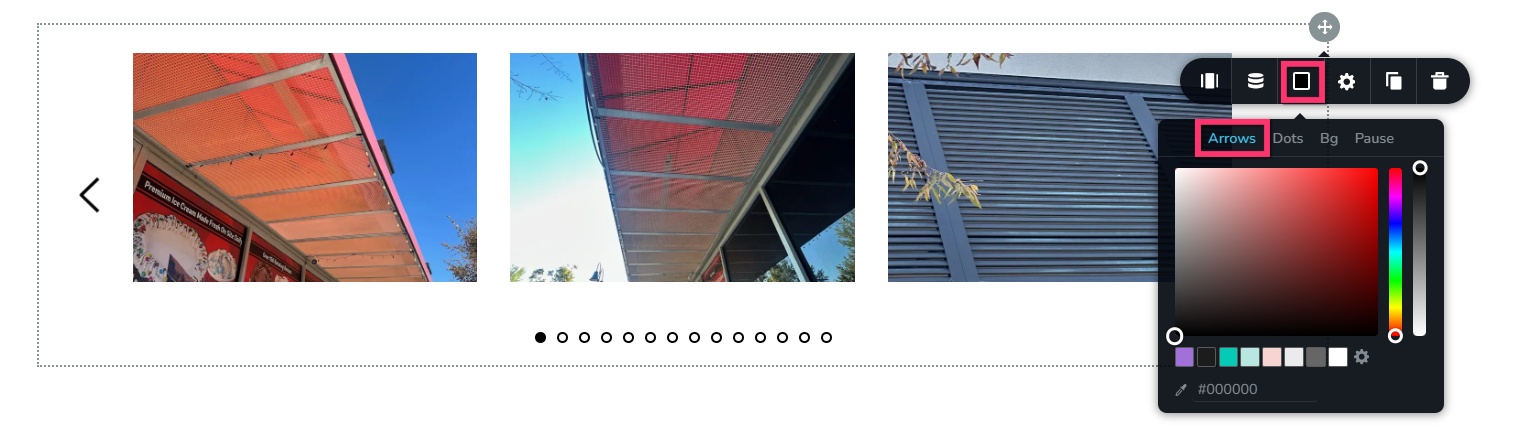 0
0
Please sign in to leave a comment.
Comments
3 comments