Image png and webp

When I upload an image (builder) in PNG format and publish the site, the website no longer opens - stuck. In the builder, the image uploads correctly. However, when I upload the image in JPEG format, everything works fine — the site loads without any issues. I also tried using the WEBP format, but the same problem occurs as with the PNG file.
Please help....
Dejan
-

Hi Dejan,
Thank you for contacting us.
We tried to replicate the issue as described but couldn’t reproduce it on our end. Could you please try disabling all other plugins except Brizy and Brizy Pro to see if the issue still occurs? Also, try using another browser to check if the problem persists there as well.
Please give this a try and let me know the results so we can advise you on the next steps.
Best regards,
Ariel H.0 -
Hi,
thanks for reply, the problem is plugin LiteSpeed Cache.
Do you have any advice?
Best and regards,
Dejan
0 -

Hello Dejan,
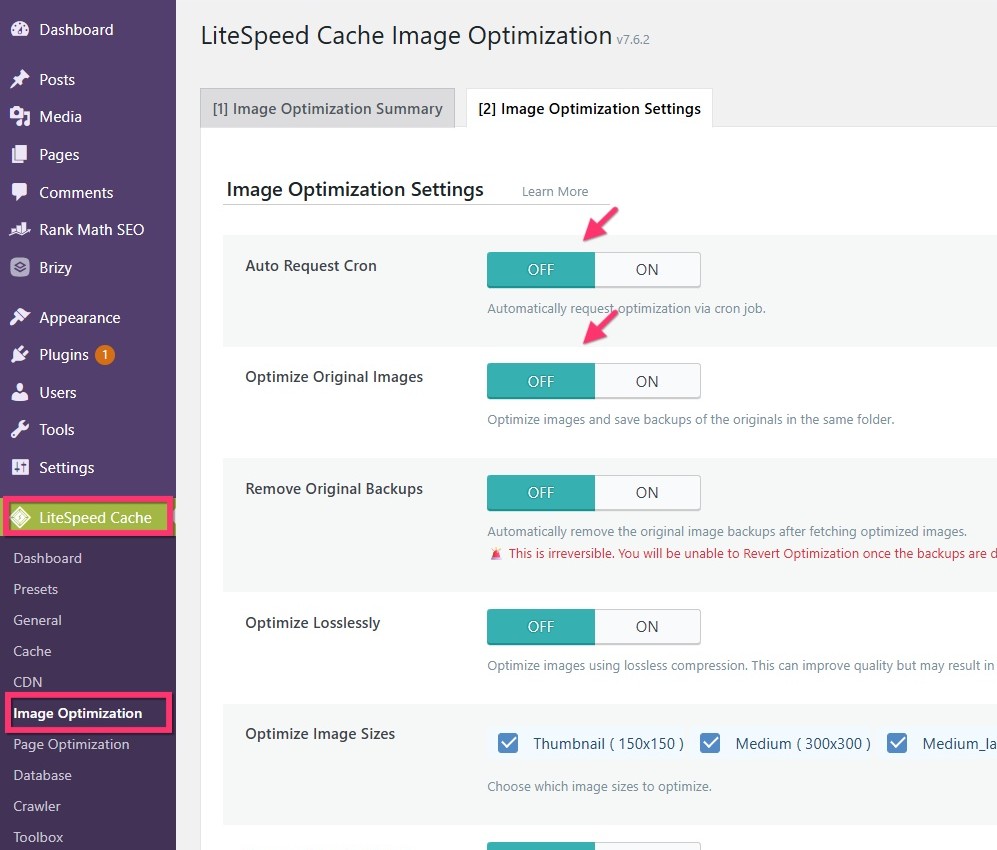
Please try disabling image optimzation in Litespeed Cache and check if that helps. In your WordPress Dashboard under LiteSpeed Cache > Image Optimization, disable these two options
- Auto Request Cron
- Optimize Original Images
 0
0 -
Hi,
I try but not working. Maybe some more advice?
Thanks,
Dejan
0 -
Hi Dejan,
Thank you for the update.
Could you please try disabling both the CSS and JS minification options in LiteSpeed Cache to see if that resolves the issue?
Here are the steps to disable JS and CSS minification:
1. Disable JS Minification
a. Go to LiteSpeed Cache → Page Optimization → JS Settings
b. Set JS Minify to OFF
c. Set JS Combine to OFF
d. Click Save Changes2. Disable CSS Minification
a. Go to LiteSpeed Cache → Page Optimization → CSS Settings
b. Set CSS Minify to OFF
c. Set CSS Combine to OFF
d. Click Save ChangesAfter doing this, please check if the issue is resolved. If not, you may temporarily disable the LiteSpeed Cache plugin while editing your pages, then re-enable it once you re done and ready to publish.
Best regards,
Ariel H.0
Please sign in to leave a comment.
Comments
5 comments