Issue with dropdown menus

Hi there,
On the drop down menu on https://www.heydayscare.co.uk there's a gap between the main menu and the start of the drop down - see below.
To fix it we added
.brz-menu__sub-menu {
transform: translate3d(0px, 41px, 0px) !important;
}
But then on the sticky menu you can't access the drop down menu. For now I've disabled that CSS.
Could you advise?
Thanks,
Darrren

-

Hi Darren,
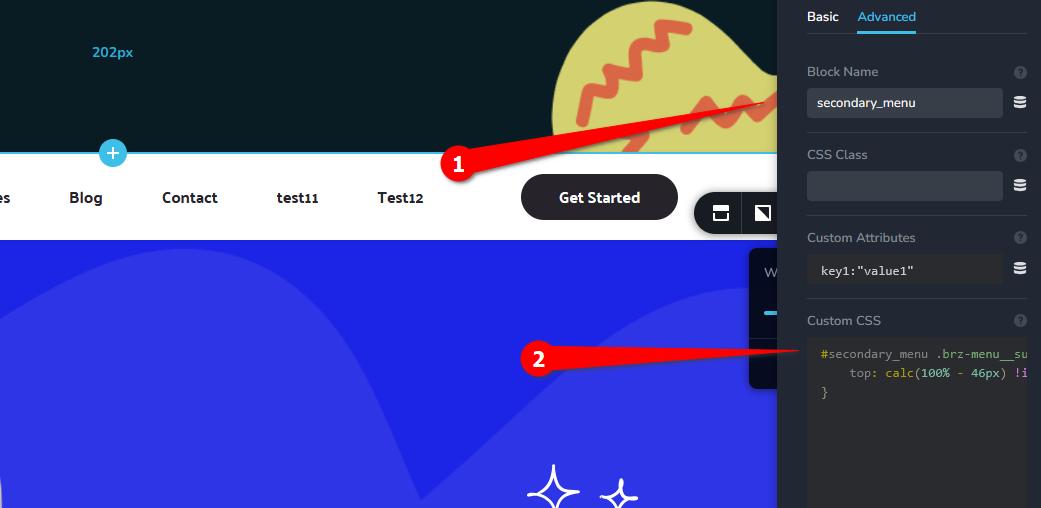
Could you please assign a unique class or ID to the secondary menu block? In this example, we’ve used #secondary_menu. This way, the CSS will only target this specific block and won’t affect the sticky menu.
#secondary_menu .brz-menu__sub-menu {
    top: calc(100% - 46px) !important;
}
Best regards,
Ariel H.0 -
Hi Darren,
I just wanted to follow up to see if the issue has been resolved with the solution we shared earlier. If you’re still experiencing any problems, please share your site’s credentials with us so we can take a closer look.
Best regards,
Ariel H.0 -
Hi Ariel,
Sorry for the delay.
I can't see where I can add in the unique class / ID to the secondary menu block?
When I select the drop down or the main menu there's no option like you've provided in your screenshot.
Thanks,
Darren 0
0 -
Hi Darren, could you please provide temporary access to your site so we can take a closer look? You can send the login details to mailto:communitysupport@brizy.io and include 30998305218834 in the subject line.
0 -
Hi Darren, we’ve just applied the CSS - https://youtu.be/_MWDrVbwF6A
0 -
Thanks for this Ariel. How did you fix it?
0 -
Hi Darren, please watch the screencast - https://youtu.be/_MWDrVbwF6A
0 -
Got it. Thanks again Ariel :)
0
Please sign in to leave a comment.
Comments
8 comments