Formating embedded element

Hi,
I have a dynamic content on a Brizy cloud page. its a number that fetch via html script as below
<div>
<span class="highlight" id="recordCount">Loading...</span>
</div>
How can i format the id="recordCount" to display in same font as the theme/style i'm using in the page. the default style used is "Overpass"
Please assist.
Thank you,
-

Hi Sla,
Thank you for contacting us. Could you please share the URL of the page so we can inspect it? Also, kindly let us know which part of the page contains the embedded HTML.
Best regards,
Ariel H.0 -
Hi Ariel,
Thank you for connecting.
The URL is https://woodpecker0fef50fe.brizy.site/ , the embedded code is in the last block of the page.
Thank you.
0 -
Hi Sla,
You can inspect the CSS using your browser’s Dev Tools and copy any specific style you’d like to apply to the embedded HTML. For example, in this case, you can select the <h2> element on your page, copy its class or CSS properties, and then apply them inside your <div> tag.
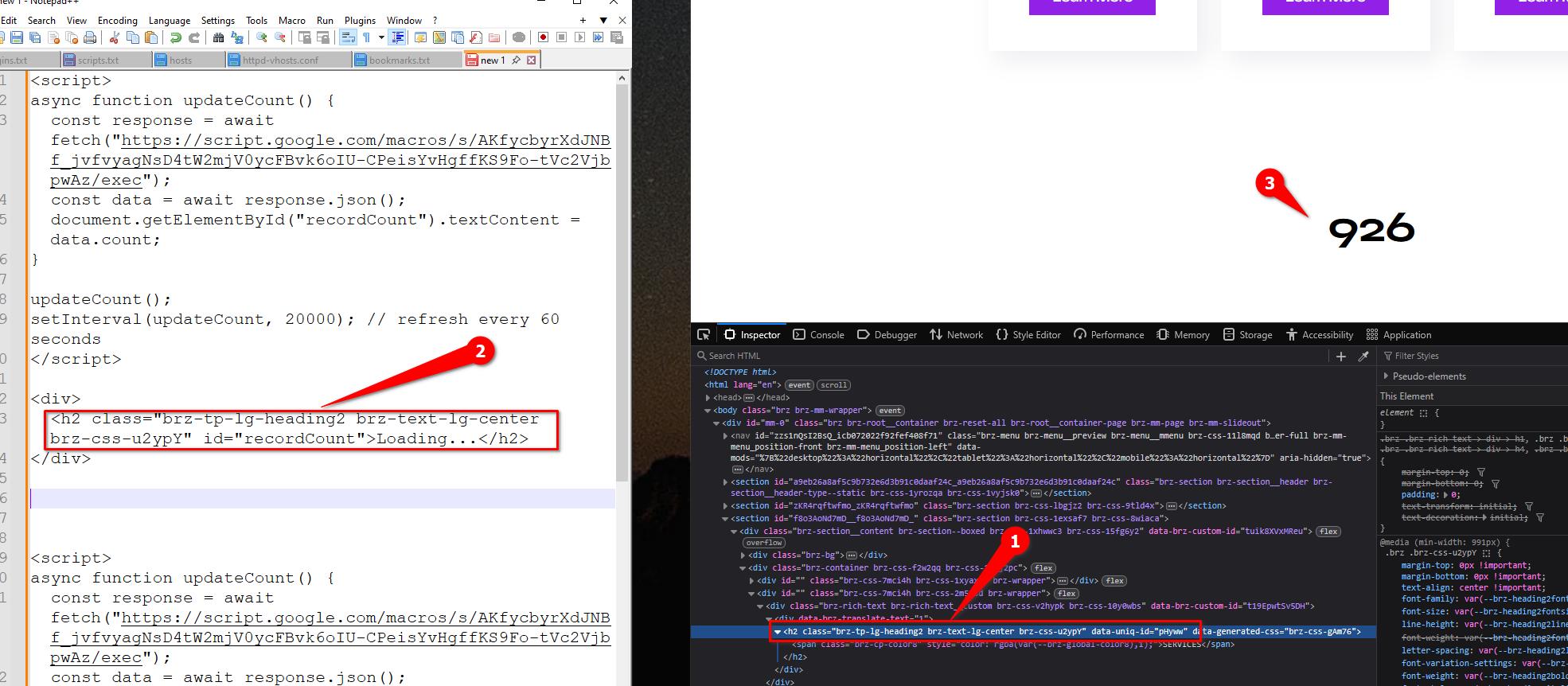
Here’s a quick example:
<div>
  <h2 class="brz-tp-lg-heading2 brz-text-lg-center brz-css-u2ypY" id="recordCount">Loading...</h2>
</div>
This way, the embedded content will inherit the same font and styling as the rest of your page.
Best regards,
Ariel H.0 -
Thank you ! This is cool.
0
Please sign in to leave a comment.
Comments
4 comments