How can I force a Line break within a List?

I have a list. How can I force a new line?<br> is not working.
-
and Shift or ALT Return is also not working. Whats the way to force a line break within a text or list?
0 -

Hi MR,
Thank you for contacting us.
You can press Shift + Enter to insert a line break within a bullet list, delete the extra bullet that appears on the new line, and then use the Tab or Space key to align the text properly, as shown in this screencast: https://youtu.be/TbzyHZM8mZI.
Please try this and let me know how it goes.
Best regards,
Ariel H.0 -
Thanks Ariel,
1. this is not working with Autoptimize
2. this is working without Auoptimze BUT if you come back to the Brizy Editor the tab / spaces are missing again.
Please try it by yourself.
Thanks Martin
0 -
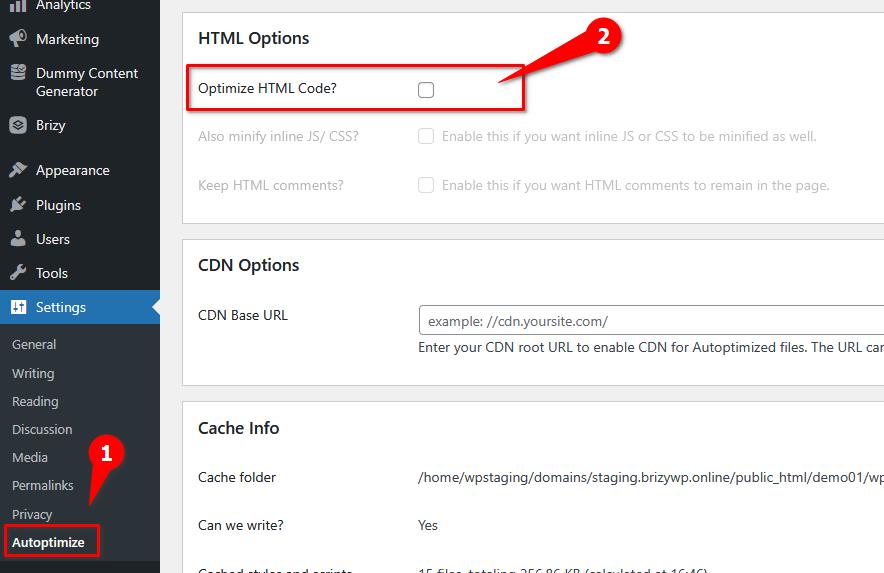
Hi Martin, to fix this, please unselect Optimize HTML Code. After that, click Save Changes and Empty Cache.
 0
0 -
Yes, thanks. it works either with HTML disabled or with Autoptimize turned off.
However, when I open the page (where the tabs look fine) with "Edit with Brizy", the tabs disappear.
0 -
Hi Martin, please try clearing your browser cache or try using another browser and see if that makes any difference?
0
Please sign in to leave a comment.
Comments
6 comments