Custom SVG Icons not showing up on Tablet and Mobile layout with tabs

I have added custom icons using SVG Icons to my site. When using the Tabs element, if I use custom icons, when it resizes to tablet or mobile and it turns into an accordion, the icons disappear.
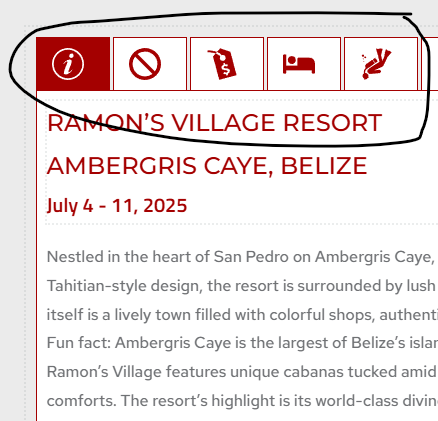
and
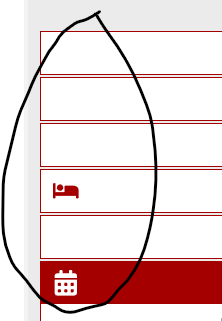
-

Hi Jose,
Thank you for contacting us.
This issue could be related to caching. Please try flushing or temporarily disabling any caching plugins and check if the icons reappear. If the issue persists, kindly provide your site’s credentials so we can inspect the issue.
Please send the following details to communitysupport@brizy.io
* Community Post link: https://support.brizy.io/hc/en-us/community/posts/30487440907026
* WordPress admin URL
* Admin username and password
* Link to the page where the issue occursOnce we have this information, we’ll check the issue directly and possibly offer a solution.
Best regards,
Ariel H.0 -
replied by email. I do not have any caching plugins installed.
0 -
Hi Jose,
Thank you for your cooperation and this is a very interesting issue. Please give us some more time to figure this out.
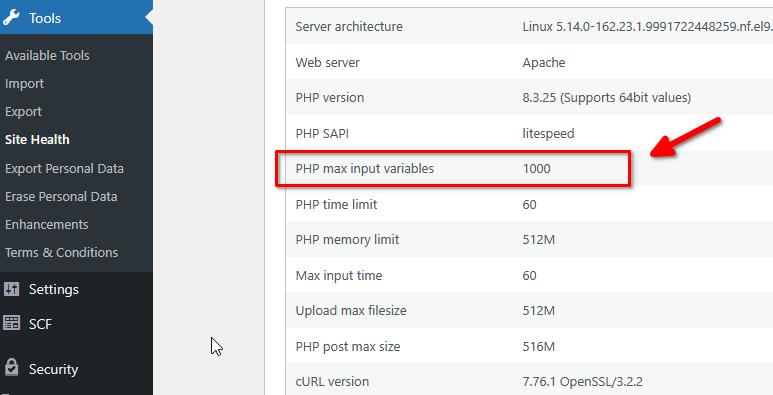
In the meantime, could you please ask your hosting provider to increase the PHP Max Input vars to 10000, this will help in handling larger pages, especially that you have so many photos on the page and in the tab element.
Best regards,
Ariel H.0 -
Done
0 -
Any updates on the matter? I will try to create one on another site that I host and see if the issue is the same.
0 -
Hi Jose,
It seems that the issue is connected to the custom icons used in the Tabs element. When icons from the built-in icon library are used instead, the issue no longer occurs.
Could you please try finding similar icons from the existing icon library or replace the custom icons you’re currently using to see if this makes any difference?
Best regards,
Ariel H.0 -
I will try to use a small PNG file. These are currently SVG files, I don't know how size is an issue.
0 -
uploaded a 75 pixel ICO file and the behavior is the same. I just added an accordion element to another site and having the same results. can you sent me a link to an icon you are using that works on your sites? I can try using your icons. But I am downloading svg files from www.svgrepo.com which is where JP goes in his tutorials.
0 -
Hi Jose,
Sorry about that. Could you please send us the original SVG files by emailing it to communitysupport@brizy.io? Please include the reference 30487440907026 in the subject line. Once we receive the file, we’ll try it out and get back to you with our findings.
Looking forward to your response.
Best regards,
Ariel H.0 -
I sent the email with the attachments.
I just created a WP website on a completely different server system using NGINX and the behavior is the same on a stand alone web host server.
0 -
Hi Jose,
Thank you for your patience. I’ve escalated the issue to our developers for further investigation, and we’ll get back to you as soon as we receive an update. I apologize for the delay and appreciate your understanding.
Best regards,
Ariel H.0 -
Has there been any update to this matter? We are looking at two weeks and I am still with a non functioning website that needs to be completed.
0 -
Hi Jose,
Thank you for following up. The issue is still ongoing at the moment, please give us some more time to fix it.
In the meantime, please consider using similar icons from the built-in Brizy icon library instead of the custom icons. This should help restore the functionality of your site while we work on a fix.
We appreciate your patience, and I’ll let you know as soon as there’s any progress.
Best regards,
Ariel H.0
Please sign in to leave a comment.
Comments
13 comments