Problem sejours a themes affichage https://azoresfreediving.com/sejours-a-themes/

Hello,
I have a problem.
On wordpress, everything looks ok but on my online website, no.
Can you please have a look at "sejours à themes" ?
There is a wrong block in english "among our sites" .
This block is in the english excursion tab and I dont why it duplicated in "sejours a themes" .
Thanks for your help.
-

Hi Ondine,
Thank you for contacting us.
To better understand and check the issue on your site, could you please share temporary access to your WordPress Admin credentials? This will allow us to inspect the page and identify why the English block appears there.
Kindly send the following details:
* WordPress Admin URL
* Username
* PasswordYou can send them securely to communitysupport@brizy.io.
Kind regards,
Ariel H.0 -
Hi Odine,
Thank you for your cooperation.
We’ve fixed the issue by saving the page as a layout, then creating a new page with the same title and importing the layout from the saved layouts. Everything should now be working correctly.
This is demonstrated on this screencast - https://youtu.be/jA7rP_AvVMsKind regards,
Ariel H.0 -
Hi Ondine,
Thank you for the update.
I’ve read your message from our community support inbox.
To better understand what’s happening on your end, could you please provide a short screencast showing the issue? You can easily record it using loom.com and share the link with us here.
This will help us see exactly what’s going on and provide a suitable solution.
Best regards,
Ariel H.0 -
Hi Ondine,
Could you please reactivate access to your site so we can take another look into the issue? Unfortunately, the previous credentials no longer work on our end.
Best regards,
Ariel H.0 -
Hi Ondine,
Thank you for the update.
The 404 error you’re seeing in the mobile view appears to be caused by your current permalink structure. It’s currently set to "Day and Name", which can sometimes cause issues with how links are interpreted on mobile devices, especially if caching or redirects are involved.
To fix this, please change your permalink structure to "Post name", which is the most stable and recommended option.
1. Go to your WordPress Dashboard.
2. Navigate to Settings → Permalinks.
3. Select the Post name option.
4. Click Save Changes at the bottom of the page.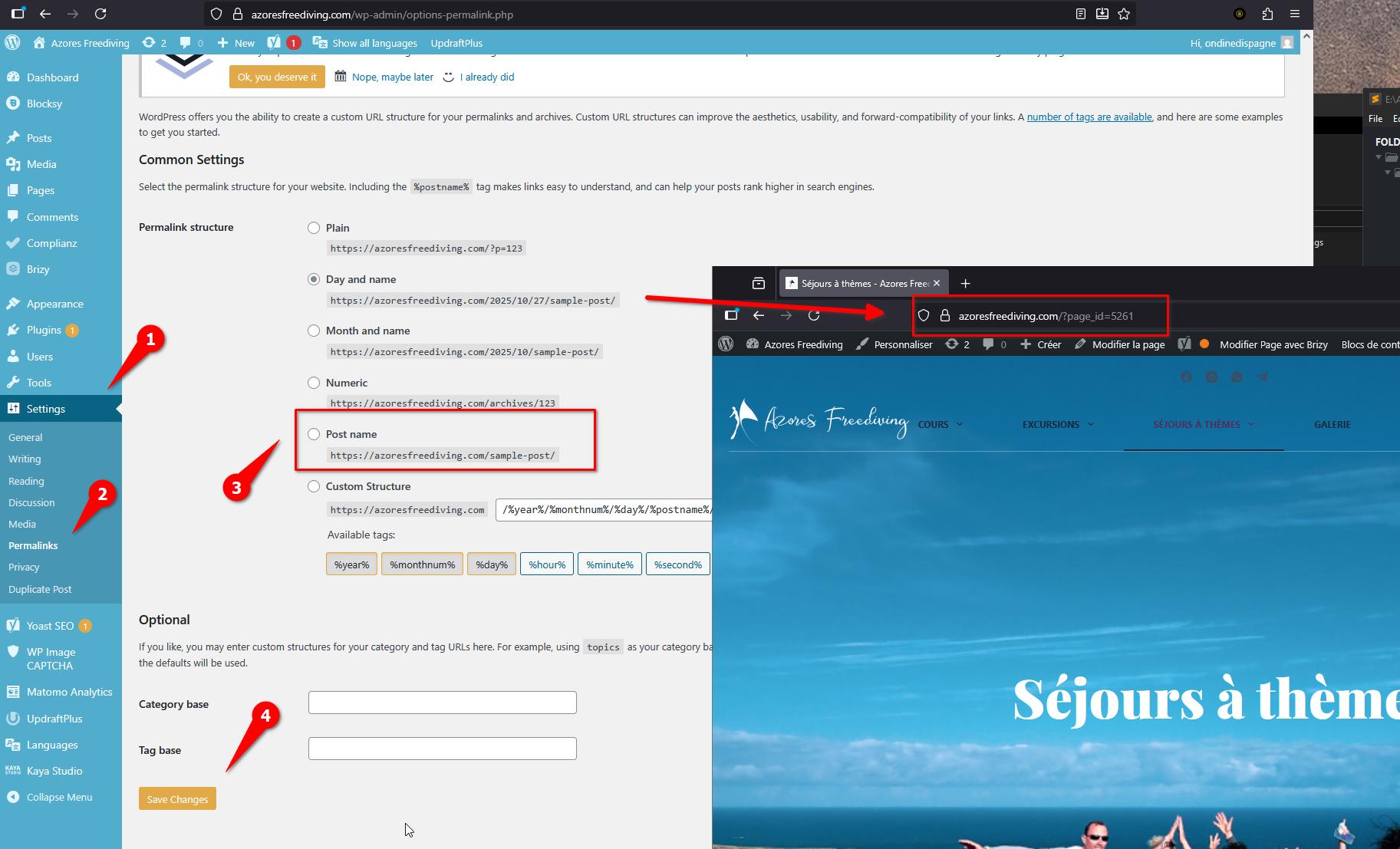
Once you’ve done this, please clear your cache (both site and browser) and check again on mobile — the 404 error should be resolved.
Best regards,
Ariel H.0 -
Hi Ondine,
Thank you for your patience. Upon checking, the menu was still pointing to the draft page, which is why it wasn’t working. We’ve corrected it, and it should be working properly now. Please try it on your end to confirm. I’ve also made a screencast to show you how we fixed it - https://youtu.be/yFkH7mTtceg
Best regards,
Ariel H.0
Please sign in to leave a comment.
Comments
6 comments