refund

Hello, I would like to refund my purchase as I bought the wrong service.
I wanted to buy something else.
Thanks
-

Hi Bilal,
Thank you for reaching out.
I understand you purchased the wrong service. Before proceeding with the refund, may I ask if you plan to switch to a different Brizy Pro subscription instead? This will help us guide you accordingly.
Looking forward to your reply.
Kind regards,
Ariel H.0 -
Hello Ariel,
Yes we plan to switch to another service. Will be buying a wordpress freelancer package instead
Thanks,
Bilal
0 -
Hi Bilal,
In order to upgrade to the Freelancer PRO package, please follow these instructions:
1. Log into your Brizy account, using the login page https://www.brizy.io/account/login
2. Navigate to Account >> Billing tab - https://jmp.sh/fHDasvRG
3. Click on the Upgrade Plan button - https://jmp.sh/aEYVWDzh
4. Choose the plan you want to upgrade to - https://jmp.sh/mMzJUfrw.
5. Scroll down and click on Continue Button
6. Confirm your new updates.If you have any further questions or if there is anything else we can assist you with, please don’t hesitate to reach out.
0 -
Thanks alot. But how to refund the package I mistakenly purchased!
0 -

Hello Bilal,
You have two options to switch to Freelancer WordPress plan. First option is that we issue a refund of your payment of $189.00 and then you can purchase the Freelancer WordPress plan at https://www.brizy.io/pricing-wordpress.
The second option is to reverse the cancellation of your Personal Cloud plan and replace it with Freelancer WordPress plan. The amount will be re-allotted towards your Freelancer WordPress subscription. Here are the steps.
- Sign in to your Brizy account at https://www.brizy.io/account/login and navigate to "Billing" option under the "Account" menu

- Select the button "Don't Cancel Subscription"
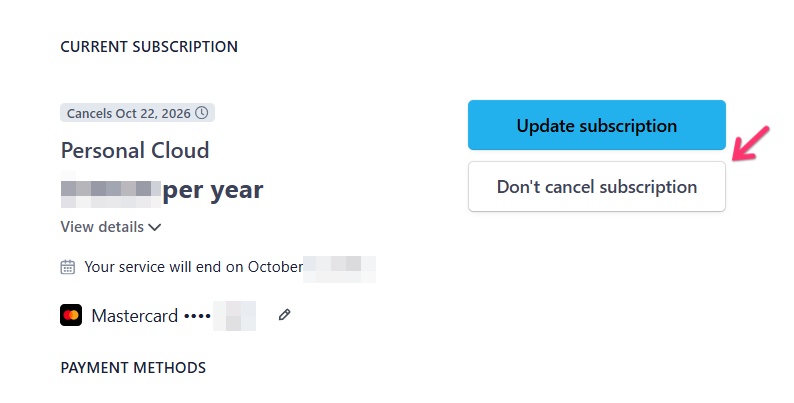
- Click on the "Update Subscription" button
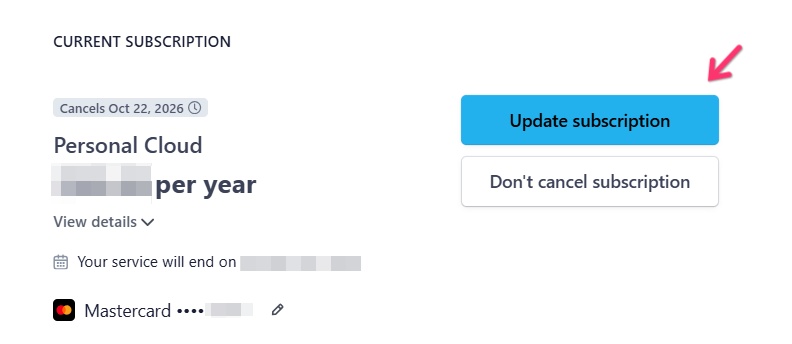
- Scroll down and select the "Freelancer WordPress" plan and click "Continue" button at the bottom.
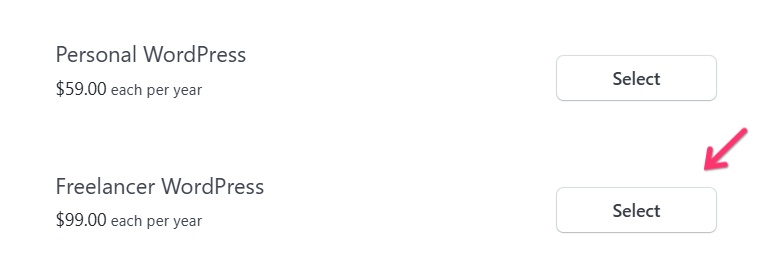
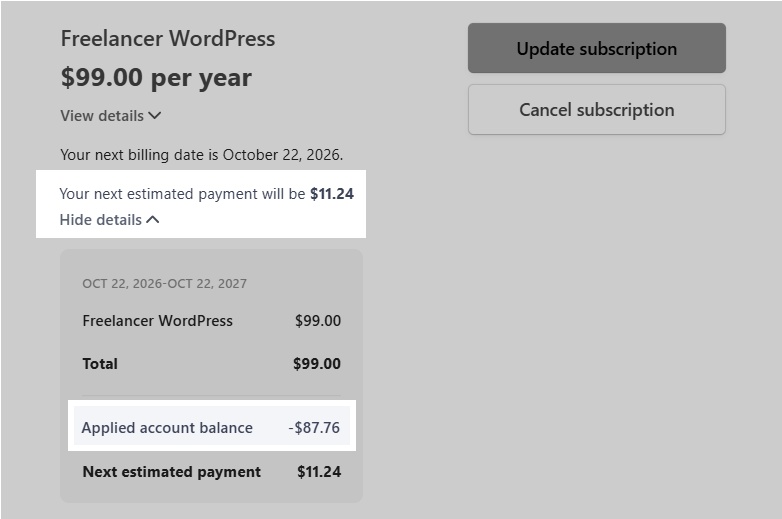
- You will see the calculation of how the amount paid will be reallocated towards your Freelancer WordPress subscription. If you are happy with the calculation, kindly confirm your decision by clicking in the "Confirm" button
Please let us know how you would like to proceed. If you want us to issue a refund, kindly confirm your decision here.
0 - Sign in to your Brizy account at https://www.brizy.io/account/login and navigate to "Billing" option under the "Account" menu
-
Hello.
Thanks alot for the help. Now that I have changed my plan. I still have paid extra money (extra 90 USD)How will this be handled? Will you refund it to my account?
Regrds,
Bilal
0 -
Hello Bilal,
After switching to the Freelancer WordPress plan, your Brizy account has a credit balance of $87.76. This amount will be adjusted against your next year's renewal transaction on October 22, 2026. Your renewal cost will go down from $99 to $11.24. You can see this calculation in your account..
 0
0
Please sign in to leave a comment.
Comments
7 comments