All web site images look streched

I created a site several months ago and now that I need it to finish it, the images aspect looks vertically streched. It shows bad on chrome and Brave. Safari and Firefox's looks fine.
website:
-

Hi Roberto,
Thank you for contacting us.
Please provide us with temporary access to your WP Admin page so we can take a look. Kindly add us as an Admin user to your WordPress Dashboard and send the following details to communitysupport@brizy.io.
Community Post link: https://support.brizy.io/hc/en-us/community/posts/30269512514194
WordPress Admin URL:
Super Admin Username:
Password:Looking forward to your reply.
Best regards,
Ariel H.0 -
Hi Roberto,
Thank you for your cooperation.
We found that the issue was caused by a conflict with the Image Prioritizer plugin. Disabling it, along with updating Brizy Pro and purging the LiteSpeed Cache, resolved the problem.
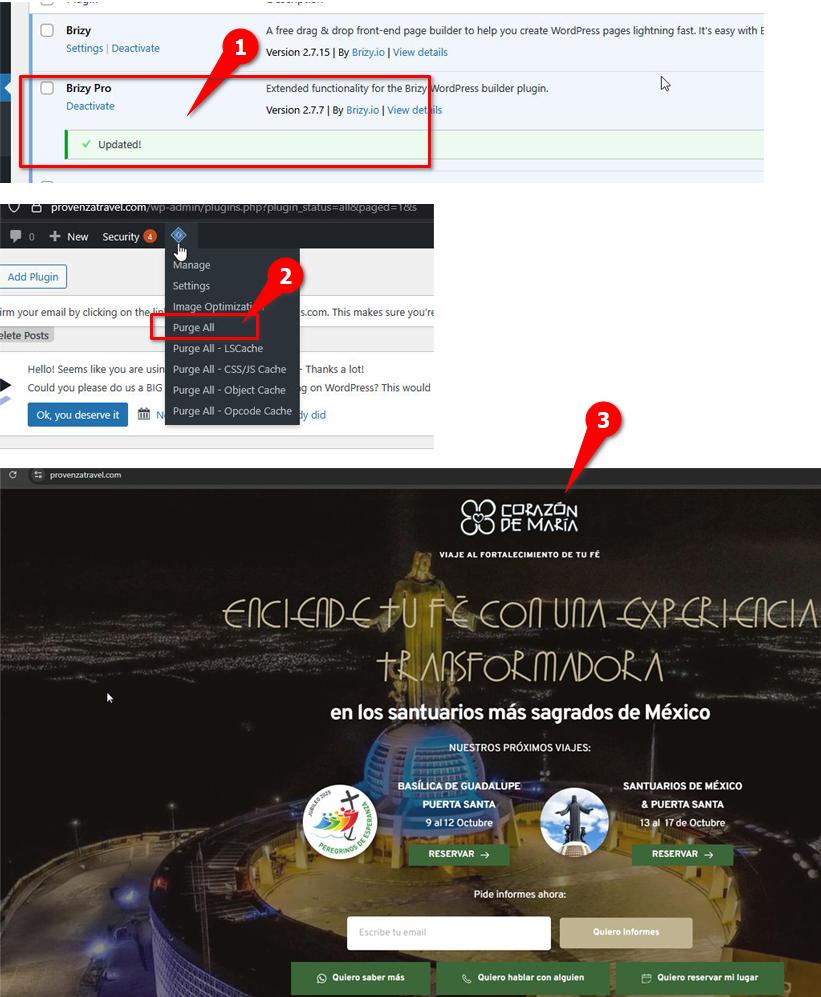
Please check and let us know if you still encounter any issues.
Best regards,
Ariel H.0 -
Thank you very much for your help!
0
Please sign in to leave a comment.
Comments
3 comments