SLOW BRIZY WEBSITE

Hello Omoya,
The problem comes from the brizy-pro plugin.
I disabled the plugin and noticed that my website https://www.gorilla-tracking-uganda.com/ started loading significantly faster.
-

Hi Robert,
Thank you for contacting us.
Could you please try the opposite, instead of disabling Brizy Pro, try disabling all other third-party plugins while keeping only Brizy and Brizy Pro active? This will help us determine if another plugin is causing a conflict or performance issue. Once done, please let us know the results.
I also noticed that your homepage is displaying a blog archive, which is pulling in dynamic content, posts, images, and metadata that are fetched from your database each time the page loads. This requires more server resources than loading a static page, especially if you have many posts or large featured images. That’s one reason the page may take longer to load.
When you disabled Brizy Pro, the site appeared faster because the layout and styling created by Brizy Pro were temporarily inactive, leaving behind a simpler, less resource-heavy version of your page. However, this doesn’t necessarily mean Brizy Pro is the cause, it’s likely that the combination of dynamic queries, image-heavy content, and plugin interactions contributes to the slowdown.
In the meantime, here are a few steps you can take to help improve your site’s performance:
1. Compress large images using a tool like https://tinypng.com and save them as WebP for faster loading.
2. If you haven’t already, enable SiteGround's CDN - https://world.siteground.com/kb/what-is-cdn/
3. Limit the use of large background images and multiple animations, as they can slow down your site’s initial load time.
4. Enable lazy loading to ensure images and videos only load when a visitor scrolls to them, improving your initial page load speed.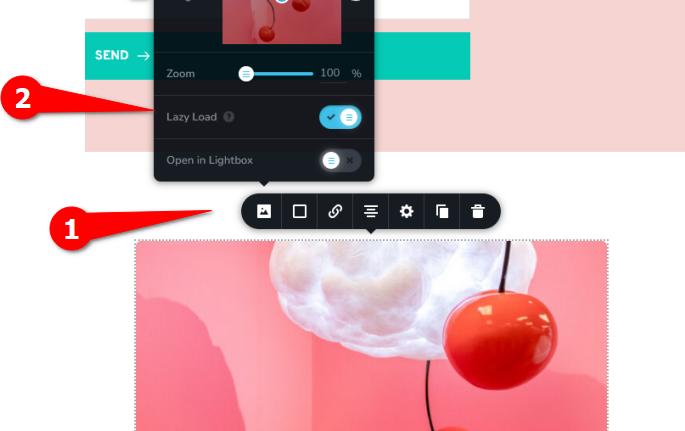
Please try this and let me know how it goes.
Best regards,
Ariel H.0
Please sign in to leave a comment.
Comments
1 comment