Updates to 2.7.15 and pro 2.7.7 have broken multiple site

I have multiple client sites on GoDaddy who have just updated their must-use plugin, this has enabled auto updates on all plugins!!!! Now I have numerous sites which I have had to revert to back-ups - when will this be fixed please?
I've done some testing in a local environment and can get every page except the home page working using the global blocks advice in other posts.
Please help - I love Brizy and have used it for several years now, but on the occasions it goes wrong - it's difficult to wade through the support pages and find a suitable workaround.
-

Hi Sonia,
Thank you for contacting us.
I understand how frustrating that must be, especially when several client sites are affected at once.
We generally don’t recommend bulk or automatic plugin updates, as this approach is only suitable for sites with very few active plugins. When multiple plugins update simultaneously, conflicts or compatibility issues can arise, which may lead to layout and functionality issues, especially on larger or more complex sites. Manual updates are more reliable since you can quickly review the front end after each update to ensure everything is working correctly.
If you notice layout issues after an update, you can fix them by forcing Brizy to recompile the affected pages. To do this, edit the page in Brizy, make a small adjustment (for example, set a block’s width to 90%), save, then set it back to 100% and save again. You can also try adding some padding to the block, saving, checking the front end, and then reverting any temporary changes. These steps often fixes layout issues.
I hope this helps, if you have any further questions, please let us know.
Best regards,
Ariel H.0 -
I'm getting the same problems again when I update just Brizy plugins. I have used a back-up of the working site onto my local environment and updated Brizy, lots of layout issues and tweaking the block width or padding isn't helping. What else can be done please?
0 -

Hello Sonia,
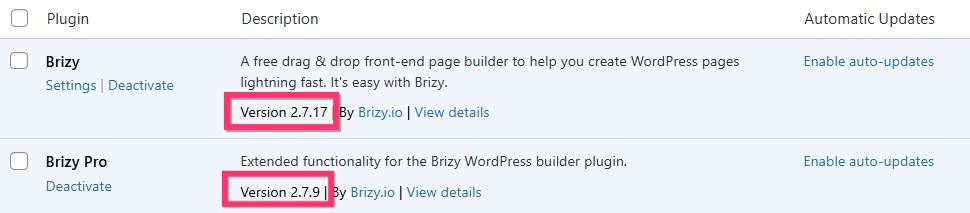
Users who updated to Brizy 2.7.17 and Brizy Pro 2.7.9 did not experience issues with their websites. Few users who experiecned issues were those who did not see an update notification for Brizy Pro and did not upate the Pro version. Please check if you have these versions of Brizy and Brizy Pro. If you do not see an update notification for Brizy Pro, kindly deactivate and delete Brizy Pro and re-install Brizy Pro 2.7.9 by following the procedure at How to Install Brizy PRO in WordPress
 0
0 -
Hi KC,
I have rolled one site back to before the issues, updated plugins one by one and cleared cache in between each. Then updated Brizy & Pro to the versions shown above (without a cache clear inbetween)
The pages all displayed but a couple of the footer menu's changed alignment. I corrected that and now have one page which is the same jumbled mess as before and tweaking padding doesn't fix it. The rest of the website is absolutely fine!
Website is https://dwdunn.co.uk/ the page that isn't behaving is https://dwdunn.co.uk/work-at-dw-dunn/
0 -
Hi Sonia,
Thank you for contacting us.
Please try temporarily setting the width of the affected blocks to 90%, then click Update and preview the page on the front end to see if this fixes the issue. If it does, you can restore the blocks to their original width.
Alternatively, you can also try adding 1px of padding to the same block — this simple change forces Brizy to recompile the page, which often resolves layout issues.
If this didn't help, please provide us with temporary access to your WP Admin page so we can take a look. Kindly add us as an Admin user to your WordPress Dashboard and send the following details to communitysupport@brizy.io.
Community Post link: https://support.brizy.io/hc/en-us/community/posts/30036825387410
WordPress Admin URL:
Username:
Password:Best regards,
Ariel H.0 -
Hi Sonia,
I just wanted to follow up to see if the issue has been resolved with the solution we shared earlier. If you’re still experiencing any problems, please share your site’s credentials with us so we can take a closer look.
Best regards,
Ariel H.0 -
Hi Sonia,
Thank you for your cooperation.
Newly created pages don’t show this issue, which suggests it may be related to OPcache. When OPcache saves old versions of your site’s files, this can cause the layout to look broken or incorrect.
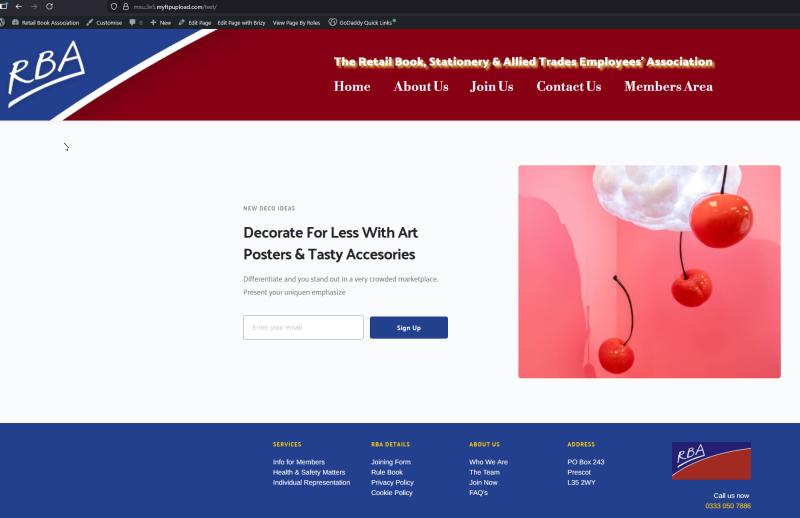
To confirm this, please ask your hosting provider to temporarily disable OPcache. Once it’s turned off, check the affected page again — if the layout displays correctly, then the issue is indeed caused by server-side caching.
Please let me know once you’ve tried this, and I’ll be glad to assist further.
Best regards,
Ariel H.0 -
Hi Sonia, we’ve resolved the issue by flushing the object cache from the settings menu and making small edits to the pages, then saving them. This forces Brizy to recompile the pages.
0
Please sign in to leave a comment.
Comments
8 comments