Strange Scroll Behaviour

When I scroll on my Brizy Pro theme, it suddenly 'jumps' or 'snaps' to the next section automatically. Is this a bug in the latest version of Brizy?
-

Hi Jhs,
Thank you for reaching out.
To better understand what’s happening, could you please provide us with a short screencast of the issue you’re facing? This will help us see exactly what you’re experiencing and allow us to assist you more effectively.
Best regards,
Ariel H.0 -
Hi Ariel. You may view the website and see the issue here: https://staging.jhsblinds.com.au/
Just scroll down with your mouse and you should see it 'jump'. It doesn't scroll smoothly and fluidly how a website should.
0 -
Hi Jhs,
Thank you for the update.
Upon checking, it looks like you’ve set the Blinds and Doors block to full height. Since this forces the block to take up the entire screen, the scroll will pause there until the full viewport has passed over it. Full height works best for hero sections at the top of a page.
For smoother scrolling, please try using a fixed height (or a min-height) instead on the Blinds and Doors block and similar blocks, so the content flows more naturally.
Please give this a try and let me know how it goes.
Best regards,
Ariel H.0 -
Strange, everything is set to auto. I will try to use a fixed height instead and see how it behaves.
0 -
Using a custom percentage of the height for all sections still results in the same issue. Any other suggestions?
NOTE: I have since reverted the changes back to auto.
0 -
Hi Jhs,
Please try using pixels (px) instead, as it provides more consistent results across different screen sizes and avoids unexpected scrolling behavior.
Best regards,
Ariel H.0 -
Changing it to pixels didn't do anything either. It's still exactly the same. Please escalate this to a stronger programmer since it seems like a bug in the Brizy logic.
0 -
Okay, I managed to solve the issue. It's a bug in Brizy. If the background layer is set to have an animated parallax effect, the snap-scrolling issue happens. Please forward this to your internal development team.
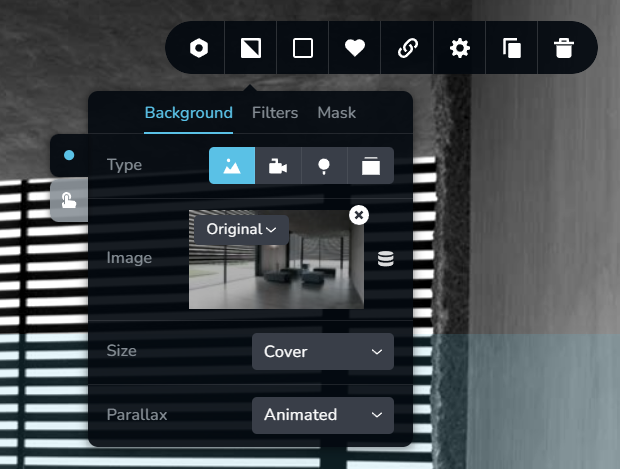 0
0 -
Hi Jhs,
I can confirm that the issue occurs when the background layer is set with an animated parallax effect. We’ve received similar reports before, and this has already been raised to our development team. As a temporary workaround, please set the parallax effect to Fixed until a permanent fix is rolled out in a future update.
I apologize for the inconvenience this may cause and appreciate your patience.
Best regards,
Ariel H.0
Please sign in to leave a comment.
Comments
9 comments