Weird counter behaviour

hello, I have noticed a very strange counter behaviour.
when i set any number it always add +1.
If I type 80 become 81.
if I type 79 remain 79, if I type anything ending with Zero it become +1
I have recorded a Gif
https://drive.google.com/file/d/1u7GvNISlO4vjSAybM48nQvT2pmbsOPQz/view?usp=sharing
-
update,
- type 500 became 501 (+1)
- type 499 stay 499
- type 498 became 497 (-1)
check this video:
https://drive.google.com/file/d/1PZ09r2ghbaVGAUnQdwWJZuXi7JxwiuEo/view?usp=sharing0 -

Hello Valerio,
We apologize for the inconvenience. This is a known bug and we are working on fixing it. In the interim, kindly follow these steps to set an even number for your counter.
- In the "Counter" element, select a "Style" other than the first one. For instance, select the second style
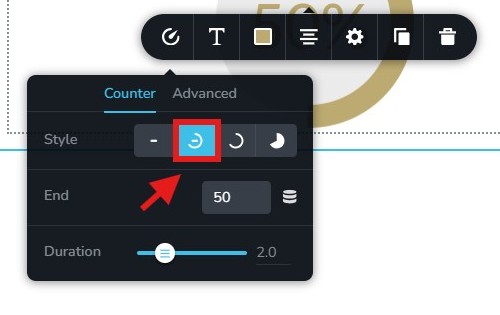
- Set an even number for the "End" field.
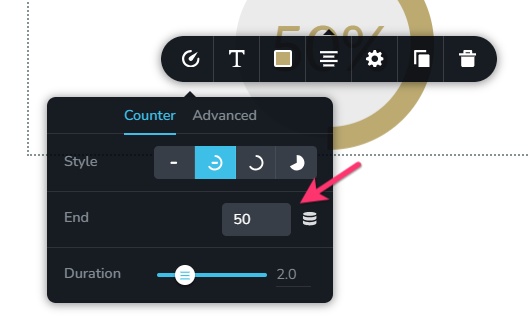
- Switch back to the first style and check if the even number stays.
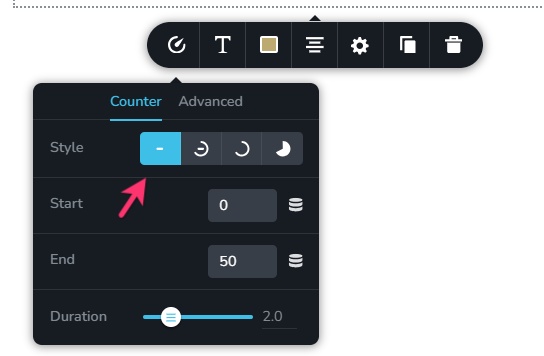
0 - In the "Counter" element, select a "Style" other than the first one. For instance, select the second style
-
this work only for numbers between 0 and 100, if you want to count 150 or 1500 this workaround won't work because the maximum percentage on the circles are 100%
0 -
Hello Valerio,
You are right; for setting up a counter for numbers above 100, the above procedure would not work. We have developed a fix for this. We hope to release it soon.
Please consider embedding the Elfsight counter widget at https://elfsight.com/number-counter-widget/create/ if you must use a counter for your Brizy project in the interim.
0
Please sign in to leave a comment.
Comments
4 comments