Floating control panel and Virtual Assistant window in the way

1- I'm having great difficulty with a floating control panel when I'm typing text. Sometimes it covers what I'm trying to do... it's really, really distracting. It feels like "whack-a-mole" trying to move around the panel... is this new?? Can I disable it?
2- I appreciate efforts to improve Brizy and I can guess what a challenge it is. But that new Virtual Assistant must be disabled... how can I deactivate it?
Thanks so much!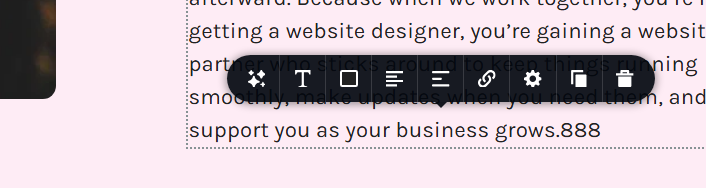
-

Hello Michelle,
You are right; it is not a pleasant typing experience when the text toolbar moves next to the text being typed. Our developers have been notified of the problem, and they will endeavor to enhance the text toolbar's usability.
Thanks for reporting the issue with the Virtual Assistant icon. We have removed the icon from the Brizy Cloud editor.
0 -
THANK YOU so much on both accounts! Love your platform and appreciate you all!
0 -

When is this being fixed? It's a pain in the butt.
0 -

Hi Chad,
Thank you for reaching out. The text toolbar is designed to disappear while you’re typing so it doesn’t cover or block the text you’re working on. Once you stop typing or select the text again, the toolbar should reappear automatically - https://youtu.be/ZuBtvAP5aDw
If you notice any unusual behavior beyond this, please let us know and we’ll be glad to take a closer look.
Best regards,
Ariel H.0 -
Ariel,
What you described isn't the issue. The issues, is like the user above showed, the toolbar will cover up text above and below if you're trying to click on it to make an adjustment. The issue isn't when you're typing, it's when you're editing an existing paragraph.
0 -
Hi Chad,
Thank you for the clarification. When editing an existing paragraph, the text toolbar appears close to the cursor by design so the formatting options are easily accessible. If it overlaps nearby text, you can simply click outside the text box and the toolbar will disappear, allowing you to clearly select or view the content underneath.
We understand how this can feel intrusive in some cases, and we appreciate you taking the time to explain the scenario more clearly. Your feedback has been noted and helps us improve the editing experience.
Best regards,
Ariel H.0
Please sign in to leave a comment.
Comments
6 comments