Brizy Pro WP Import/Export Issue – Layout missing on different domain

Hello,
I am experiencing a recurring issue with the import/export feature in Brizy Pro for WordPress (latest version installed).
-
When I export a block or a layout from a WordPress site, I can re-import it on the same domain without any problem.
-
However, when I try to import it on a different domain (same WP version, same Brizy + Pro version, tested on OVH and o2switch hosting), the import hangs:
-
Images and fonts are imported correctly,
-
But the layout/block structure does not appear at all.
-
I have tested:
-
With complex blocks (images, buttons, links) and also with a very simple text-only block → same problem.
-
With all other plugins disabled → no change.
-
On multiple hosting providers (OVH, o2switch).
-
Using the latest Brizy and Brizy Pro versions.
👉 Conclusion:
-
Import/export no longer works cross-domain.
-
This makes the feature unusable for deploying blocks or pages between multiple sites.
-
It used to work correctly in earlier versions of Brizy Pro.
Could you please confirm:
-
If this is a known bug in the current Brizy Pro WP releases,
-
If there is a fix planned or if you recommend a stable earlier version that restores cross-domain import,
-
If there is any official method to transfer blocks/pages between domains without relying on Brizy Cloud (which I prefer not to use).
This issue is very blocking for my workflow, so I would greatly appreciate your quick feedback.
Best regards,
-

Hi Mourier,
Thank you for contacting us.
We tried to reproduce the issue on our side but weren’t able to get the same result. I’ve recorded a short screencast to demonstrate our approach: https://www.youtube.com/watch?v=8he27BSbN5Q
It’s possible that the steps you followed differ slightly. If that’s the case, could you please create a short screencast showing how you reproduce the issue on your end?
Additionally, if you could provide the credentials for your sites where you’re encountering the problem, we’ll be able to test directly and investigate further. Please provide us with temporary access to your WP Admin page so we can take a look. Kindly add us as an Admin user to your WordPress Dashboard and send the following details to communitysupport@brizy.io.
Community Post link: https://support.brizy.io/hc/en-us/community/posts/29505318210578
WordPress Admin URL:
Username:
Password:Looking forward to your reply.
Best regards,
Ariel H.0 -
Hello Brizy Support,
Thank you for your response and the video.
I watched the video you sent, but I noticed that it only shows the import working on the same site. The issue I’m facing occurs when I save a layout on Site 1 and try to export it as a ZIP to import on Site 2.
Here are more details about the issue:
-
Export as ZIP works correctly,
-
But when importing to Site 2, the import stays stuck in an endless loading loop on the image in Brizy.
-
However, images and fonts are imported correctly, and once I click on the spinning image, the layout appears with CSS issues (incorrect colors and styles).
Could you please take this into account and let me know if there is another approach to resolve this issue with cross-domain imports?
Thank you again for your help.
0 -
-

Hello Mourier,
When importing a block from one domain to another, you see a spinning circle instead of the block thumbnail image. This looks like a bug.
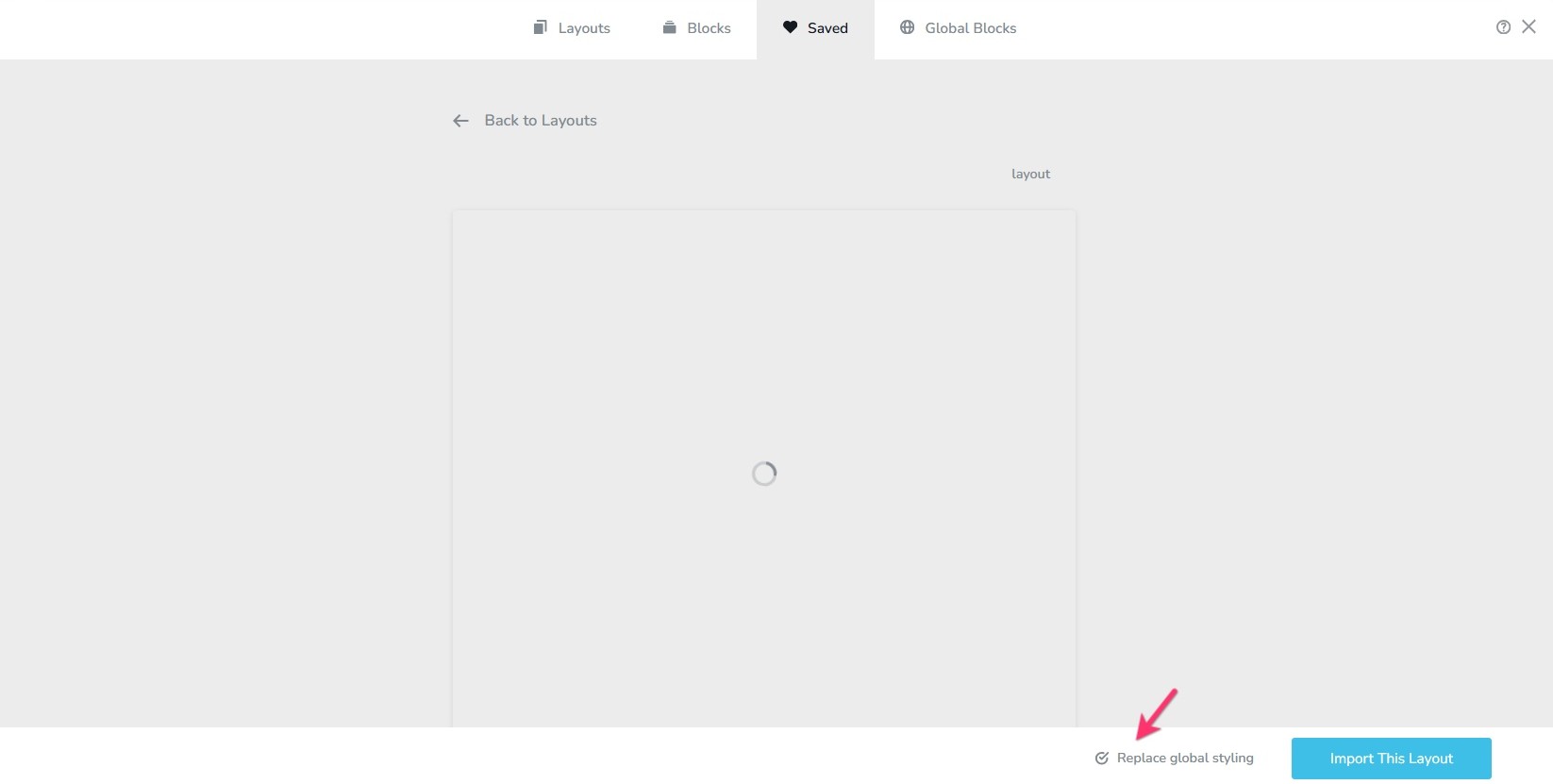
If you click on the spinning circle, the block get imported. Incorrect colors and typography is due to the differences in the global typography of the two projects. To overcome this issue, kindly import the global styles from one project to another. To import global styles from one project to another, please save a page as layout and when importing it to the another project, select the option "Replace Global Styling" towards the bottom. This will add the the global style to the destination project. The next time you import a block, it will display with the correct typography and colors.
 0
0 -
Hello George,
Thank you so much for your response and the proposed solution. I tested it and it works perfectly now!
I followed your method of saving a page as a layout and importing the global styles into the destination project, selecting the "Replace Global Styling" option. This solved the issue with CSS errors and incorrect colors. The layout now displays correctly on the target site.I also wanted to take a moment to thank you for always being there and for your continuous support throughout this journey with Brizy. You've always been responsive and attentive, which has really made it easier to resolve the issues encountered.
However, I would like to point out a small issue that still persists: the spinning circle that keeps spinning indefinitely when trying to import the block. This bug is still present, although it’s possible to retrieve the layout by clicking on the spinning image. I believe this is a bug that could be fixed in a future version of Brizy Pro.
Thanks again for your help and responsiveness. I’m happy that I was able to resolve this issue, but I wanted to flag this small bug so it can be addressed in upcoming updates.
I’m available if you need any more information.
0 -
Hi Mourier,
Please try to temporarily increase the following settings in your server and see if this resolves the issue.
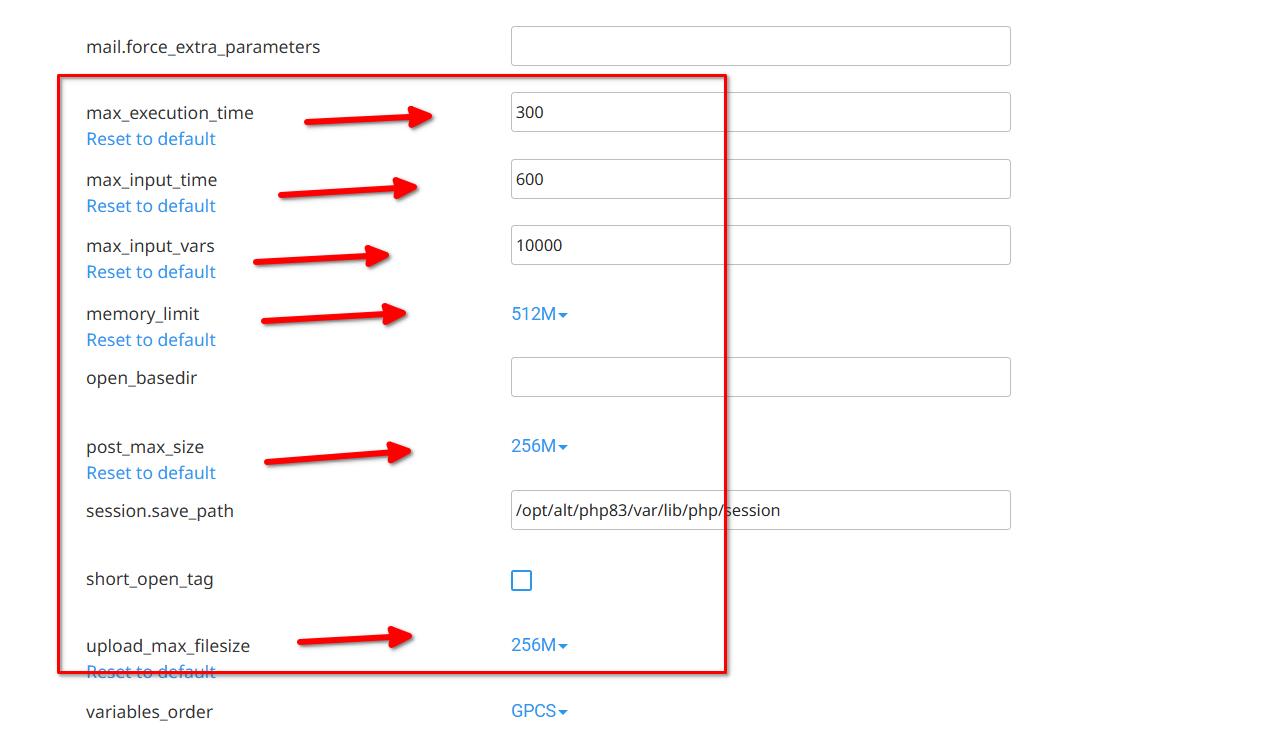
You can find these options in Select PHP Version > Options in cPanel, otherwise, please reach out to your hosting provider and ask them to update this for you.Best regards,
Ariel H.0
Please sign in to leave a comment.
Comments
5 comments