global header issue

Hi, i've been trying to make the global header work with my website for almost a day now i have tried everything with no luck. please can someone help me as im wasting so much time on this and very much unsure where to go now.
-

Hi Terri,
Thank you for contacting us.
Please try the steps suggested on this support article: https://support.brizy.io/hc/en-us/articles/360041728052
If this did not help, please provide us with temporary access to your WP Admin page so we can take a look. Kindly add us as an Admin user to your WordPress Dashboard and send the following details to communitysupport@brizy.io.
Community Post link: https://support.brizy.io/hc/en-us/community/posts/29480240557074
WordPress Admin URL:
Username:
Password:Looking forward to your reply.
Best regards,
Ariel H.0 -
Hi Terri,
I just wanted to follow up to see if the issue has been resolved with the solution we shared earlier. If you’re still experiencing any problems, please share your site’s credentials with us so we can take a closer look.
Best regards,
Ariel H.0 -
Hi ,
I've tried this, i made the block global but some options such as settings pages just don't seem available to me so i can't complete it.
I did have an issue at the start where i believe booqable plugin was clashing as it wouldn't load things like the gallery so i've disabled this whilst building which worked but i cant figure out the problem for the global header.I have made you a temporary admin login, how do i safely get these details to you? I did email back from my inbox with this reponse but im assumingthat hasn't come through?ThanksThanks!0 -
Hi Terri, you can send your site's credentials here, rest assured it will be kept hidden for your security.
0 -
Hi ok, just to confirm do you mean as a comment or reply to the email? thanks!
0 -
Hi Terri, please comment directly on the thread.
0 -
ok its here:
Wordpress admin access ---
0 -
Hi Terri,
Thank you for your cooperation.
You don’t need a separate header template for this. You can create the header directly on the page you’re working on. Just make sure the page template is set to Brizy Template, then from the block library, add a header block. Once you’ve set up the menu element inside the header, you can save it as a global block and assign it to all pages. This way, your header will be consistent site-wide without the need for a separate template. This is demonstrated on this screencast - https://www.youtube.com/watch?v=A2Q8-OehDOQ
If you have any further questions, please let us know.
Best regards,
Ariel H.0 -
Hi Ariel,
I am still struggling with the menus. I have created one that i am happy with and it is. working at the top of each page but when i scroll down it changes to the one you made. i set it as sticky so thought that would work but it doesn't seem to be the case can you possibly help me?
I also believe that i signed up to pro and that should give me access to blog layouts but i don't see any, can you point me in the right direction/advise on that too please?
I still have you as a login user but let me know if i need to do anything else?
Many thanks,Faye0 -
Hi Faye,
Thank you for the update.
We’ve fixed the header; I believe the issue was related to adjusting the sticky header. In the below screencast, you’ll see how we created a temporary block so we could copy the logo and paste it into the sticky header, then reduce its size. Since a sticky header should be thinner than the main header, we also reduced the padding to achieve a cleaner result. Please check the screencast for the full walkthrough: https://streamable.com/o6ukjf
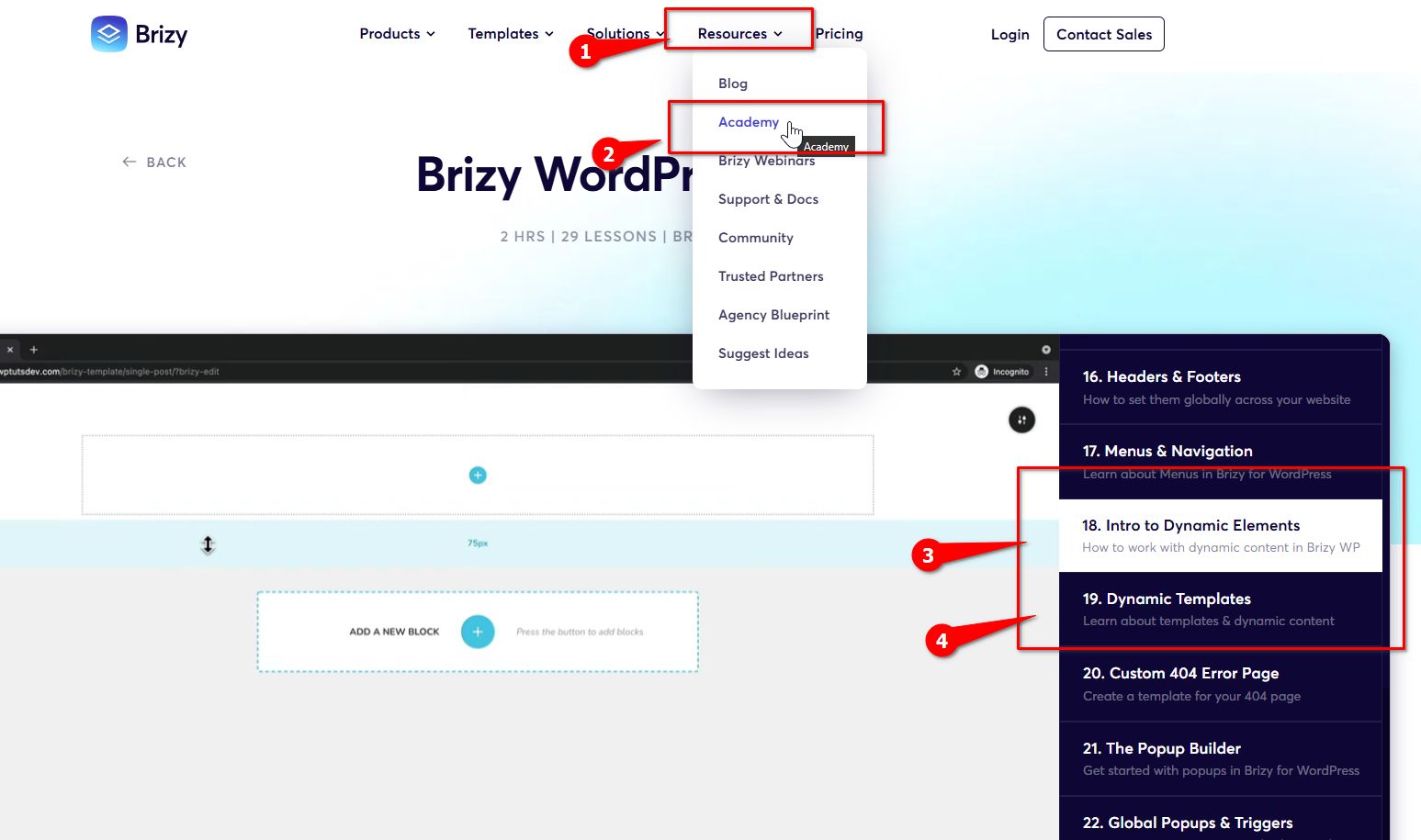
Regarding creating a blog layout, please head over to brizy.io and navigate to Resources → Academy. Lessons 18 and 19 walk through how to create a blog using dynamic templates step by step.
If you have any further questions, please let us know.
Best regards,
Ariel H.0
Please sign in to leave a comment.
Comments
10 comments