Navigation menu changed

Hello, a one-page website I built in Brizy Cloud worked fine at first.
The website is https://bebberdv.brizy.site/
A few months ago, it stopped working.
I re-created the links to the blocks in the dashboard, and it worked again.
Now I've looked at the website again and noticed it's not working again.
What's going on? The menu links aren't showing up in the browser, but strange characters are appearing.
A link to the services is displayed as https://bebberdv.brizy.site/#lrwj4oJ2MuVu_lrwj4oJ2MuVu
I like working with Bryzy, but these issues are causing problems with my clients.
Which is understandable.
How does this happen? And how can I prevent it?
-

Hello Betty,
We apologize for the inconvenience. Linking to blocks using the "Blocks" tab of the link tool is buggy at the moment. I have added the anchor manually to each menu text. Please check if everything works fine.
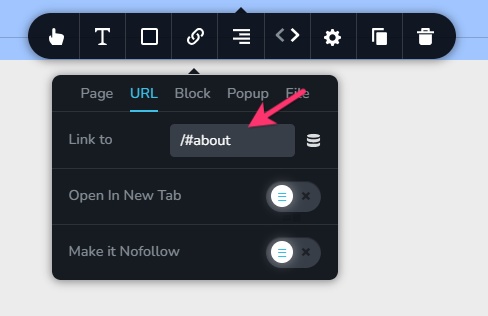 0
0 -
Hi KC,
Now it works again.Thanks for this quick fix. Great support.
I value your assistance very much, but is this because Brizy changed? And does this mean that I need to check my websites in Brizy every month like I need to do on my WordPress websites?
I assumed this would keep working, and therefore did not charge my clients for maintenance. I did not expect Brizy to be so buggy in this stadium of development.Regards, Betty
0 -

Hi Betty,
Thank you for reaching out.
I’m glad to hear it’s working again. I understand your concern, like any platform, including WordPress, Brizy Cloud may occasionally experience small hiccups as it continues to evolve. While we work hard to maintain consistency and reliability, it’s always a good idea to review your sites periodically to ensure everything is running smoothly.
Best regards,
Ariel H.0
Please sign in to leave a comment.
Comments
3 comments