Problem short code MASTER STUDY LMS

Hello support team.
I am currently using MasterStudy LMS platform with elementor. And I want to switch to Brizy. However, during the design process, I encountered a problem where the LMS shortcode does not display well in the Brizy editing interface.
This really reduces the inspiration to create and use Brizy.
How can I fix this error, or currently Brizy does not support optimal shortcode for MasterStudy LMS platform, please give me an alternative LMS solution. I really like using Brizy in design,
Thank you
-

Hello THÀNH,
When a single plugin provides a website's core features, we recommend keeping the plugin pages in the theme design without using Brizy to stylize them. In this approach, there is no need to make the LMS shortcodes work with Brizy.
Kindly consider these steps.
- Retain the MasterStudy LMS pages in the theme design and do not stylize the LMS pages using Brizy.
- Recreate the website header and footer using your theme. Change to a theme with a good header footer builder if necessary. The Blocksy theme is one option. Kindly refer to How to Use the Header Builder and Exploring the Footer Builder
- Use the "Default Page Template" for your Brizy pages. Select the "Page" icon on the left sidebar and then the "Default" option under "Page Template" after opening each Brizy page in the editor. Your pages will start using your theme header and footer when switching to the "Default Page Template". The Brizy header and footer can then be removed. In this manner, the header and footer of your entire website, including your LMS pages, will be consistent.
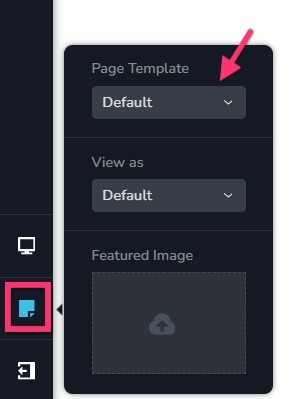
Have a look at https://brizy.support/ for a sample website with Default Page Template. This website uses Blocksy header and footer on all pages. The page content (the HTML body) is designed using Brizy.
0
Please sign in to leave a comment.
Comments
1 comment