Brizy Stories

Hi Brizy team,
I created a Story in Brizy for WordPress and I would like to display it inside one of my WordPress pages (for example, on my homepage).
I see shortcodes like on the frontpage:
{{editor_story id='4766'}}
[brizy id="4766" story="true"]
but when I place them inside a page, they only show up as text instead of rendering the actual Story.
Could you please tell me the official way / shortcode to integrate a Story into a normal WordPress page or Brizy page?
Thanks in advance!
Kind regards,
Jeroen
-

Hello Jeroen,
There no option in Brizy to set a story as a website homepage. However you can use a plugin to redirect your homepage to the story page. Have a look at https://brizy.support/ Kindly follow these steps.
- Install the Frontype plugin
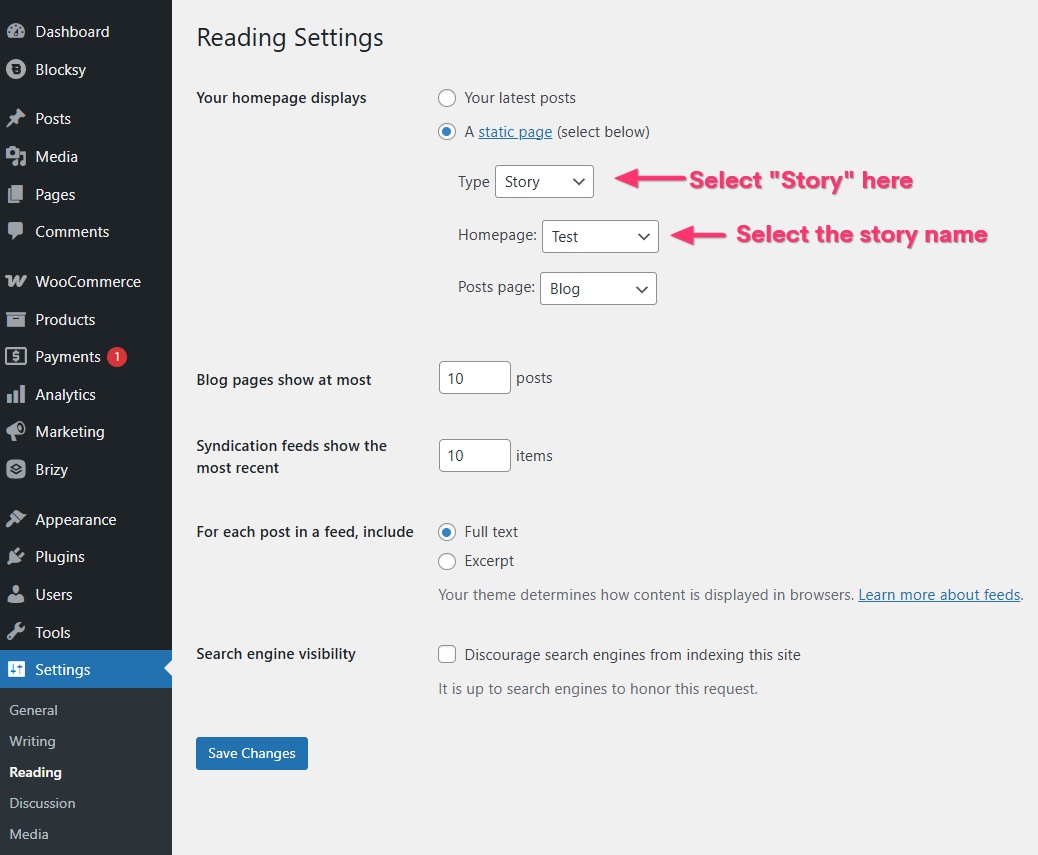
- In your WordPress Dashboard under Settings > Reading, select the "Type" as "Story" and select the specific story you have created as your Home page
0 -
Thanks for the reply.
I want only a section of a storie on my homepage, so as a element. Not the whole page...
0 -

Hi Jeroen,
Thank you for the update.
Brizy Stories are designed as mobile-first, full-screen, swipeable slides—similar to the story format you may know from social media. There isn’t an official shortcode for placing a Story inside a page, since Stories are intended to work as standalone content.
If your goal is to display that type of content inside a page, we recommend using the Carousel element instead. It works within your layouts and lets you showcase images, text, and even videos in a similar swipeable style.
Best regards,
Ariel H.0 -
Hi,
Thanks! But with the carousel I can’t set the option for an image to be displayed half on the screen. See attachment.
Thanks!
 0
0 -
Hi Jeroen,
Thank you for the update.
At the moment, the carousel doesn’t have an option to display an image half on the screen. It will always show full images in sequence.
Best regards,
Ariel H.0
Please sign in to leave a comment.
Comments
5 comments