How to remove plugins on Brizy Cloud

Hi there,
We are moving to Hubspot so I need to remove my Kit & Mailerlote plugins. Clicking on the icons just re-selects them, I can't remove them.
How can I do this?
Thanks,
Tom
-

Hi Thomas,
Thank you for reaching out.
Since you’re moving to HubSpot, you can safely disconnect MailerLite. While the Brizy Cloud dashboard doesn’t have a direct 'remove' button for those icons, the secure way to stop access is by revoking the MailerLite API key:
1. Log in to your MailerLite account.
2. Go to Integrations → MailerLite API.
3. Find the token connected to Brizy Cloud and click Delete.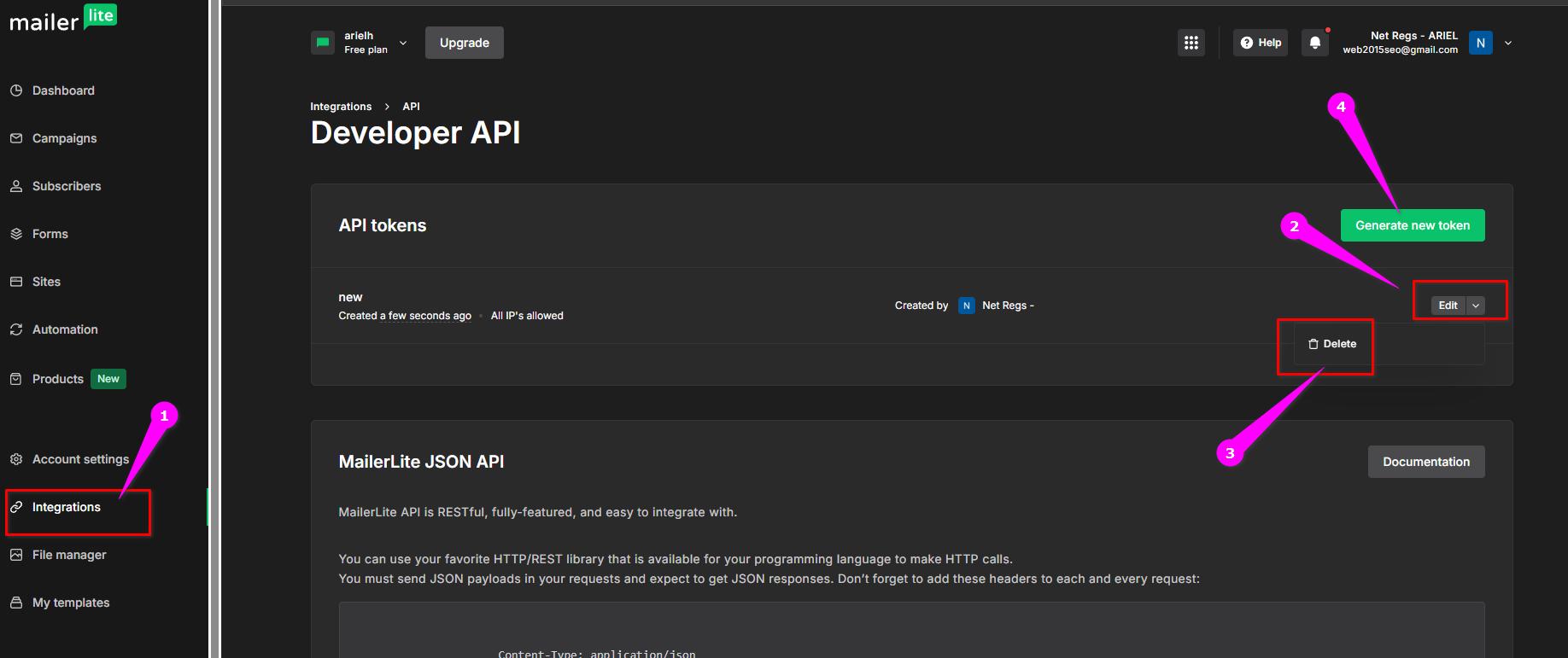
This will disconnect MailerLite from Brizy Cloud. You can then generate a new API token for HubSpot and connect it to your HubSpot CRM.
Best regards,
Ariel H.0
Please sign in to leave a comment.
Comments
1 comment