Database structure

Thanks for your reply Kc George. To help illustrate what I am trying to get answers for, I will use the sample product database that is included with the shoe store template. That template provides 4 sizes as product_options and I understand how that works. But if the product was only one color, one size, one width, and one gender, what would the master row look like and what would the product_option table (rows) look like? In your sample database, I don't see an option for color (other than the image itself) or width (or gender for that matter) and it leaves some room for interpretation of how the database should be structured. I like your overall approach to this database, but it also seems that a single row should provide all the data when there are no additional unique options for a given product. Thanks again for your help..
-

Hello Wil,
As you can see in the data structure for the MCShoes shop template, each "product_option_value" has its own row. For example, shoes are sold in 4 sizes and you will find one row for each of these four sizes.
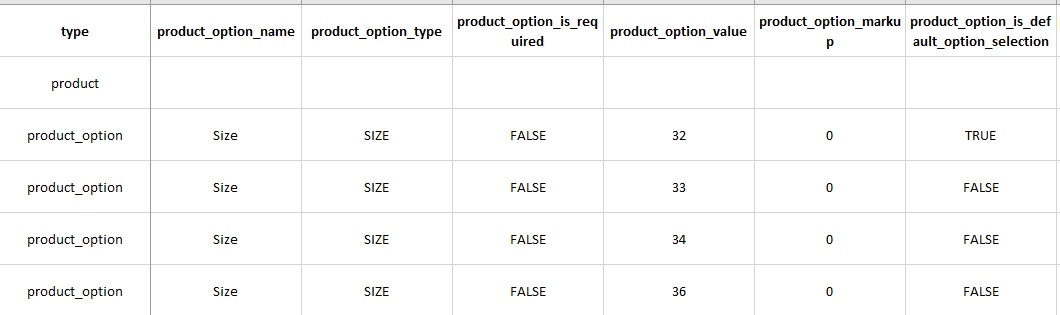
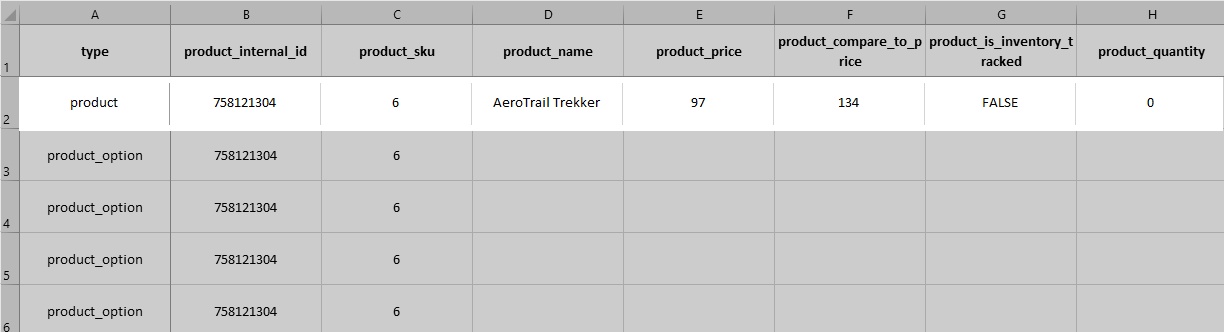
If a product has no options, you will not find the "product_option" rows. Every product will have a single row and this row will contain basic products details. Kindly have a look at the MCShoes Product Catalog at https://docs.google.com/spreadsheets/d/1jLZxSXJ4KgM8rysZBWQHbZLRfyuuABIOxpkbPMZ768s/edit?usp=sharing. Checkout the rows with "product" type. You can see the data fields associated with a basic product.
 0
0
Please sign in to leave a comment.
Comments
1 comment