Tab box border widens with addition of tabs

I'm working on a digital ad reporting dashboard:
https://branddeliver.com/four/
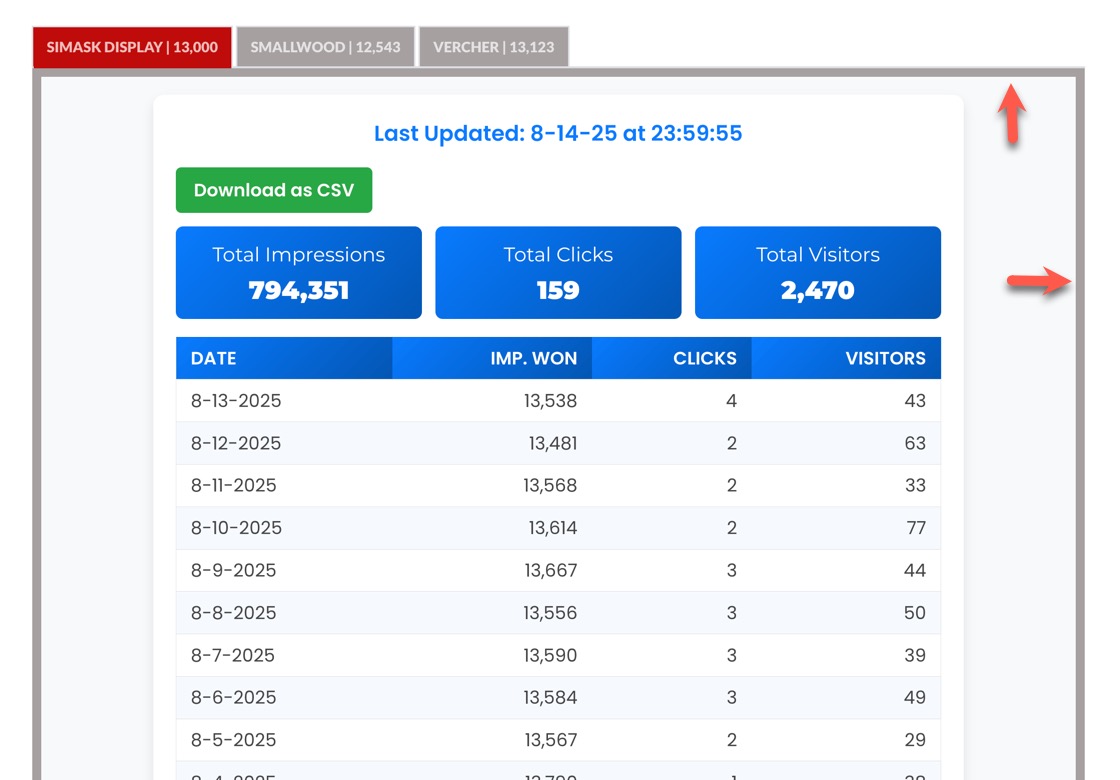
The problem I'm having is that every time I add a new tab, the border of the container gets wider (see image below...red arrows point to the border).
I had to add custom CSS to format the tables--and that may be the culprit. If not, is this something I can somehow get rid of totally? I want much thinner lines if possible. I'll include the custom css I added beneath the image. Thank you for your help...
/* Add to Brizy Global CSS or a Custom HTML block */
@import url('https://fonts.googleapis.com/css2?family=Poppins:wght@400;600&family=Montserrat:wght@400;900&display=swap');
.gsheet-container {
font-family: 'Poppins', sans-serif;
color: #333;
background-color: #f8f9fa;
padding: 20px;
}
.gsheet-inner-container {
width: 100%;
max-width: 900px;
background: white;
padding: 25px;
border-radius: 12px;
box-shadow: 0 6px 12px rgba(0,0,0,0.1);
margin: 0 auto;
}
.gsheet-last-updated {
font-size: 1.2em;
text-align: center;
margin-bottom: 20px;
color: #007bff;
font-weight: 600;
}
.gsheet-download-btn {
display: inline-block;
margin-bottom: 15px;
padding: 10px 20px;
background: #28a745;
color: white;
border: none;
border-radius: 6px;
cursor: pointer;
font-size: 1em;
font-weight: 600;
transition: background 0.3s ease;
}
.gsheet-download-btn:hover {
background: #218838;
}
.gsheet-summary-cards {
display: flex;
gap: 15px;
margin-bottom: 20px;
flex-wrap: wrap;
}
.gsheet-summary-card {
flex: 1;
background: linear-gradient(135deg, #007bff, #0056b3);
color: white;
padding: 15px;
border-radius: 8px;
text-align: center;
min-width: 150px;
}
.gsheet-summary-card h3 {
font-family: 'Montserrat', sans-serif;
margin: 0;
font-size: 1.1em;
font-weight: 400;
color: white;
}
.gsheet-summary-card p {
font-family: 'Montserrat', sans-serif;
margin: 5px 0 0;
font-size: 1.4em;
font-weight: 900;
}
.gsheet-table {
width: 100%;
border-collapse: collapse;
color: #444;
}
.gsheet-table th, .gsheet-table td {
padding: 8px 16px; /* Reduced vertical padding from 14px to 8px */
border-bottom: 1px solid #e0e0e0;
}
.gsheet-table thead th {
background: linear-gradient(135deg, #007bff, #0056b3);
color: white;
font-weight: 600;
cursor: pointer;
}
.gsheet-table th:nth-child(n+2), .gsheet-table td:nth-child(n+2) {
text-align: right;
}
.gsheet-table tbody tr:nth-child(even) {
background-color: #f6faff;
}
.gsheet-table tbody tr {
transition: transform 0.2s ease, background-color 0.3s ease;
}
.gsheet-table tbody tr:hover {
background-color: #e6f0fa;
transform: translateY(-2px);
}
.gsheet-table tfoot tr {
font-weight: 600;
background-color: #e9ecef;
border-top: 2px solid #ccc;
}
.gsheet-loading-message {
text-align: center;
padding: 20px;
}
@media (max-width: 600px) {
.gsheet-table, .gsheet-table thead, .gsheet-table tbody, .gsheet-table th, .gsheet-table td, .gsheet-table tr {
display: block;
}
.gsheet-table thead tr {
position: absolute;
top: -9999px;
left: -9999px;
}
.gsheet-table tr {
border: 1px solid #ddd;
margin-bottom: 5px; /* Reduced from 10px to 5px */
border-radius: 8px;
background: white;
box-shadow: 0 2px 4px rgba(0,0,0,0.1);
}
.gsheet-table td {
border: none;
border-bottom: 1px solid #eee;
position: relative;
padding: 8px 16px; /* Match desktop padding, reduced from 14px */
text-align: right;
font-size: 0.9em;
}
.gsheet-table td:last-child {
border-bottom: 0;
}
.gsheet-table td::before {
content: attr(data-label);
position: absolute;
left: 15px;
width: 45%;
padding-right: 10px;
font-weight: 600;
text-align: left;
color: #007bff;
}
.gsheet-summary-cards {
flex-direction: column;
}
.gsheet-download-btn {
width: 100%;
text-align: center;
}
}
-

Hi Gregg,
Thank you for reaching out.
The borders inside the embedded Google Sheet can’t be styled directly from Brizy, since it’s loaded in an iframe from a different domain. This is likely why the borders appear thicker with each tab, and it isn’t something we’re able to fix on our side. If you’d like thinner or no borders, the best option would be to adjust the formatting directly in Google Sheets.
Best regards,
Ariel H.0
Please sign in to leave a comment.
Comments
1 comment