The page with icons takes a long time to load

Hello
I noticed that the page with icons loads very slowly, 30 seconds. I contacted the hosting company, they gave me a report with errors. The latest versions of plugins are installed.
page with icons:
https://openyoga.by/
page without icons:
https://openyoga.by/brizy-12207/
log:
u114921.na4u.ru 128.204.69.26 RU - - [13/Aug/2025:20:59:54 +0500] "GET /?brizy_file=https%3A%2F%2Fs.w.org%2Fimages%2Fcore%2Femoji%2F16.0.1%2Fsvg%2F1f4cd.svg HTTP/1.1" 503 408 "https://openyoga.by/wp-content/plugins/brizy/public/editor-build/prod/editor/js/screenshots.worker.min.js?ver=326-wp" "Mozilla/5.0 (Windows NT 10.0; Win64; x64) AppleWebKit/537.36 (KHTML, like Gecko) Chrome/134.0.0.0 Safari/537.36 OPR/119.0.0.0" 64195132
u114921.na4u.ru 128.204.69.26 RU - - [13/Aug/2025:20:59:54 +0500] "GET /?brizy_file=https%3A%2F%2Fs.w.org%2Fimages%2Fcore%2Femoji%2F16.0.1%2Fsvg%2F2714.svg HTTP/1.1" 503 408 "https://openyoga.by/wp-content/plugins/brizy/public/editor-build/prod/editor/js/screenshots.worker.min.js?ver=326-wp" "Mozilla/5.0 (Windows NT 10.0; Win64; x64) AppleWebKit/537.36 (KHTML, like Gecko) Chrome/134.0.0.0 Safari/537.36 OPR/119.0.0.0" 64195256
u114921.na4u.ru 128.204.69.26 RU - - [13/Aug/2025:20:59:55 +0500] "GET /?brizy_file=https%3A%2F%2Fs.w.org%2Fimages%2Fcore%2Femoji%2F16.0.1%2Fsvg%2F2714.svg HTTP/1.1" 503 408 "https://openyoga.by/wp-content/plugins/brizy/public/editor-build/prod/editor/js/screenshots.worker.min.js?ver=326-wp" "Mozilla/5.0 (Windows NT 10.0; Win64; x64) AppleWebKit/537.36 (KHTML, like Gecko) Chrome/134.0.0.0 Safari/537.36 OPR/119.0.0.0" 64107265
u114921.na4u.ru 128.204.69.26 RU - - [13/Aug/2025:20:59:55 +0500] "GET /?brizy_file=https%3A%2F%2Fs.w.org%2Fimages%2Fcore%2Femoji%2F16.0.1%2Fsvg%2F23f0.svg HTTP/1.1" 503 408 "https://openyoga.by/wp-content/plugins/brizy/public/editor-build/prod/editor/js/screenshots.worker.min.js?ver=326-wp" "Mozilla/5.0 (Windows NT 10.0; Win64; x64) AppleWebKit/537.36 (KHTML, like Gecko) Chrome/134.0.0.0 Safari/537.36 OPR/119.0.0.0" 64105224
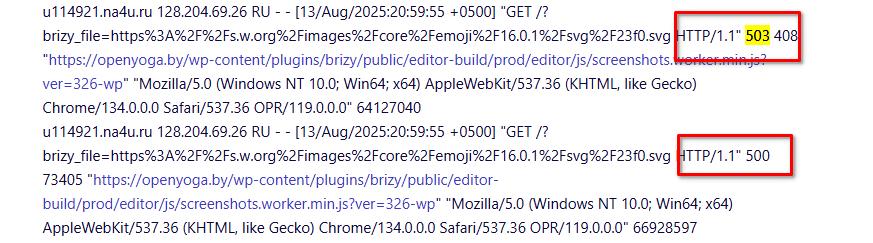
u114921.na4u.ru 128.204.69.26 RU - - [13/Aug/2025:20:59:55 +0500] "GET /?brizy_file=https%3A%2F%2Fs.w.org%2Fimages%2Fcore%2Femoji%2F16.0.1%2Fsvg%2F23f0.svg HTTP/1.1" 503 408 "https://openyoga.by/wp-content/plugins/brizy/public/editor-build/prod/editor/js/screenshots.worker.min.js?ver=326-wp" "Mozilla/5.0 (Windows NT 10.0; Win64; x64) AppleWebKit/537.36 (KHTML, like Gecko) Chrome/134.0.0.0 Safari/537.36 OPR/119.0.0.0" 64127040
u114921.na4u.ru 128.204.69.26 RU - - [13/Aug/2025:20:59:55 +0500] "GET /?brizy_file=https%3A%2F%2Fs.w.org%2Fimages%2Fcore%2Femoji%2F16.0.1%2Fsvg%2F23f0.svg HTTP/1.1" 500 73405 "https://openyoga.by/wp-content/plugins/brizy/public/editor-build/prod/editor/js/screenshots.worker.min.js?ver=326-wp" "Mozilla/5.0 (Windows NT 10.0; Win64; x64) AppleWebKit/537.36 (KHTML, like Gecko) Chrome/134.0.0.0 Safari/537.36 OPR/119.0.0.0" 66928597
В strace ситуация та же, что и в прошлый раз POLLIN и таймаут 1000 мс:
rt_sigaction(SIGPIPE, {sa_handler=SIG_IGN, sa_mask=[PIPE], sa_flags=SA_RESTORER|SA_RESTART, sa_restorer=0x7f724e493970}, NULL, 8) = 0
poll([{fd=7, events=POLLIN}], 1, 1000) = 0 (Timeout)
rt_sigaction(SIGPIPE, NULL, {sa_handler=SIG_IGN, sa_mask=[PIPE], sa_flags=SA_RESTORER|SA_RESTART, sa_restorer=0x7f724e493970}, 8) = 0
rt_sigaction(SIGPIPE, {sa_handler=SIG_IGN, sa_mask=[PIPE], sa_flags=SA_RESTORER|SA_RESTART, sa_restorer=0x7f724e493970}, NULL, 8) = 0
poll([{fd=7, events=POLLIN|POLLPRI|POLLRDNORM|POLLRDBAND}], 1, 0) = 0 (Timeout)
rt_sigaction(SIGPIPE, {sa_handler=SIG_IGN, sa_mask=[PIPE], sa_flags=SA_RESTORER|SA_RESTART, sa_restorer=0x7f724e493970}, NULL, 8) = 0
poll([{fd=7, events=POLLIN}], 1, 1000) = 0 (Timeout)
-

Hi Timur,
Thank you for the details and the links.
The issue seems related to caching or your CDN. The log files also show Error 500 and Error 503, which point to possible server-side issues.
Could you please try temporarily disabling all plugins except Brizy and Brizy Pro and see if the problem still occurs? This will help us check if another plugin or caching layer is causing the slowdown. Also, make sure to clear your site, browser, and CDN cache before testing.
Please let us know the results.
Best regards,
Ariel H.0
Please sign in to leave a comment.
Comments
1 comment